
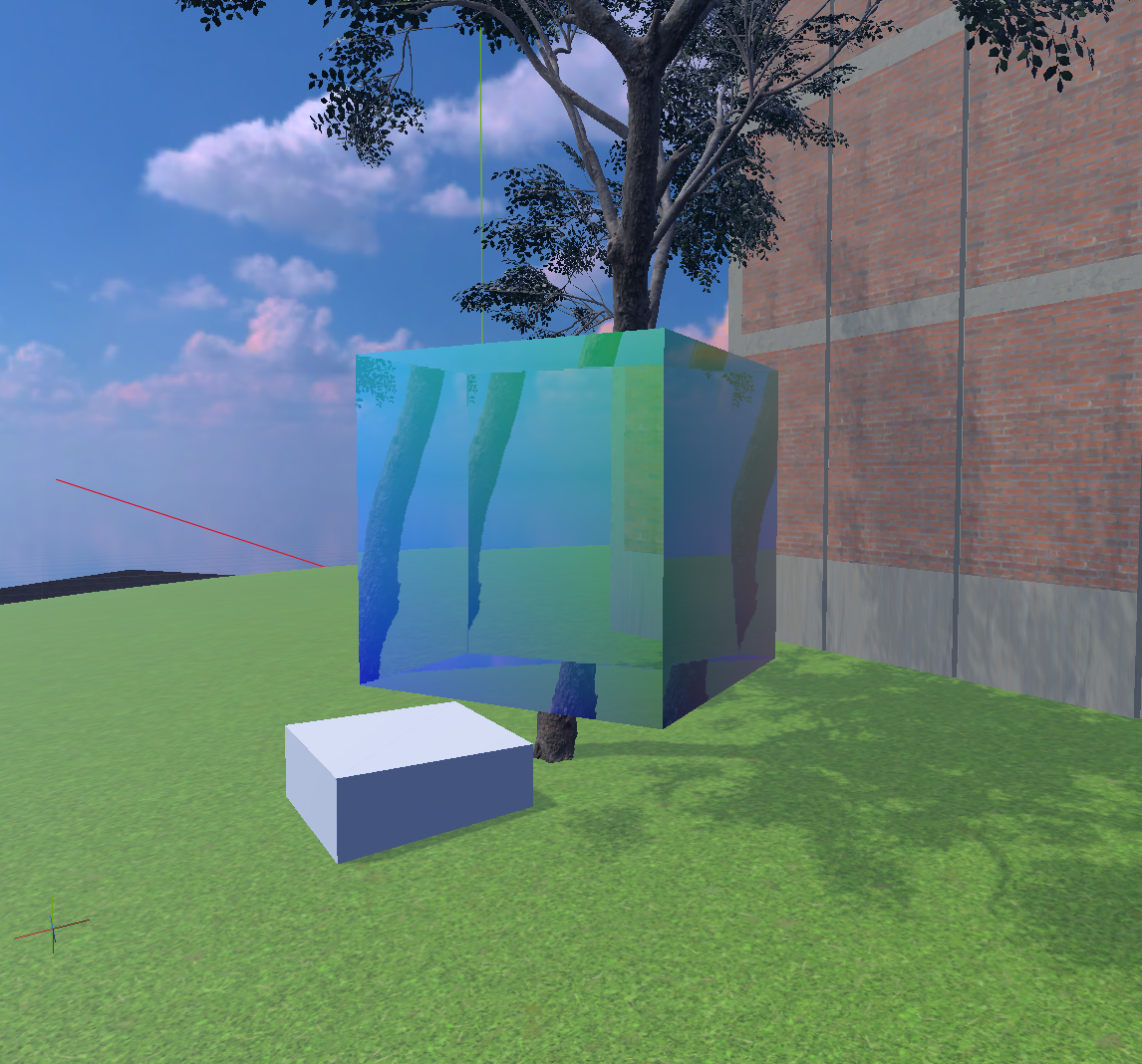
Refractive glass cube

Inspired by those floating glass cubes in PlayStation 2 system menu.
Not perfect by any means, but it seemed cool and useful enough to share.
Uses vertex color. You may want to change that.
Shader code
/* Refractive glass cube.
 * Made for Go-Box
 * Licensed CC0 — Use however you please.
 *
 * The mesh must be an axis-aligned 1m cube for the effect to work. Or just make
 * a sphere that thinks it's a cube when you look through it. I'm not a cop.
 * If you need a different dimensioned box, you can scale a 1x1x1 box to size.
 */

shader_type spatial;
render_mode cull_back;
uniform sampler2D SCREEN_TEXTURE: hint_screen_texture;

varying vec3 vertex_pos;
varying vec3 obj_norm;
varying vec3 obj_campos;

void vertex() {
	vertex_pos = VERTEX;
	obj_norm = NORMAL;
	obj_campos = (inverse(MODEL_MATRIX) * vec4(CAMERA_POSITION_WORLD, 1.0)).xyz;
}

void fragment() {
	vec3 ray_dir = normalize(vertex_pos - obj_campos);
	ray_dir = refract(ray_dir, obj_norm, 0.9);
	// alternative refraction effect that doesn't make the edges curvy
	// ray_dir -= obj_norm * 0.2;
	vec3 tmax3 = (sign(ray_dir) * 0.5 - obj_campos) / ray_dir;
	float t_exit = min(min(tmax3.x, tmax3.y), tmax3.z);
	vec3 exit_pos = obj_campos + ray_dir * t_exit;
	vec3 exit_normal = vec3(0.0);
	if (abs(exit_pos.x - 0.5) < 1e-4) exit_normal = vec3(1, 0, 0);
	else if (abs(exit_pos.x + 0.5) < 1e-4) exit_normal = vec3(-1, 0, 0);
	else if (abs(exit_pos.y - 0.5) < 1e-4) exit_normal = vec3(0, 1, 0);
	else if (abs(exit_pos.y + 0.5) < 1e-4) exit_normal = vec3(0, -1, 0);
	else if (abs(exit_pos.z - 0.5) < 1e-4) exit_normal = vec3(0, 0, 1);
	else exit_normal = vec3(0, 0, -1);

	vec3 backface_norm = normalize((MODEL_MATRIX * vec4(exit_normal, 0.0)).xyz);
	vec2 refraction = refract(backface_norm, obj_norm, 0.9).xy * 0.1;
	vec3 seethru = texture(SCREEN_TEXTURE, SCREEN_UV + refraction).rgb;
	ALBEDO = mix(COLOR.rgb, seethru, 0.5);
	ROUGHNESS = 0.0;
	SPECULAR = 0.5;
}
Comments 0
No comments yet.