
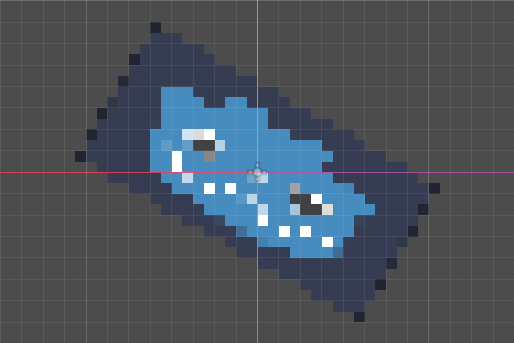
2D Pixel Perfect – Adapted to rotation and scaling

This shader generates pixel blocks with constant size and rotation in world space, and can cuts off incomplete blocks at the edges. Set the position of nodes on your pixel grid to perform pixel perfection.
Uniforms
pixel_size The size of a pixel block in world units. Recommended to set it to a multiple of 4.
handle_edges Enable this option if there is not enough transparent space around the texture; otherwise, keep it off for performance reasons.
Note
This shader may not be able to work with versions prior to 4.0.
Reference
https://godotshaders.com/shader/pixel-art-style-shader/ (By Ephnrora)
Shader code
shader_type canvas_item;

uniform float pixel_size : hint_range(4.0, 16.0) = 4.0;
uniform bool handle_edges = false;

varying vec2 p_world;

void vertex() {
	p_world = (MODEL_MATRIX * vec4(VERTEX, 0.0, 1.0)).xy;
}

void fragment() {
	vec2 p_snapped = floor(p_world / pixel_size) * pixel_size + pixel_size / 2.0;
	vec2 delta = p_snapped - p_world;

	mat2 M_p = mat2(dFdx(p_world), dFdy(p_world));
	mat2 M_uv = mat2(dFdx(UV), dFdy(UV));
	mat2 J = M_uv * inverse(M_p);
	vec2 delta_uv = J * delta;

	vec2 uv = UV + delta_uv;
	vec4 color = texture(TEXTURE, uv);

	if (handle_edges) {
		float margin_x = (abs(J[0].x) + abs(J[1].x)) * pixel_size * 0.5;
		float margin_y = (abs(J[0].y) + abs(J[1].y)) * pixel_size * 0.5;
		if (uv.x < margin_x || uv.x > 1.0 - margin_x || uv.y < margin_y || uv.y > 1.0 - margin_y) {
			color.a = 0.0;
		} else {
			color.a = step(0.5, color.a);
		}
	} else {
		color.a = step(0.5, color.a);
	}

	COLOR = color;
}

Is there a way to apply this to the whole screen?
Just use a post processing filter instead
what is that ?May you teach me the details?