

3D-perspective TextureRect with Touch

Hi! As I was working for my project, I wanted a fake 3D perspective effect on an image when touched. I tried to use some of the shaders already published in this platform but none of them seemed to work since my TextureRect was inside so many control nodes.
Then I found this one shader and tweaked it so that it worked when touched upon the image, and the result is just what I wanted! I limited the rotation to 30º so it would look like when hovering a card in any card game. I hope it’s useful for you too!
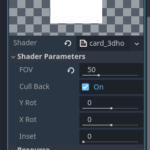
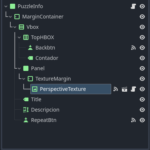
NOTE: For it to work you will need to assign a script to the Item you want and paste the one I provide you. See screenshots for more details.
The shader I tweaked:
https://godotshaders.com/shader/2d-perspective/
Script—————————————————————
extends TextureRect
@export var rotation_speed: float = 100.0
@export var max_rotation: float = 30.0 # Límite de rotación en grados
@export var return_speed: float = 5.0 # Velocidad de retorno a la posición original
var last_touch_position: Vector2
var is_dragging: bool = false
func _process(delta):
if not is_dragging:
var current_y_rot = material.get_shader_parameter(“y_rot”)
var current_x_rot = material.get_shader_parameter(“x_rot”)
# Interpolación suave hacia 0
var new_y_rot = lerp(current_y_rot, 0.0, return_speed * delta)
var new_x_rot = lerp(current_x_rot, 0.0, return_speed * delta)
material.set_shader_parameter(“y_rot”, new_y_rot)
material.set_shader_parameter(“x_rot”, new_x_rot)
func _input(event):
if event is InputEventScreenDrag:
is_dragging = true
var delta_x = event.position.x – last_touch_position.x
var delta_y = event.position.y – last_touch_position.y
var half_width = size.x * 0.5
var half_height = size.y * 0.5
var current_y_rot = material.get_shader_parameter(“y_rot”)
var current_x_rot = material.get_shader_parameter(“x_rot”)
var new_y_rot = current_y_rot
var new_x_rot = current_x_rot
if event.position.x > half_width:
# Mitad derecha → Yrot negativo
new_y_rot -= delta_x * rotation_speed * 0.01
else:
# Mitad izquierda → Yrot positivo
new_y_rot += delta_x * rotation_speed * 0.01
if event.position.y > half_height:
# Mitad inferior → Xrot positivo
new_x_rot += delta_y * rotation_speed * 0.01
else:
# Mitad superior → Xrot negativo
new_x_rot -= delta_y * rotation_speed * 0.01
# Limitar la rotación entre -30 y 30 grados
new_y_rot = clamp(new_y_rot, -max_rotation, max_rotation)
new_x_rot = clamp(new_x_rot, -max_rotation, max_rotation)
material.set_shader_parameter(“y_rot”, new_y_rot)
material.set_shader_parameter(“x_rot”, new_x_rot)
last_touch_position = event.position
elif event is InputEventScreenTouch:
if event.pressed:
last_touch_position = event.position
else:
# Cuando se suelta el dedo, activa el retorno automático
is_dragging = false
Shader code
shader_type canvas_item;

// Camera FOV
uniform float fov : hint_range(1, 179) = 90;
uniform bool cull_back = true;
uniform float y_rot : hint_range(-30, 30) = 0.0; // Limitado a ±30 grados
uniform float x_rot : hint_range(-30, 30) = 0.0; // Limitado a ±30 grados
uniform float inset : hint_range(0, 1) = 0.0;

varying flat vec2 o;
varying vec3 p;

void vertex() {
    // Limitar los valores dentro del shader por seguridad
    float limited_y_rot = clamp(y_rot, -30.0, 30.0);
    float limited_x_rot = clamp(x_rot, -30.0, 30.0);

    float sin_b = sin(limited_y_rot / 180.0 * PI);
    float cos_b = cos(limited_y_rot / 180.0 * PI);
    float sin_c = sin(limited_x_rot / 180.0 * PI);
    float cos_c = cos(limited_x_rot / 180.0 * PI);

    mat3 inv_rot_mat;
    inv_rot_mat[0][0] = cos_b;
    inv_rot_mat[0][1] = 0.0;
    inv_rot_mat[0][2] = -sin_b;

    inv_rot_mat[1][0] = sin_b * sin_c;
    inv_rot_mat[1][1] = cos_c;
    inv_rot_mat[1][2] = cos_b * sin_c;

    inv_rot_mat[2][0] = sin_b * cos_c;
    inv_rot_mat[2][1] = -sin_c;
    inv_rot_mat[2][2] = cos_b * cos_c;

    float t = tan(fov / 360.0 * PI);
    p = inv_rot_mat * vec3((UV - 0.5), 0.5 / t);
    float v = (0.5 / t) + 0.5;
    p.xy *= v * inv_rot_mat[2].z;
    o = v * inv_rot_mat[2].xy;

    VERTEX += (UV - 0.5) / TEXTURE_PIXEL_SIZE * t * (1.0 - inset);
}

void fragment() {
    if (cull_back && p.z <= 0.0) discard;
    vec2 uv = (p.xy / p.z).xy - o;
    COLOR = texture(TEXTURE, uv + 0.5);
    COLOR.a *= step(max(abs(uv.x), abs(uv.y)), 0.5);
}
Live Preview


good