
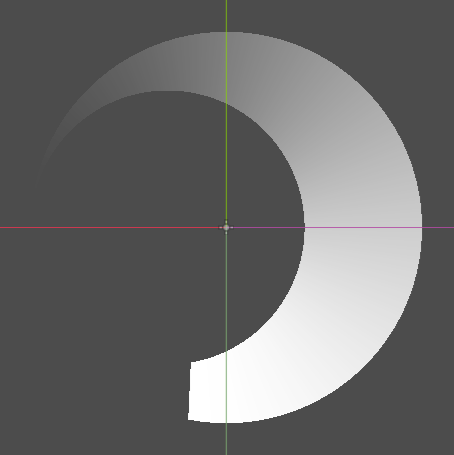
Circular_Cresent_Slash_2D_Mask

Simple 2D transparency mask made with 2 circle masks and an angular mask that produces a creasent shape mask
usage: put it on a Sprite2D that has a visible texture then animate the shader parameter with gdscript or AnimationPlayer
Shader code
shader_type canvas_item;

group_uniforms circles;
uniform float inner_radius: hint_range(0.0, 1.0) = 0.35;
/** circle center offset */
uniform vec2 inner_offset = vec2(0.0, 0.0);
uniform float outer_radius: hint_range(0.0, 1.0) = 0.5;
/** circle center offset */
uniform vec2 outer_offset = vec2(0.0, 0.0);
group_uniforms slash_progress;
/** origin of progress angle */
uniform vec2 spin_center = vec2(0.0, 0.0);
/** 1.0 is full circle */
uniform float lead_angle: hint_range(0.0, 2.0) = 0.5;
/** 1.0 is full circle */
uniform float tail_angle: hint_range(0.0, 2.0) = 0.5;

void fragment() {
	/* prepare coords */
	vec2 inner_center = vec2(- 0.5 + inner_radius, 0) + inner_offset;
	vec2 outer_center = vec2(outer_radius - 0.5, 0) + outer_offset;
	vec2 pos = UV - 0.5;
	// angle of current pixel relative to spin_center
	vec2 relative_pos = pos - spin_center;
	float angle = (atan(relative_pos.y, relative_pos.x) + PI) / TAU;

	float angle_mask = step(angle, lead_angle);
	float outer_mask = step(distance(pos, outer_center), outer_radius);
	float inner_mask = step(inner_radius, distance(pos, inner_center));

	/* apply masks to alpha */
	COLOR = texture(TEXTURE, UV);
	COLOR.a *= inner_mask * outer_mask * angle_mask;
	COLOR.a *= smoothstep(lead_angle - tail_angle, lead_angle, angle);
}