
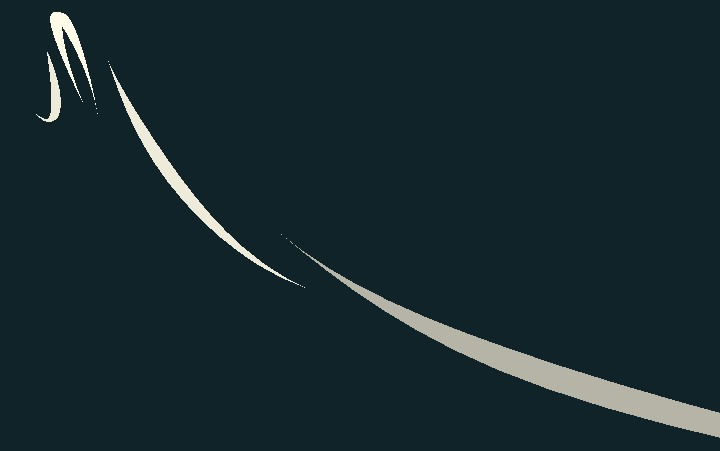
Dynamic Wind Trail With Loops

WHAT IS THIS?
A mathematically animated 3D cartoonish wind trail using a TubeTrailMesh featuring..
- ☑️ Parametric straight waves from point A to point B
- ☑️ Parametric Loops around itself
- ☑️ Alpha Fade
HOW TO SET THIS UP?!!
See the repository HERE, or download it HERE. Or follow the next instructions:
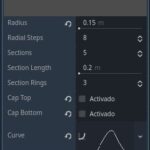
- Add MeshInstance3D. Add a new TubeTrailMesh with a small radius, unitary length, and a bell-shaped curve.
- Add this shader. Remember to:
- Rotate the MeshInstance3D to your preference (TubeTrailMeshes are only vertical for some reason)
- Set custom_aabb.h = 20 to prevent off-camera pop-out.
- Use instance_shader_parameters/extra_offset_time and other extra instance parameters to create simultaneous, unique wind trails without needing to make individual resources.
Comment doubts, optimizations, and stuff, thanks!
Shader code
/**
 * WIND STRIP SHADER by DIP
 1. Add a new TubeTrailMesh with a small radius, unitary length, and a bell-shaped curve.
 2. Rotate the MeshInstance3D to your preference (TubeTrailMeshes are only vertical for some reason)
 3. Set custom_aabb.h = 20 to prevent off-camera pop-out.
 4. Use instance_shader_parameters/extra_offset_time and other extra instance parameters to create simultaneous, unique wind trails without needing to make individual resources.
 */
shader_type spatial;
render_mode unshaded;

group_uniforms Global;
/**
Wind color. Can use alpha values*/
uniform vec4 color:source_color = vec4(1.0);
/**
The [b]fade_in_out[/b] time in seconds*/
uniform float fade_time = 5.0;
/**
General speed of time. Affects every time calculation*/
uniform float time_scale = 3.0;

group_uniforms Wave;
/**
Width of the straight-travel wave animation*/
uniform float wave_amplitude = 0.1;
/**
Speed of the straight-travel wave animation*/
uniform float wave_frequency = 1.0;
/**
Length of each wave*/
uniform float wave_length = 2.0;
/**
How many waves of straight-travel before a loop happens. Only makes sense if [b]loop_count > 0[/b]*/
uniform float wave_count:hint_range(0.0, 10.0, 1.0) = 1.0;

group_uniforms Twist;
/**
Width of the back-and-forth twist animation*/
uniform float twist_amplitude = 0.1;
/**
Speed of the back-and-forth twist animation*/
uniform float twist_frequency = 1.0;

group_uniforms Loop;
/**
Size of the full circle animation. Set to zero to disable*/
uniform float loop_radius = 1.0;
/**
How many times the wind make a full circle at the same time*/
uniform float loop_count = 0.5;


// Add variety from Inspector > GeometryInstance3D > Instance Shader Parameters
instance uniform float extra_offset_time = 0.0;
instance uniform float extra_wave_length = 0.0;
instance uniform float extra_loop_radius = 0.0;


void vertex() {
	float scaled_time = TIME * time_scale + extra_offset_time;

	vec3 wave = vec3(
		VERTEX.x + sin(VERTEX.y * twist_frequency + scaled_time) * twist_amplitude,
		VERTEX.y * (wave_length + extra_wave_length),
		VERTEX.z + sin(VERTEX.y * wave_frequency + scaled_time) * wave_amplitude
	);

	float loop_angle = VERTEX.y * TAU * loop_count + scaled_time;
	vec3 loop = vec3(
		VERTEX.x,
		sin(loop_angle) * (loop_radius+extra_loop_radius),
		cos(loop_angle) * (loop_radius+extra_loop_radius)
	);

	float period = TAU; //the animation period is given by the loop, assuming a 1-meter-long mesh at 1m/s, that's 1*2*PI = TAU seconds
	float offset_time = period*0.5; //so the transitions don't bend awkwardly at the wrong moment (if awkwardness persists, set loop_count to a fraction, like 0.5)
	float hold_time = wave_count * period;
	float total_time = hold_time + 2.0*period;
	float t = mod(scaled_time + offset_time, total_time); //timer that counts up to total_time, then restarts
	float factor; //from 0.0 (wave animation), to 0.5 (loop-wave animation mix)

	if (t < hold_time) {
		factor = 0.0; //wave
	} else if (t < hold_time + period) {
		factor = ((t - hold_time) / period) * 0.5; //wave to loop-wave
	} else {
		factor = (1.0 - (t - hold_time - period) / period) * 0.5; // loop-wave to wave
	}

	VERTEX = mix(wave, loop, factor); //most satisfying line ever :D
	VERTEX.y += t; //travel along y-axis (trail meshes can only be vertical for some reason)

	COLOR = color; //vertex color enable

	if (t < fade_time) {
		COLOR.a = t / fade_time;
	} else if (t > total_time - fade_time) {
		COLOR.a = (total_time - t) / fade_time;
	}
}

void fragment(){
	ALBEDO = COLOR.rgb;
	ALPHA = COLOR.a;
}
Live Preview

This is a very cool shader but so tricky to set up.
Here’s what I ended up with (although very finnicky it works decently):
COLOR = color;withCOLOR *= color;,COLOR.a = t / fade_time;withCOLOR.a *= t / fade_time;, andCOLOR.a = (total_time - t) / fade_time;withCOLOR.a *= (total_time - t) / fade_time;. This allows the shader to be recoloured by a particle process material.GPUParticles3Dwithamount= 1,lifetime= 10.0s,rotation= desired wind direction.TubeTrailMeshwithradius=0.01m to0.05m,section_length= 1.0,section_rings= 12,cap_top= false,cap_bottom= false,curve= bell curve,material= this shader.ParticleProcessMaterialwithlifetime_randomess= 0.8,emission_shape= Sphere,emission_sphere_radius= 5.0 to 20.0,gravity(in accelerations) = (0.0, 0.0, 0.0),alpha_curve= bell curve.GPUParticles3D4 to 16 times and set a randomextra_offset_timefor each one.GPUParticles3Dto the player or camera position.Hi. I’ve been playing with particles to try this since it was originally for a simple mesh, but I’m struggling to make it GPUParticles3D-worthy. Here’s my reasoning: