
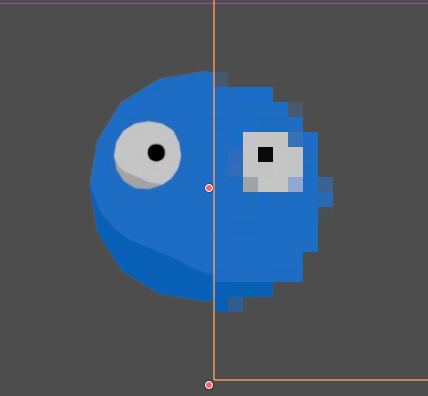
Dynamic2D_Censorship_Effect
Line-by-Line Code Explanation
shader_type canvas_item;
Tells Godot that this shader is designed for 2D objects or User Interface (UI) elements.uniform float escala_pixel...
Creates a mathematical variable adjustable from Godot’s Inspector. It defines the size of the “censorship blocks”. A higher value groups more real screen pixels into a single block, making the censorship stronger.uniform sampler2D screen_texture : hint_screen_texture...
This is the most important part. Thehint_screen_textureflag requests a copy of everything that has already been rendered on the screen just before drawing theColorRect. Thefilter_nearestoption prevents the edges of the blocks from becoming blurry, keeping the pixelated mosaic sharp.vec2 screen_size = vec2(textureSize(screen_texture, 0));
Gets the exact pixel resolution of your game window at that frame. This prevents the pixelation from stretching or warping if the player resizes the game window.vec2 grid = screen_size / escala_pixel;
Divides the screen space into an invisible virtual grid.uv = floor(uv * grid) / grid;
The mathematicalfloor()function removes intermediate decimal values from the screen coordinates. By “clamping” these positions, it forces an entire region of pixels to sample from the exact same point, creating the block effect.COLOR = texture(screen_texture, uv);
Takes the color samples from the background using the newly calculated blocky coordinates and displays them. The final result is the background transformed into a pixelated mosaic.
Shader code
shader_type canvas_item;

uniform float escala_pixel : hint_range(1.0, 100.0) = 15.0;

uniform sampler2D screen_texture : hint_screen_texture, filter_nearest;

void fragment() {
    vec2 uv = SCREEN_UV;

    vec2 screen_size = vec2(textureSize(screen_texture, 0));

    vec2 grid = screen_size / escala_pixel;
    uv = floor(uv * grid) / grid;

    COLOR = texture(screen_texture, uv);
}
Live Preview


Comments 0
No comments yet.