
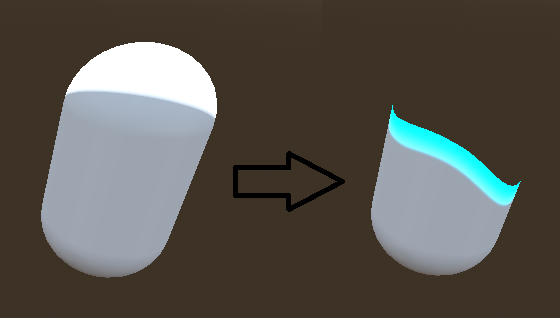
Godot 4+ 3D Vertical Dissolve Shader

A reusable vertical dissolve effect for MeshInstance3D with an animated noise edge, customizable edge color, and emission glow. This shader should work with Godot 4’s Forward+, Mobile, and Compatibility renderers
Setup
- Create a ShaderMaterial and assign the provided dissolve shader to it.
- Assign the ShaderMaterial to your
MeshInstance3D→ Material Override. - Assign a grayscale noise texture to the shader’s Noise Texture property.
- Seamless/tileable noise works best.
- Perlin, Simplex, Worley, or similar noise textures work well.
- Adjust the shader parameters in the ShaderMaterial inspector.
The dissolve is controlled by the shader’s offset:
0.0= fully visible1.0= fully dissolved
Basic usage
You only need to change offset from your script.
Dissolve over 2 seconds
var mat = $MeshInstance3D.material_override as ShaderMaterial

for i in 60:
	mat.set_shader_parameter("offset", float(i) / 59.0)
	await get_tree().create_timer(2.0 / 60.0).timeout
Or with a Tween — recommended
var mat = $MeshInstance3D.material_override as ShaderMaterial

mat.set_shader_parameter("offset", 0.0)

create_tween().tween_method(
	func(value): mat.set_shader_parameter("offset", value),
	0.0,
	1.0,
	2.0
)
To make it reappear, simply reverse the values:
create_tween().tween_method(
	func(value): mat.set_shader_parameter("offset", value),
	1.0,
	0.0,
	2.0
)
Direction
Change the shader’s Up parameter:
Up = true   → Bottom → Top
Up = false  → Top → Bottom
That’s all you need — the rest can be configured directly in the ShaderMaterial inspector.
Shader code
// Core dissolve controls
// Variable				What it does [Typical value]
// Offset				How far the mesh has dissolved. [0 = fully visible, 1 = fully gone. 0.0 → 1.0]
// Up					Direction of the dissolve. [true = bottom → top, false = top → bottom. true]
// Border Color			Color of the glowing edge where the dissolve is happening. [Yellow]
// Border Height		Thickness of the colored transition edge. [Larger = thicker. 0.1]
// Wave Amplitude		How much the dissolve edge moves up/down in a wave pattern [0.05]
// Wave Frequency		How frequently the edge waves across the X axis. [Higher = more waves. 3.0]
// Wave Phase			Offsets the wave pattern horizontally. [0.1]
// Emission Intensity	Brightness of the border's glow. [Higher = brighter. 2.0]
// Noise Speed			How quickly the noise pattern moves over time. [0.1]
// Noise Influence		How strongly the noise distorts the dissolve edge. [0.05]

// Noise Influence determines how much the texture affects the dissolve edge.
// What should you put in Noise Texture? : A grayscale noise texture.
// Something like:
// Perlin noise
// Simplex noise
// Worley/cellular noise
// Cloud/noise texture
// Ideally a seamless/tileable texture.
// For example, a 256×256 grayscale noise image works perfectly well.

shader_type spatial;
render_mode cull_back;

uniform sampler2D albedo_texture : source_color;
uniform sampler2D noiseTexture : source_color;

uniform bool has_texture = false;
uniform vec4 base_color : source_color = vec4(1.0);

uniform float offset = 0.0;
uniform bool up = true;

uniform vec4 borderColor : source_color = vec4(1.0, 1.0, 0.0, 1.0);
uniform float borderHeight = 0.1;

uniform float waveAmplitude = 0.05;
uniform float waveFrequency = 3.0;
uniform float wavePhase = 0.1;

uniform float emissionIntensity = 2.0;
uniform float noiseSpeed = 0.1;
uniform float noiseInfluence = 0.05;

uniform vec2 noiseUVScale = vec2(1.0);
uniform vec2 textureUVScale = vec2(1.0);

varying vec3 local_pos;


void vertex() {
	local_pos = VERTEX;
}


void fragment() {

	// -----------------------------------------
	// Original material appearance
	// -----------------------------------------

	vec4 text = base_color;

	if (has_texture) {
		text *= texture(albedo_texture, UV * textureUVScale);
	}


	// -----------------------------------------
	// Animated noise
	// -----------------------------------------

	vec2 noise_uv = UV * noiseUVScale;
	noise_uv.y -= TIME * noiseSpeed;

	float noise = texture(noiseTexture, noise_uv).r;


	// -----------------------------------------
	// 1. Normalized vertical position
	// -----------------------------------------

	float height = (local_pos.y + 1.0) / 2.0;


	// -----------------------------------------
	// 2. Wavy dissolve edge
	// -----------------------------------------

	float wave = sin(
		local_pos.x * waveFrequency + wavePhase
	);

	wave += sin(
		local_pos.x * waveFrequency * 1.7 + wavePhase
	);

	wave *= waveAmplitude;


	float edge = height + wave;


	// Center noise around zero
	edge += (noise - 0.5) * noiseInfluence;


	// -----------------------------------------
	// 3. Convert to dissolve coordinate
	// -----------------------------------------

	float dissolve_position;

	if (up) {
		dissolve_position = edge;
	}
	else {
		dissolve_position = 1.0 - edge;
	}


	// -----------------------------------------
	// 4. Guarantee proper endpoints
	// -----------------------------------------

	if (offset <= 0.0) {
		dissolve_position = 1.0;
	}

	if (offset >= 1.0) {
		dissolve_position = -1.0;
	}


	// -----------------------------------------
	// 5. Distance from dissolve edge
	// -----------------------------------------

	float distance = dissolve_position - offset;


	// -----------------------------------------
	// 6. Discard dissolved area
	// -----------------------------------------

	if (distance < 0.0) {
		discard;
	}


	// -----------------------------------------
	// 7. Yellow dissolve border
	// -----------------------------------------

	float border = 1.0 - smoothstep(
		0.0,
		borderHeight,
		distance
	);


	// -----------------------------------------
	// 8. Final color
	// -----------------------------------------

	vec4 color = text;

	color.rgb = mix(
		color.rgb,
		borderColor.rgb,
		border
	);


	ALBEDO = color.rgb;
	ALPHA = color.a;


	// -----------------------------------------
	// 9. Border emission
	// -----------------------------------------

	EMISSION =
		borderColor.rgb *
		border *
		emissionIntensity;
}