
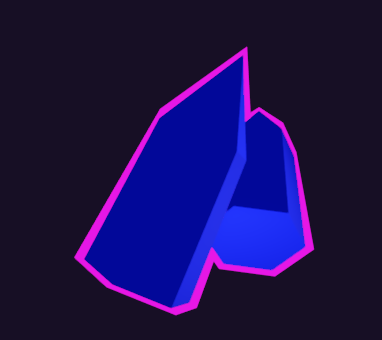
Inverted-Hull Outline with Group Merge
A clean inverted-hull outline
With an extra trick: merge_group option. When several objects overlap, turning this on hides the outline wherever it sits in front of another object, so a cluster reads as one shape with a single outer outline, instead of every object drawing its own outline over its neighbours.
Parameters
– outline_color -> color of the outline.
– outline_energy -> brightness: 0 = dark, 1 = full color, >1 = blooms (with glow enabled).
– outline_transparency -> 0 = fully transparent (blends with whatever is behind: object or sky), 1 = opaque.
– thickness -> outline width in view-space units (consistent across object scales).
– merge_group -> hide the outline where it overlaps another object behind it, so a cluster shares one outer outline.
– merge_depth_range -> how far behind (world units) a surface still counts as part of the “group”. Large enough for neighbours, tiny compared to the background.
Shader code
// Inverted-hull outline pass
shader_type spatial;
render_mode cull_front, unshaded, blend_mix, depth_draw_opaque, shadows_disabled;

uniform vec3  outline_color : source_color = vec3(1.0, 0.95, 1.0);
uniform float thickness : hint_range(0.0, 0.3) = 0.04;   // view-space units
uniform float outline_energy : hint_range(0.0, 4.0) = 1.0;        // brightness: 0 dark, 1 full, >1 blooms
uniform float outline_transparency : hint_range(0.0, 1.0) = 1.0;  // 0 = transparent (blend with what's behind), 1 = opaque

// When ON, the outline is hidden wherever ANOTHER opaque surface sits just behind it
// (i.e. it overlaps another group member) -> only the group's outer silhouette keeps
// its outline. The background is "infinitely" far, so it is never treated as a member.
uniform bool merge_group = false;
// max depth gap (world units) between the outline and a surface behind it for that
// surface to count as a group member. Big enough to span neighbours, tiny vs the sky.
uniform float merge_depth_range : hint_range(0.1, 100.0) = 10.0;
uniform sampler2D DEPTH_TEXTURE : hint_depth_texture, filter_linear_mipmap;

varying float v_view_z;   // view-space z of the (expanded) outline vertex

void vertex() {
	// radial expansion from near the BASE so bottom verts expand outward (not down)
	// -> the outline wraps the bottom too. Continuous shell, no gaps, no normal use.
	vec3 d = VERTEX - vec3(0.0, 0.05, 0.0);
	vec3 dir = length(d) > 0.001 ? normalize(d) : vec3(0.0, -1.0, 0.0);
	vec3 view_n = normalize((MODELVIEW_MATRIX * vec4(dir, 0.0)).xyz);
	vec4 view_pos = MODELVIEW_MATRIX * vec4(VERTEX, 1.0);
	view_pos.xyz += view_n * thickness;
	v_view_z = view_pos.z;
	POSITION = PROJECTION_MATRIX * view_pos;
}

void fragment() {
	if (merge_group) {
		// Linearize the nearest opaque depth to a view-space distance (convention-proof
		// via INV_PROJECTION). Compare with this outline fragment's own distance.
		float raw = texture(DEPTH_TEXTURE, SCREEN_UV).r;
		vec4 vs = INV_PROJECTION_MATRIX * vec4(SCREEN_UV * 2.0 - 1.0, raw, 1.0);
		float scene_dist = -(vs.xyz / vs.w).z;     // farther = larger
		float frag_dist = -v_view_z;
		// A group member sits a little BEHIND the outline (small positive gap); the sky
		// sits ~infinitely behind (huge gap) -> keep the outer silhouette, drop overlaps.
		float gap = scene_dist - frag_dist;
		if (gap > 0.01 && gap < merge_depth_range) {
			discard;
		}
	}
	// Unshaded: ALBEDO is the final colour (EMISSION is ignored in unshaded mode).
	// outline_energy scales it; values >1 bloom via the HDR colour buffer.
	ALBEDO = outline_color * outline_energy;
	// outline_transparency = true alpha mix with whatever is behind it (object or sky).
	ALPHA = outline_transparency;
}
Live Preview


The shader seems to just cover the object in the selected color with no outlining?
Add the shader as a next pass Material and it’ll work (so where your mesh has it’s usual Material applied to it, in that Material’s dropdown you can add another material as a Next Pass)