
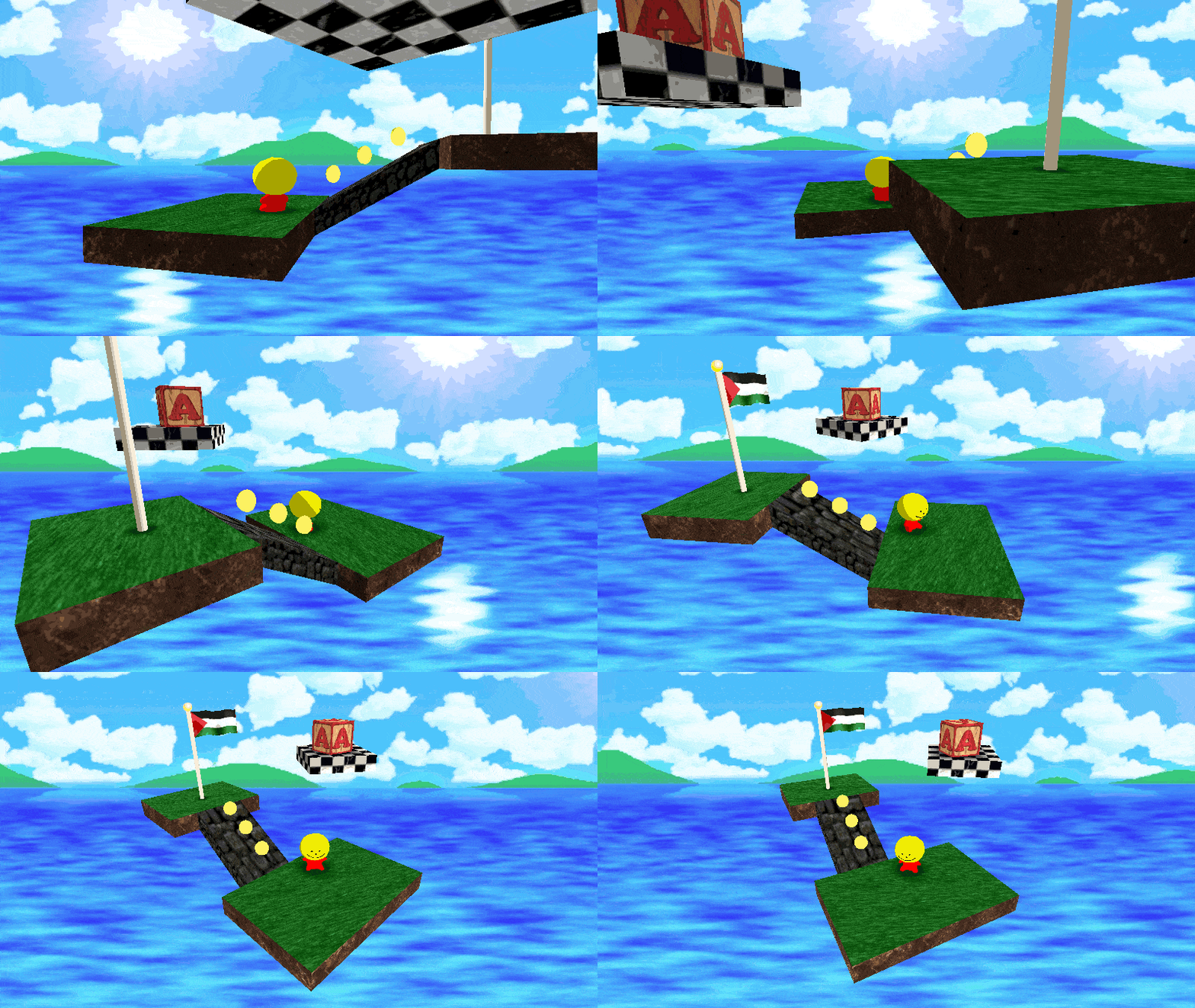
N64 Style Skybox

5/25/25 – I opened up a proposal on Godot’s GitHub page that would allow this to be natively supported as a sky shader. Several people have asked for this, so please show your support there if this would be useful to you.
Single-image skybox as seen in some N64 and PS1 games. I’ve always enjoyed this effect but found surprisingly little information about it, so I decided to recreate it myself. Debug textures are available here.
This works as a spatial shader where you apply it to a skybox object surrounding the scene. It’s also possible to implement as a proper sky shader, but you have to pass the camera’s rotation from a script since sky shaders don’t have access to the view matrix.
Shader code
shader_type spatial;
render_mode unshaded;

uniform sampler2D sky_texture : source_color;
uniform bool lock_aspect = false;
uniform float aspect_ratio = 1.3333333;
uniform vec2 fov = vec2(180.0, 90.0);
uniform ivec2 tiling = ivec2(1, 1);
uniform vec2 offset = vec2(0.0, 0.0);

// XY offset, ZW tiling
varying vec4 bg_coords;

void vertex() {
	// Camera YX rotation per Basis.get_euler source code
	float y = atan(VIEW_MATRIX[0][2], VIEW_MATRIX[2][2]);
	float x = asin(VIEW_MATRIX[1][2]);

	// Map rotation to screen space
	bg_coords.xy = vec2(y * -0.5, x) / PI;
	bg_coords.y += 0.5;

	bg_coords.w = fov.y / 180.0;
	bg_coords.z = !lock_aspect ? fov.x / 360.0 : VIEWPORT_SIZE.x / (VIEWPORT_SIZE.y * aspect_ratio) * bg_coords.w;

	// Keep background centered vertically when FOV changes
	bg_coords.y *= bg_coords.w > 1.0 ? 0.0 : 1.0 - bg_coords.w;
}

void fragment() {
	vec2 uv_offset = vec2(-offset.x, offset.y);
	vec2 uv = (SCREEN_UV + uv_offset) * bg_coords.zw + bg_coords.xy;
	uv *= vec2(tiling);
	ALBEDO = texture(sky_texture, uv).rgb;
}
Live Preview
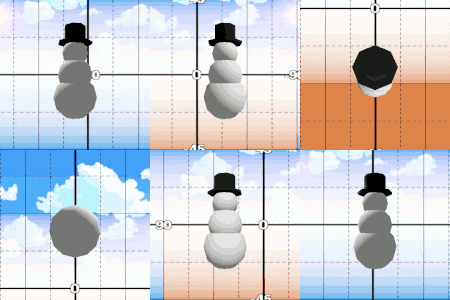

Can someone explain how to use it, i dont understand it
Easiest way to use it:
could you offer the template texture you used in the gif? that looks very helpful incase you wanna make custom backgrounds
Oh, sure: https://imgur.com/a/L4suJ8B
Godot 3.5???
shader_type spatial;
render_mode unshaded;
uniform sampler2D sky_texture : hint_albedo;
uniform bool lock_aspect = false;
uniform float aspect_ratio = 1.3333333;
uniform vec2 fov = vec2(180.0, 90.0);
//uniform ivec2 tiling = ivec2(1, 1);
uniform vec2 offset = vec2(0.0, 0.0);
const float PI = 3.14159;
varying vec2 BG_COORDS;
varying vec2 BG_SCALE;
void vertex() {
//Camera YX rotation per Basis.get_euler source code
float y = atan(CAMERA_MATRIX[0][2], CAMERA_MATRIX[2][2]);
float x = asin(CAMERA_MATRIX[1][2]);
//Map rotation to screen space
BG_COORDS = vec2(y * 0.5, -x) * -(1.0 / PI);
BG_COORDS.y += 0.5;
BG_SCALE.y = fov.y * (1.0 / 180.0);
BG_SCALE.x = !lock_aspect ?
fov.x * (1.0 / 360.0) :
VIEWPORT_SIZE.x / (VIEWPORT_SIZE.y * aspect_ratio) * BG_SCALE.y;
//Keep background centered vertically when FOV changes
BG_COORDS.y *= BG_SCALE.y > 1.0 ? 0.0 : 1.0 - BG_SCALE.y;
}
void fragment() {
vec2 uv_offset = vec2(-offset.x, offset.y);
vec2 uv = (SCREEN_UV + uv_offset) * BG_SCALE + BG_COORDS;
// uv *= vec2(tiling);
ALBEDO = texture(sky_texture, uv).rgb;
}
(I took tiling out cause it seems to break it)
This works perfectly, thank you! But I have a question – is it possible to use nearest neighbor interpolation instead of linear interpolation here?
Replace:
uniform sampler2D sky_texture : source_color;
with:
uniform sampler2D sky_texture : source_color, filter_nearest;
Hey! nice shader. I have bug and i cannot use it.
https://imgur.com/a/pENKo6u
Thanks for pointing it out, it’ll work correctly if you change BG_COORDS to BG_COORDS.xy on that line
Thank you!!! it workssssss
What about
EYEDIR? It’s available in sky shaders (but not spatial shaders, interestingly).The way this shader works, it needs to know the actual rotation of the camera. I don’t think that could be derived from EYEDIR, but maybe if you also use the view space position? If you think it’s possible I’d be interested to know.
Did you manage to get this working as a sky shader? I’d like to try it that way so I can still use aerial perspective on fog.
I didn’t look into it further (I don’t think it’s possible just using the sky shader builtins) but as I said in the post, you can pass the relevant information from a script attached to your main camera. Honestly it might even better to do it that way since you avoid per-vertex inverse trigonometry in the shader XD
i was able to convert this to a canvas shader for direct use with a world environment with the canvas background type
shader_type canvas_item;

// I needed to enable texture repeating here to avoid the skybox uv stretching before the loop completes
uniform sampler2D sky_texture : source_color, repeat_enable;
uniform bool lock_aspect = false;
uniform float aspect_ratio = 1.3333333;
uniform vec2 fov = vec2(180.0, 90.0);
uniform ivec2 tiling = ivec2(1, 1);
uniform vec2 offset = vec2(0.0, 0.0);
uniform mat4 cam_transform;

// XY offset, ZW tiling
varying vec4 bg_coords;

void vertex() {
    // Camera YX rotation per Basis.get_euler source code
    // I needed to divide x here to avoid vertical skybox movement changing when facing certain directions (i have no idea why this happened)
    float y = atan(cam_transform[0][2], cam_transform[2][2]);
    float x = asin(cam_transform[1][2] / cam_transform[2][2]);

    // Map rotation to screen space
    // I needed to flip y here to avoid the skybox turning backwards
    bg_coords.xy = vec2(y * 0.5, x) / PI;
    bg_coords.x -= 0.5;
    bg_coords.y += 0.5;

    bg_coords.w = fov.y / 180.0;

    bg_coords.z = !lock_aspect ? fov.x / 360.0 : TEXTURE_PIXEL_SIZE.x / (TEXTURE_PIXEL_SIZE.y * aspect_ratio) * bg_coords.w;

    // Keep background centered vertically when FOV changes
    bg_coords.y *= bg_coords.w > 1.0 ? 0.0 : 1.0 - bg_coords.w;
}

void fragment() {
    vec2 uv_offset = vec2(-offset.x, offset.y);
    vec2 uv = (SCREEN_UV + uv_offset) * bg_coords.zw + bg_coords.xy;
    uv *= vec2(tiling);

    // I used COLOR here as there is no albedo texture to edit on a colorrect
    COLOR = vec4(texture(sky_texture, uv).rgb, 1.0);
}
(cam_transform is the global_transform of a camera object obtained using set_shader_parameter() in a gdscript)
hopefully this can help those who dont want a large cube around their map for a simple skybox