
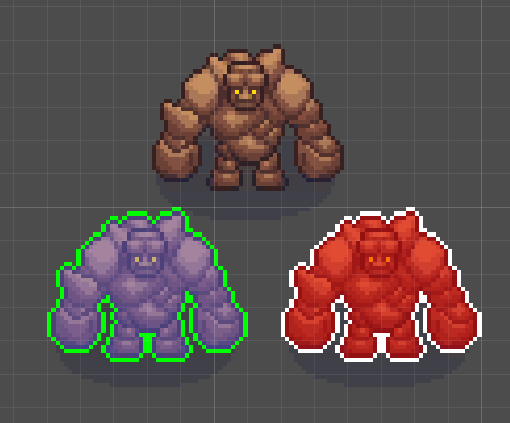
Outline and Shade With Alpha Threshold

With this shader you can outline a sprite and shade iniside with a color. You can also apply a alpha threshold to avoid outlining or shading semi-transparent pixles. Great for sprites with shadows. Check it out!
Shader code
shader_type canvas_item;

// === User Controls ===

// Color of the outline
uniform vec4 outline_color    : source_color = vec4(1.0);
// How far to search around a pixel for solid neighbors (in texels)
uniform float outline_size    : hint_range(0.0, 16.0, 0.1) = 1.0;
// Minimum alpha for a pixel to be considered solid
uniform float alpha_threshold : hint_range(0.0, 1.0, 0.01) = 0.0;
// Number of directions to sample from (max 8)
uniform int outline_samples   : hint_range(4, 8) = 4;
// Color to blend with solid pixels (alpha is blend strength)
uniform vec4 shade_color      : source_color = vec4(1.0, 1.0, 1.0, 0.5);

// === Outline Sampling Directions ===

const vec2[8] DIRS = vec2[8]
(vec2(1.0, 0.0), vec2(0.0, 1.0),  vec2(-1.0, 0.0),  vec2(0.0, -1.0),
 vec2(1.0, 1.0), vec2(-1.0, 1.0), vec2(-1.0, -1.0), vec2(1.0, -1.0));

// === Main Fragment ===

void fragment() {
	vec4 tex = texture(TEXTURE, UV);
	float alpha = tex.a;

	 // Skip fully transparent pixel with no outline
	if (alpha <= 0.0 && outline_size <= 0.0) discard;

	bool solid = alpha > alpha_threshold;
	bool semi  = (alpha > 0.0) && !solid;
	vec4 out_color = tex;

	// Blend solid pixels toward the shade_color based on its alpha
	if (solid && shade_color.a > 0.0) {
		out_color.rgb = mix(tex.rgb, shade_color.rgb, shade_color.a);
		out_color.a   = alpha;
	}

	bool found = false;

	// If not solid, check surrounding pixels for solid neighbors
	if (!solid && outline_size > 0.0) {
		vec2 offset = TEXTURE_PIXEL_SIZE * outline_size;
		for (int i = 0; i < outline_samples; i++) {
			if (texture(TEXTURE, UV + DIRS[i] * offset).a > alpha_threshold) {
				found = true;
				break;
			}
		}
	}

	// Set final pixel color
	if      (solid) COLOR = out_color;
	else if (found) COLOR = outline_color;
	else if (semi)  COLOR = tex;
	else            discard;
}

Alpha threshold is a good things to have, thanks