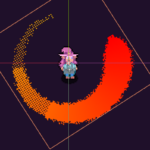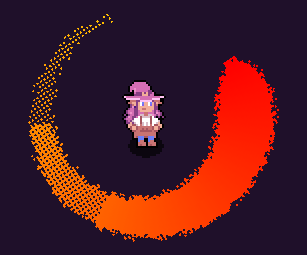
Pixel Slash shader

Supports dither, jagged edges, changing thickness and colour, and customisable arc.
Simply attach to a sprite with a set texture, and set the pixelScale to match that of the texture.
Hope you like it!
Shader code
shader_type canvas_item;

uniform float pixelScale = 32.0; //scale of pixels. 32 for a 32x32 sprite etc
uniform float minRadius : hint_range(0.0, 0.5, 0.01) = 0.3; //inner radius
uniform float maxRadius : hint_range(0.0, 0.5, 0.01) = 0.5; //outer radius
uniform float maxAngle : hint_range(0.0, 1.0, 0.01) = 0.5; //angle of the arc
uniform float maxRandomness : hint_range(0.0, 1.0, 0.01) = 0.05; //random thickness around edge (creates jagged edges)
uniform float visibleArc : hint_range(0.0, 1.0, 0.01) = 1.0; //use to animate the arc without affecting the other parameters

uniform sampler2D thicknessGradient : filter_nearest, repeat_disable; //gradient for thickness
uniform sampler2D color : filter_linear, repeat_disable; //gradient for color
uniform float dither : hint_range(0.0, 2.0, 0.01); //amount of dither over arc

uniform float animFPS = 8.0; //rounds TIME to a FPS

float random (vec2 uv) {
    return fract(sin(dot(uv.xy,
        vec2(12.9898,78.233))) * 43758.5453123);
}

void fragment() {
	vec2 uv = floor(UV * pixelScale) / pixelScale;
	float arc = (atan(uv.x - 0.5, uv.y - 0.5) + PI) / (2.0 * PI);

	float rad = distance(uv, vec2(0.5,0.5));

	float r = random(vec2(arc - floor(TIME * animFPS), rad)) * maxRandomness;

	float maxThickness = maxRadius - minRadius;
	float thickness = 1.0 - texture(thicknessGradient, vec2(((1.0 - arc) / maxAngle), 0)).r;
	float t = maxThickness * thickness * 0.5 + r;

	if(rad > maxRadius - t){
		discard;
	}

	if(rad < minRadius + t){
		discard;
	}

	if(1.0 - arc > maxAngle * visibleArc){
		discard;
	}
	COLOR = texture(color, vec2((1.0 - arc) / maxAngle, 0.0));

	vec2 d = mod(floor(UV * pixelScale), vec2(2.0,2.0));
	if(length(d) * ((1.0 - arc) / (maxAngle * visibleArc)) > dither){
		discard;
	}
}
Live Preview