
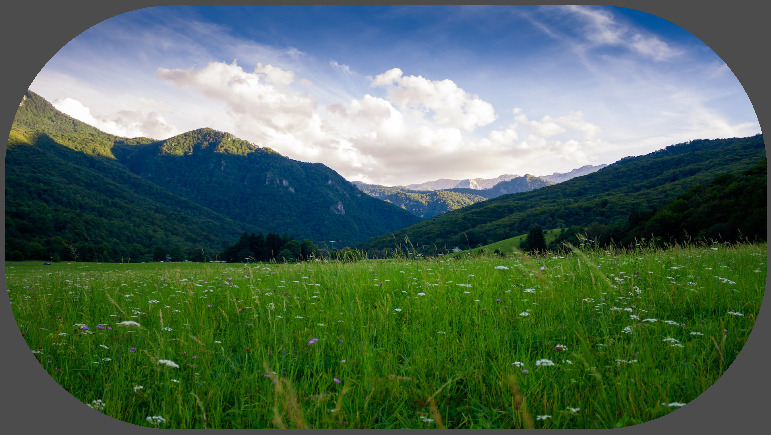
Rounded corners

Rounded corners for nodes. See comments for more information. Designed for Widgets. Please, read instructions before using.
Cover image source: https://unsplash.com/photos/hXNGeAFOgT4
Shader code
shader_type canvas_item;
// Shader to round corners of a canvas. The 'radius_scale' is multiplied by
// minimum(width, height)/2.0 to calculate the radius of the corners.
//
// Instructions:
// 1) The node that uses this shader must have signals 'tree_entered' and
// 'item_rect_changed' connected to a callable with the next code:
// material.set_shader_parameter("width", size.x)
// material.set_shader_parameter("height", size.y)
//
// Known issues:
// 1) If used on 'TextureRect', take care of 'expand_mode' and 'stretch_mode',
// because image corners might be outside node rectangle and therefore clipped.
// Corners are rounded, but they are outside node's rectangle.


uniform float radius_scale: hint_range(0.0, 1.0, 0.1) = 0.1;
uniform bool rounded_corner_top_left = true;
uniform bool rounded_corner_top_right = true;
uniform bool rounded_corner_bottom_left = true;
uniform bool rounded_corner_bottom_right = true;
uniform float width = 1.0;
uniform float height = 1.0;


void fragment() {
	vec4 image = texture(TEXTURE, UV);
	vec2 pos = vec2(UV.x*width, UV.y*height);
	float radius = min(width, height)*radius_scale/2.0;
	float dist;
	// Top left corner
	if (rounded_corner_top_left) {
		dist = length(pos - vec2(radius));
		if (dist > radius && pos.x < radius && pos.y < radius) {
			image.a = 0.0;
		}
		// debugging only
//		if (dist < radius){image.r = 1.0;}
	}
	// Top right corner
	if (rounded_corner_top_right) {
		dist = length(pos - vec2(width-radius, radius));
		if (dist > radius && pos.x > width-radius && pos.y < radius) {
			image.a = 0.0;
		}
		// debugging only
//		if (dist < radius){image.r = 1.0;}
	}
	// Bottom left corner
	if (rounded_corner_bottom_left) {
		dist = length(pos - vec2(radius, height-radius));
		if (dist > radius && pos.x < radius && pos.y > height-radius) {
			image.a = 0.0;
		}
		// debugging only
//		if (dist < radius){image.r = 1.0;}
	}
	// Bottom right corner
	if (rounded_corner_bottom_right) {
		dist = length(pos - vec2(width-radius, height-radius));
		if (dist > radius && pos.x > width-radius && pos.y > height-radius) {
			image.a = 0.0;
		}
		// debugging only
//		if (dist < radius){image.r = 1.0;}
	}
	COLOR = image;
}

Version for constant – anchor size and simple color:
shader_type canvas_item;uniform vec4 color : source_color = vec4(0.18, 0.2, 0.22, 1.0);uniform float radius : hint_range(0.0, 1.0, 0.01) = 0.2;bool IsCornerOut(float X, float Y, float D){ return D > radius && X < radius / 2.0 && Y < radius;}void fragment(){ float K = SCREEN_PIXEL_SIZE.y / SCREEN_PIXEL_SIZE.x; float dist = 0.0; vec4 col_mod = color; if (IsCornerOut(UV.x, UV.y, length(vec2(UV.x * K, UV.y) - vec2(radius)))) { col_mod.a = 0.0; } dist = length(vec2((1.0 - UV.x) * K, UV.y) - vec2(radius)); if (IsCornerOut(1.0 - UV.x, UV.y, length(vec2((1.0 - UV.x) * K, UV.y) - vec2(radius)))) { col_mod.a = 0.0; } if (IsCornerOut(UV.x, 1.0 - UV.y, length(vec2(UV.x * K, 1.0 - UV.y) - vec2(radius)))) { col_mod.a = 0.0; } if (IsCornerOut(1.0 - UV.x, 1.0 - UV.y, length(vec2((1.0 - UV.x) * K, 1.0 - UV.y) - vec2(radius)))) { col_mod.a = 0.0; } COLOR = col_mod;}shader_type canvas_item;
uniform vec4 color : source_color = vec4(0.18, 0.2, 0.22, 1.0);
uniform float radius : hint_range(0.0, 1.0, 0.01) = 0.2;
bool IsCornerOut(float X, float Y, float D)
{
return D > radius && X < radius / 2.0 && Y < radius;
}
void fragment()
{
float K = SCREEN_PIXEL_SIZE.y / SCREEN_PIXEL_SIZE.x;
float dist = 0.0;
vec4 col_mod = color;
if (IsCornerOut(UV.x, UV.y, length(vec2(UV.x * K, UV.y) – vec2(radius))))
{
col_mod.a = 0.0;
}
if (IsCornerOut(1.0 – UV.x, UV.y, length(vec2((1.0 – UV.x) * K, UV.y) – vec2(radius)))) {
col_mod.a = 0.0;
}
if (IsCornerOut(UV.x, 1.0 – UV.y, length(vec2(UV.x * K, 1.0 – UV.y) – vec2(radius))))
{
col_mod.a = 0.0;
}
if (IsCornerOut(1.0 – UV.x, 1.0 – UV.y, length(vec2((1.0 – UV.x) * K, 1.0 – UV.y) – vec2(radius))))
{
col_mod.a = 0.0;
}
COLOR = col_mod;
}
1:1 anchor delta size relations needed, and it will work with different screen size.
Here’s a version I made with an adjustable border to go around the control node. For me, setting the overall width and height parameters to 1/100th of their size looked good but YMMV!
shader_type canvas_item; uniform sampler2D source_texture; uniform float radius_scale : hint_range(0.0, 1.0, 0.1) = 0.1; uniform bool rounded_corner_top_left = true; uniform bool rounded_corner_top_right = true; uniform bool rounded_corner_bottom_left = true; uniform bool rounded_corner_bottom_right = true; uniform float width = 1.0; uniform float height = 1.0; uniform vec4 border_color : source_color = vec4(1.0); uniform float border_thickness : hint_range(0.0, 1.0, 0.001) = 1.0; float corner_distance(vec2 pos, vec2 center, bool enabled) { if (!enabled) return -1.0; return length(pos - center); } void fragment() { vec2 pos = vec2(UV.x * width, UV.y * height); float radius = min(width, height) * radius_scale / 2.0; vec4 tex_color = texture(source_texture, UV); float inner = radius - border_thickness; bool mask = false; bool border = false; // Corner masks. if (rounded_corner_top_left && pos.x < radius && pos.y < radius) mask = corner_distance(pos, vec2(radius), true) > radius; else if (rounded_corner_top_right && pos.x > width - radius && pos.y < radius) mask = corner_distance(pos, vec2(width - radius, radius), true) > radius; else if (rounded_corner_bottom_left && pos.x < radius && pos.y > height - radius) mask = corner_distance(pos, vec2(radius, height - radius), true) > radius; else if (rounded_corner_bottom_right && pos.x > width - radius && pos.y > height - radius) mask = corner_distance(pos, vec2(width - radius, height - radius), true) > radius; // Border logic. if (!mask) { float d = -1.0; if (rounded_corner_top_left && pos.x < radius && pos.y < radius) d = corner_distance(pos, vec2(radius), true); else if (rounded_corner_top_right && pos.x > width - radius && pos.y < radius) d = corner_distance(pos, vec2(width - radius, radius), true); else if (rounded_corner_bottom_left && pos.x < radius && pos.y > height - radius) d = corner_distance(pos, vec2(radius, height - radius), true); else if (rounded_corner_bottom_right && pos.x > width - radius && pos.y > height - radius) d = corner_distance(pos, vec2(width - radius, height - radius), true); if (d >= inner && d <= radius) { border = true; } else if ( (pos.x < border_thickness || pos.x > width - border_thickness) || (pos.y < border_thickness || pos.y > height - border_thickness) ) { border = true; } } if (mask) { discard; } else if (border) { COLOR = border_color; } else { COLOR = tex_color; } }And per acgc99’s suggestion, here’s the .gdscript I added to the control nodes to ensure they dynamically resized when changed (the @tool at the top is optional):
@tool

extends Control

@onready var shader_material: ShaderMaterial = get_material()

var scale_factor: float = 100.

func _ready():
	connect("tree_entered", _on_update_shader_params)
	connect("item_rect_changed", _on_update_shader_params)

func _on_update_shader_params():
	var rect_size = get_rect().size
	shader_material.set_shader_parameter("width", rect_size.x/scale_factor)
	shader_material.set_shader_parameter("height", rect_size.y/scale_factor)