Stylized Skin

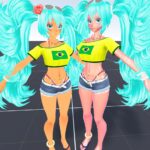
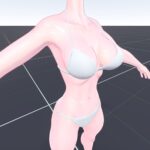
Stylized shader that isnt just two tone lighting + fresnel , based on some shaders I saw in some mmd videos and some art techniques for painting skin
What it does:
– Adds a hue around edges of viewed model (fresnel) , sort of like subsurface scattering
– Applies a function to diffuse light to sharpen it but still leaves it a little soft
– Reduces the darkness of the shadow and mixes the shadow area to have modified HSV values
– Adds a lighter hue around the transition between light and dark areas
– Adds specular highlights with ‘warmer’ hue around them
– Soft rim light
You might need to reduce specular and fresnel depending on scene lighting , or change hue values for different skin tones
Skin textures: https://imgur.com/a/LdJrhBa
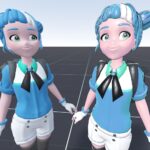
“Godette (Rigged)” (https://skfb.ly/oxZY8) by zahlenmaler is licensed under Creative Commons Attribution (http://creativecommons.org/licenses/by/4.0/).
“miku brazilian (fbx) + rig” (https://skfb.ly/pwtDx) by Prismxd oficial yt is licensed under Creative Commons Attribution (http://creativecommons.org/licenses/by/4.0/).
Shader code
// Stylized Skin shader by paperbag

shader_type spatial;
render_mode cull_back;

// UTILITY

float remap(float v, float from1, float to1, float from2, float to2)
{
	return (v - from1) / (to1 - from1) * (to2 - from2) + from2;
}

float fresnel(float amount, vec3 normal, vec3 view)
{
	return pow((1.0 - clamp(dot(normalize(normal), normalize(view)), 0.0, 1.0)), amount);
}

// Color space conversion from https://godotshaders.com/shader/color-range-swap/
vec3 rgb2hsv(vec3 c)
{
    vec4 K = vec4(0.0, -1.0 / 3.0, 2.0 / 3.0, -1.0);
    vec4 p = mix(vec4(c.bg, K.wz), vec4(c.gb, K.xy), step(c.b, c.g));
    vec4 q = mix(vec4(p.xyw, c.r), vec4(c.r, p.yzx), step(p.x, c.r));

    float d = q.x - min(q.w, q.y);
    float e = 1.0e-10;
    return vec3(abs(q.z + (q.w - q.y) / (6.0 * d + e)), d / (q.x + e), q.x);
}

// All components are in the range [0…1], including hue.
vec3 hsv2rgb(vec3 c)
{
    vec4 K = vec4(1.0, 2.0 / 3.0, 1.0 / 3.0, 3.0);
    vec3 p = abs(fract(c.xxx + K.xyz) * 6.0 - K.www);
    return c.z * mix(K.xxx, clamp(p - K.xxx, 0.0, 1.0), c.y);
}

vec3 shiftHSV(vec3 color, float hueChange, float saturationChange, float valueChange){
	vec3 c = rgb2hsv(color);

	c.r += hueChange;
	c.g *= saturationChange;
	c.b *= valueChange;
	float hue = c.r + hueChange;
	c.x = (hue < 0.0) ? hue + 1.0 : ((hue > 1.0) ? hue - 1.0 : hue);

	return hsv2rgb(c);
}

// UTILITY END

uniform sampler2D Diffuse: source_color;
uniform sampler2D Normal: hint_normal;
uniform float NormalDepth: hint_range(0.0, 2.0) = 0.5;

// For fine detail:
// do not use this if the material is on clothing and such
// or do but use a mask for the skin area
group_uniforms Skin;
uniform sampler2D SkinSpecular;
uniform sampler2D SkinNormal: hint_normal;
uniform float SkinScale = 10.0;
uniform float SkinDepth = 0.25;

group_uniforms Hue_Shifting;
uniform float EdgeHue: hint_range(-0.5, 0.5) = -0.025;
uniform float EdgeHueFresnel = .03;
uniform float EdgeHuePower = 12.;

uniform float LightHueMult: hint_range(-0.5, 0.5) = 0.03;
uniform float LightHuePower = 2.0;

uniform float SpecularHueMult: hint_range(-0.5, 0.5) = -0.01;
uniform float SpecularHuePower = 0.536;

group_uniforms Diffuse_Shading;
uniform float ShadowSoftness = 1.5245;
uniform float ShadowOffset: hint_range(0.0, 1.0) = .829;
uniform float ShadowAmount: hint_range(0.0, 1.0) = .74;

group_uniforms Specular_Shading;
uniform float Specular: hint_range(0.0, 20.0) = 5.;
uniform float SpecularHardness = 300.;
uniform float Wetness: hint_range(0.0, 1.0) = 0.;

group_uniforms Rim_Light;
uniform float FresnelIOR = 2.;
uniform float FresnelPower = 8.;

void fragment() {
	vec3 normal = texture(Normal, UV).rgb;
	vec3 normalSkin = texture(SkinNormal, UV * SkinScale).rgb;
	NORMAL_MAP = mix(normal, normalSkin, SkinDepth);
	NORMAL_MAP_DEPTH = NormalDepth;

	// Diffuse
	vec3 color = texture(Diffuse, UV).rgb;
	vec3 hsv = rgb2hsv(color);
	// Optional: Desaturate image
	color = shiftHSV(color, 0., 1. - hsv.y * .3, 1.);
	float f = clamp(pow(remap(fresnel(EdgeHueFresnel, NORMAL, VIEW), 0.0, 1.0, -1.0, 1.0), EdgeHuePower), 0.0, 1.0);
	vec3 hueColor = shiftHSV(color, 0.5 + EdgeHue, 1.125, 1.0);
	ALBEDO = mix(color, hueColor, f);
}

void light()
{
	// Calculate some vectors.
	vec3 lightColor = LIGHT_COLOR / PI;
	vec3 L = normalize(LIGHT);
	vec3 N = normalize(NORMAL);

	// Diffuse light shadow (Lambert).
	float NdotL = dot(NORMAL, LIGHT) * ATTENUATION;
	float shadow = clamp(pow(NdotL + ShadowOffset, ShadowSoftness), ShadowAmount, 1.0);

	// Specular light
	vec3 V = normalize(VIEW);
	vec3 H = normalize(L + V);

	float specular = max(0.0, pow(dot(H, NORMAL), SpecularHardness)) * Specular;
	float specularSkin = texture(SkinSpecular, UV * SkinScale).r + specular * .03;

	// Change skin hue around lit areas
	float lightHue = pow(abs(shadow - .5) * 1.5, LightHuePower);
	vec3 alteredAlbedo = ALBEDO;
	alteredAlbedo = shiftHSV(alteredAlbedo, LightHueMult * lightHue, 1.0 + (.23 * lightHue), 1.0 + .23 * lightHue);

	float shadowHue = 1. - shadow;
	alteredAlbedo = mix(alteredAlbedo, shiftHSV(alteredAlbedo, -.1, 1.9, .5), shadowHue);

	float specularHue = pow(clamp(specular, 0., 1.), SpecularHuePower);
	alteredAlbedo = shiftHSV(alteredAlbedo, SpecularHueMult * specularHue, 1.0 + (0.6 * specularHue), 1.0);
	DIFFUSE_LIGHT += shadow * lightColor * alteredAlbedo;

	vec3 finalSpecular = (vec3(specular * specularSkin) * LIGHT_COLOR / PI) * max(0.0, 1.0 - pow(1.0 - NdotL, 20));
	SPECULAR_LIGHT += finalSpecular;

	// Subtle extra lit area
	SPECULAR_LIGHT += pow(specular, 0.05) * .125;

	// Wetness
	SPECULAR_LIGHT += specular * specularSkin * Wetness > .07 ? .3 : 0.001;

	// Rim light (fresnel)
	float mask = clamp(NdotL * 5.0, 0.0, 1.0);
	float rim = pow(fresnel(FresnelIOR, NORMAL, VIEW), FresnelPower);
	SPECULAR_LIGHT += clamp(rim, 0.0, 1.0) * mask;
}
Live Preview