
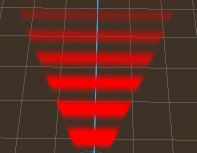
VisionConeEnergy

This shader renders a dynamic vision cone effect designed for AI detection, stealth gameplay, and debug visualization.
It is intended to be used on a PlaneMesh in 3D space, forming a forward-facing cone with animated energy waves and emissive glow, similar to radar or scanning effects.
The cone shape is computed procedurally in the shader (not geometry-based), ensuring stable visuals from any camera angle without distortion or camera dependency.
✨ Features
-
Procedural vision cone shape (no ConeMesh required)
-
Animated scanning waves moving forward
-
Emissive glow for energy / detection feedback
-
Smooth edge falloff and distance fading
-
Fully camera-independent (uses local UVs)
-
Visible from both sides (no backface culling)
-
Lightweight and suitable for AI sensors or debug views
🧩 Intended Use
-
AI vision / detection cones
-
Stealth games (Metal Gear–style visibility)
-
Debug visualization for raycast or sensor systems
-
Radar / scan / energy-based effects
⚙️ Usage Notes
-
Apply to a PlaneMesh
-
Plane should be oriented forward (typically rotated -90° on X)
-
Plane size controls vision width and distance
-
Adjust
cone_angle,max_distance, and wave parameters for different behaviors
🧠 Godot Version
-
Compatible with Godot 4.x
-
Uses a Spatial Shader
Shader code
shader_type spatial;
render_mode unshaded, cull_disabled, blend_mix;

uniform float cone_angle : hint_range(1.0, 180.0) = 60.0;
uniform float max_distance : hint_range(0.1, 1.0) = 1.0;
uniform float edge_softness : hint_range(0.0, 0.2) = 0.05;

uniform float wave_density : hint_range(1.0, 20.0) = 8.0;
uniform float wave_speed : hint_range(0.1, 10.0) = 4.0;
uniform float wave_strength : hint_range(0.0, 1.0) = 0.4;

uniform float intensity : hint_range(0.0, 2.0) = 1.0;
uniform vec4 color : source_color = vec4(1.0, 0.25, 0.25, 1.0);

void fragment() {
    vec2 uv = UV;

    float y = uv.y;
    float x = abs(uv.x - 0.5) * 2.0;

    if (y < 0.0 || y > max_distance) {
        discard;
    }

    float max_width = y * tan(radians(cone_angle * 0.5));

    float cone_edge = smoothstep(
        max_width,
        max_width - edge_softness,
        x
    );

    float distance_fade = 1.0 - (y / max_distance);

    float wave =
        sin((y * wave_density - TIME * wave_speed) * 6.2831);
    wave = wave * 0.5 + 0.5;

    float energy = mix(1.0, wave, wave_strength);

    float alpha = cone_edge * distance_fade * energy * intensity;

    ALBEDO = color.rgb;

    EMISSION = color.rgb * alpha * 2.5;

    ALPHA = alpha;
}
