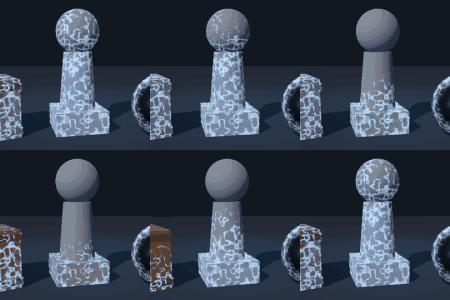
Frost Overlay for Any Mesh

Frost that grows over any 3D mesh. It goes in the Material Overlay slot, so the mesh keeps its own material and the frost is drawn on top as a thin lit layer.
Slide frost_amount from 0 to 1 and the frost spreads out from the brightest lines of the pattern, with a soft glow on the edge while it’s still spreading. Set rim_only to 1 if you only want the silhouette frosted, which works well for a cold aura on a character.
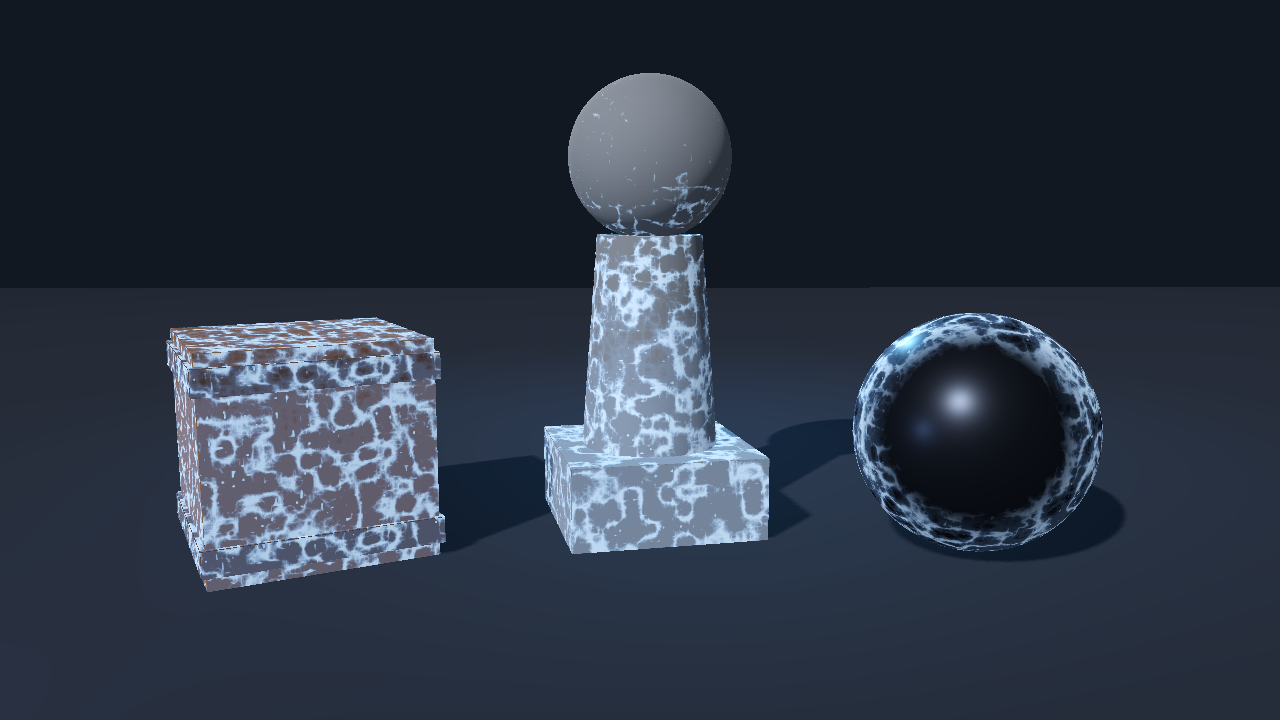
ground_bias makes the frost start low and creep upward as frost_amount rises. The crate and the statue in the GIF use 0.9, the metal ball uses rim_only.
To use it, select a MeshInstance3D, open Geometry > Material Overlay, add a new ShaderMaterial and load the shader into it. Then animate frost_amount with an AnimationPlayer or a Tween. It also works in the Next Pass of the mesh’s own material.
No textures are used. I put the noise in the mesh’s local space so the pattern sticks to the mesh when it moves, and I kept the hashes free of sin() so the pattern comes out the same in Forward+, Mobile and Compatibility. I tested it on Godot 4.4 and 4.7.
I kept the film between the ferns blue on purpose. With white mixed in everywhere, frost on a red or orange object looked pink.
If you see flicker on a large object, raise surface_offset a little. It’s 2 mm by default, which I found was enough for the meshes I tried.
The code was written with the help of an AI coding assistant.
This is a cut-down version of the frost layer in my Ice & Frost VFX pack for Godot 4, where a mesh freezes starting from the point it was hit and can melt again. I also have a free Ice Lance pack on itch if you’d like to try the projectile effects first. The free one is the first link and the full pack is the second.
https://gennai.itch.io/free-ice-lance-vfx-godot-4?utm_source=godotshaders&utm_medium=referral&utm_campaign=ice
https://gennai.itch.io/ice-frost-vfx-godot-4?utm_source=godotshaders&utm_medium=referral&utm_campaign=ice
Shader code
// Frost Overlay for Godot 4
// MIT License. Copyright (c) 2026 gennai (https://gennai.itch.io)
//
// Fern-like frost on any mesh. Put this on a MeshInstance3D as Material Overlay
// (Geometry > Material Overlay), or as Next Pass of its material. The mesh keeps
// its own material underneath; the frost is a thin lit layer drawn on top.
//
// Animate frost_amount from 0 to 1 to grow the frost over the surface.
// No textures: the pattern is ridged value noise computed in the shader, so it
// comes out the same in Forward+, Mobile and Compatibility.
shader_type spatial;
render_mode blend_mix, depth_draw_never, cull_back, specular_schlick_ggx, shadows_disabled;

group_uniforms coverage;
// 0 = no frost, 1 = fully frosted. Animate this.
uniform float frost_amount : hint_range(0.0, 1.0) = 0.75;
// Overall strength of the layer.
uniform float opacity : hint_range(0.0, 1.0) = 1.0;
// Size of the frost pattern. Higher = smaller, denser ferns (in 1 / mesh local units).
uniform float frost_scale : hint_range(0.5, 40.0) = 12.0;
// Changes the pattern so two objects side by side do not match.
uniform int seed : hint_range(0, 250) = 1;
// 0 = frost over the whole surface, 1 = only on the silhouette (a cold aura look).
uniform float rim_only : hint_range(0.0, 1.0) = 0.0;
// 0 = even coverage, 1 = frost starts low and creeps upward as frost_amount rises.
uniform float ground_bias : hint_range(0.0, 1.0) = 0.0;
// World height in metres over which ground_bias fades out (measured from y = 0).
uniform float ground_height : hint_range(0.1, 10.0) = 2.0;
// How far the layer sits above the surface, in metres. Raise it if you see z-fighting.
uniform float surface_offset : hint_range(0.0, 0.05) = 0.002;

group_uniforms colors;
// Thin wash between the ferns.
uniform vec4 film_color : source_color = vec4(0.6, 0.78, 0.95, 1.0);
// How see-through the film between the ferns is. 0 = only the ferns show.
uniform float film_opacity : hint_range(0.0, 1.0) = 0.12;
// The fern lines and grains.
uniform vec4 frost_color : source_color = vec4(0.85, 0.94, 1.0, 1.0);
// Glow on the edge where the frost is still spreading.
uniform vec4 edge_glow_color : source_color = vec4(0.55, 0.85, 1.0, 1.0);
uniform float emission : hint_range(0.0, 4.0) = 0.6;

varying vec3 v_local;
varying float v_world_y;

// Hashes without sin(), so every GPU gives the same pattern.
float frost_hash(vec3 p) {
	vec3 p3 = fract(p * 0.1031);
	p3 += dot(p3, p3.zyx + 31.32);
	return fract((p3.x + p3.y) * p3.z);
}

float frost_noise(vec3 p) {
	vec3 i = floor(p);
	vec3 f = fract(p);
	f = f * f * (3.0 - 2.0 * f);
	float a = mix(frost_hash(i), frost_hash(i + vec3(1.0, 0.0, 0.0)), f.x);
	float b = mix(frost_hash(i + vec3(0.0, 1.0, 0.0)), frost_hash(i + vec3(1.0, 1.0, 0.0)), f.x);
	float c = mix(frost_hash(i + vec3(0.0, 0.0, 1.0)), frost_hash(i + vec3(1.0, 0.0, 1.0)), f.x);
	float d = mix(frost_hash(i + vec3(0.0, 1.0, 1.0)), frost_hash(i + vec3(1.0, 1.0, 1.0)), f.x);
	return mix(mix(a, b, f.y), mix(c, d, f.y), f.z);
}

float frost_fbm(vec3 p) {
	float sum = 0.0;
	float amp = 0.5;
	for (int o = 0; o < 3; o++) {
		sum += frost_noise(p) * amp;
		p *= 2.02;
		amp *= 0.5;
	}
	return sum / 0.875;
}

// Ridged noise: the sharp ridges are what make it read as fern dendrites, not clouds.
float frost_ridged(vec3 p) {
	float sum = 0.0;
	float amp = 0.5;
	for (int o = 0; o < 4; o++) {
		float n = 1.0 - abs(frost_noise(p) * 2.0 - 1.0);
		sum += n * n * amp;
		p *= 2.13;
		amp *= 0.5;
	}
	return sum / 0.9375;
}

void vertex() {
	v_local = VERTEX;
	v_world_y = (MODEL_MATRIX * vec4(VERTEX, 1.0)).y;
	// Push out along the normal by surface_offset metres, whatever the node's scale.
	vec3 node_scale = vec3(length(MODEL_MATRIX[0].xyz), length(MODEL_MATRIX[1].xyz), length(MODEL_MATRIX[2].xyz));
	VERTEX += NORMAL * surface_offset / max(node_scale, vec3(0.0001));
}

void fragment() {
	float t = clamp(frost_amount, 0.0, 1.0);
	if (t <= 0.0) {
		discard;
	}
	vec3 p = v_local * frost_scale + float(seed % 251) * 0.37;
	float ridge = frost_ridged(p);
	float blotch = frost_fbm(p * 0.35);
	float field = ridge * 0.72 + blotch * 0.28;
	// Coverage grows from the strongest ridges outward as frost_amount rises.
	float edge = 1.0 - t;
	// Higher points need more frost_amount before they frost over.
	edge += ground_bias * (smoothstep(0.0, ground_height, v_world_y) - 0.35);
	float cov = smoothstep(edge - 0.08, edge + 0.18, field);
	float edge_line = exp(-pow((field - edge) / 0.1, 2.0)) * (1.0 - t * 0.6);
	float dendrite = smoothstep(0.46, 0.8, ridge);
	float grain = smoothstep(0.84, 0.97, frost_noise(v_local * frost_scale * 4.0 + float(seed)));
	float a = cov * max(mix(film_opacity, 0.95, dendrite), grain * 0.9) * opacity;
	if (rim_only > 0.0) {
		float rim = 1.0 - clamp(dot(normalize(NORMAL), normalize(VIEW)), 0.0, 1.0);
		a *= mix(1.0, smoothstep(0.25, 0.75, rim), rim_only);
	}
	a = clamp(a, 0.0, 1.0);
	if (a < 0.004) {
		discard;
	}
	// Blue between the ferns, white on them. White everywhere turns frost on a warm
	// object pink instead of icy.
	vec3 blue = film_color.rgb;
	vec3 base = mix(blue, frost_color.rgb, 0.14 + 0.66 * dendrite);
	ALBEDO = mix(base, frost_color.rgb, grain * 0.5);
	ALPHA = a;
	ROUGHNESS = mix(0.66, 0.3, max(dendrite, grain));
	SPECULAR = 0.55;
	// The last term keeps the frost readable in dark scenes, where a thin lit film
	// would turn grey.
	EMISSION = edge_glow_color.rgb * emission * (edge_line * 0.5 + grain * 0.1) * a
		+ ALBEDO * emission * 0.22;
}
Live Preview