
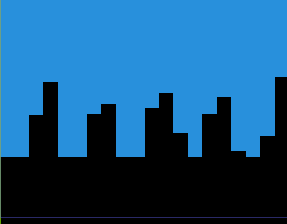
Blocky Noise curtain

Made this as a transition for my game where I wanted a blocky cascade of pixels. You can animate `curtain_descent` and `ripple_height` to control how the curtain looks as it covers the screen.
Shader code
shader_type canvas_item;

uniform float seed = 2.3456345634556;

uniform float curtain_descent: hint_range(0.0, 1.0, 0.1) = 0.5;
uniform float ripple_height: hint_range(0.0, 1.0, 0.001);
uniform float period: hint_range(1.0, 10.0, 1.0) = 5.0;
uniform float phase: hint_range(0.0, 1.0, 0.1);
uniform int q_steps = 20;

// from https://godotshaders.com/snippet/random-value/
float random (vec2 uv) {
	return fract(sin(dot(uv.xy,
		vec2(12.9898,78.233))) * 43758.5453123);
}

float square_wave(float x, float freq) {
	//const float T = 0.5;
	float y = sin(TAU * freq * x);
	return sign(y);
}

void fragment() {
	if (UV.y > curtain_descent) {
		vec4 prev_color = COLOR;
		COLOR = vec4(0);

		float distance_from_base = UV.y - curtain_descent;
		if (distance_from_base <= ripple_height) {
			vec4 new_color = prev_color;
			//new_color.a = 0.5;
			COLOR = new_color;

			float h = (curtain_descent + ripple_height) - UV.y;

			float q_delta = 1./float(q_steps);
			float x = floor(UV.x / q_delta) * q_delta;
			float wv = (ripple_height/2.) * sin(TAU * (period * x + phase))
				+ (ripple_height / 2.) * random(vec2(x * seed));

			if (h < wv) {
				COLOR = vec4(0);
			}
		}
	}
}
