
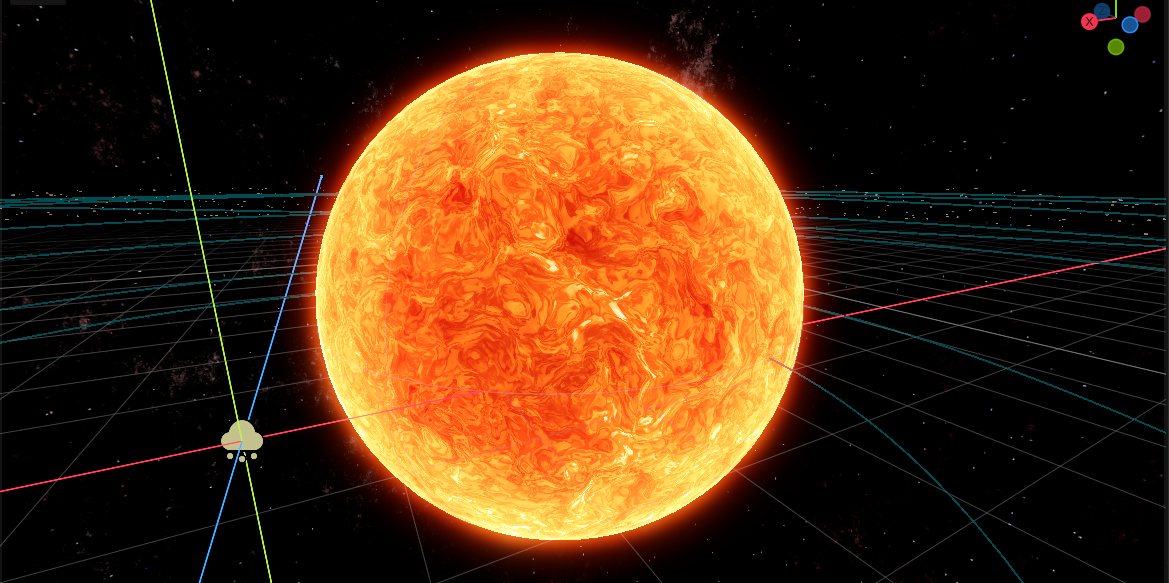
Better Sun Shader 3D

A sun shader use for 3d version.
Origin from https://godotshaders.com/shader/the-sun-a-mass-of-incandescent-gas/
I use AI transfrom this shader to spatial version, and change some of the code to
make the final result satisfying to me.
Shader code
shader_type spatial;
render_mode cull_back, depth_draw_opaque, shadows_disabled, fog_disabled;

/*
 ==============================================================================
  3D 恒星表面着色器 (spatial) — Godot 4.5+
  sun_3d_plasma.gdshader
 ==============================================================================

  2D 版(canvas_item,屏幕空间假球)的 3D 重写。三处根本改动:

  ① "用 UV 反推球面法线" → 真实几何。球网格自带法线,方向直接可用;
  ② "经纬度采样 2D 噪声" → 物体空间采样 3D 噪声。没有经线接缝、没有极点
     挤压,也不吃网格 UV(球体 UV 可以随便展,甚至不要 UV);
  ③ "N.z 当边缘变量" → mu = dot(NORMAL, VIEW)。真 3D 里这就是视线与法线
     的夹角余弦,任何机位、任何动画都成立。

  ── 每个像素做什么 ────────────────────────────────────────────────────────
   1. d = 物体空间法线(球面方向);mu = 视线夹角余弦
   2. 刚性自转:绕 Y 轴整体旋转。角速度与纬度无关 —— 让角速度随纬度变化
      会把图案随时间无限缠死(只剩两极正常),详见下方 fragment 里的说明
   3. 两级 domain warp(3D fbm)→ 翻腾的等离子流场 fld
   4. 黑子:流场模长(或独立慢场)低于阈值 → 半影 / 本影两层
   5. 米粒组织:高频噪声被流场拖着走,按半影与 mu 遮蔽
   6. 热量曲线 → 三色 ramp,乘临边昏暗(sqrt 定律)与 emission
   7. 本影压暗;半影用高度梯度做 bump 光照(屏幕空间求导,零额外采样)
   8. 边缘色球辉光(艺术加工,可选)
  输出 ALBEDO(unshaded = 直接写颜色)。emission > 1 时配合 HDR + Glow 发光。

  ── 用法 ─────────────────────────────────────────────────────────────────
   1. MeshInstance3D + SphereMesh(radius 1,height 2,radial_segments 96,
      rings 48 —— 分段太低会在边缘看出多边形)
   2. Material = ShaderMaterial,Shader = 本文件
   3. 想要 HDR 发光:WorldEnvironment -> Glow 打开,emission 调到 2~6

  ── 性能(重要)───────────────────────────────────────────────────────────
   field() 内部是 7 次 fbm(6 次 2 八度 + 1 次 octaves 层),octaves=4 时约
   16 次 simplex;加上米粒组织 1 次、黑子场 3 次,合计约 20 次/像素,
   是本着色器的绝对主成本。集成显卡/移动端:octaves 降到 2,
   或打开 use_noise_texture 用烘焙好的 3D 噪声纹理(一次采样顶一次 simplex)。
   消隐:本 shader 不支持 tessellation/LOD,远处的小太阳建议换单色球或降 octaves。
*/

// ── 颜色 ─────────────────────────────────────────────────────────────────
uniform sampler2D color_ramp : source_color, repeat_disable, filter_linear;
uniform float emission_power = 1.0;
uniform float contrast = 1.5;

// ── 临边 ─────────────────────────────────────────────────────────────────
group_uniforms Limb;
uniform float limb_darkening : hint_range(0.0, 1.0) = 0.65;  // 边缘压暗强度
uniform float limb_reddening : hint_range(0.0, 1.0) = 0.5;   // 压暗时向红端偏移多少

// ── 菲涅尔效果 ───────────────────────────────────────────────────────────
group_uniforms Fresnel;
uniform float fresnel_power = 1.0;
uniform float fresnel_energy = 6.0;

// ── 米粒组织 ─────────────────────────────────────────────────────────────
group_uniforms Granule;
uniform float granulation : hint_range(0.0, 1.0) = 0.35;
uniform float granule_size = 10.0;        // 越大 = 米粒越小

// ── 黑子 ─────────────────────────────────────────────────────────────────
group_uniforms Spot;
uniform bool spot_independent = true;     // true = 独立慢场(斑点更圆、更长寿)
uniform float spot_threshold : hint_range(0.0, 0.6) = 0.30;  // 调大 = 黑子更多
uniform float spot_scale = 0.6;           // 越小 = 黑子越大(仅独立模式)
uniform float spot_drift = 0.15;          // 慢场的时间流速(仅独立模式)
uniform float spot_darkness : hint_range(0.0, 1.0) = 0.85;   // 本影有多黑
uniform float spot_relief : hint_range(0.0, 4.0) = 1.0;      // 半影起伏的受光强度
uniform bool spot_band_only = true;       // 只让黑子出现在中低纬
uniform vec2 spot_light_dir = vec2(-0.7, 0.7);  // 起伏的假光源,屏幕空间、y 向上

// ── 流场与自转 ───────────────────────────────────────────────────────────
group_uniforms SpinAndScale;
uniform float scale = 2.0;                // 流场尺度,越大 = 涡越小
uniform float speed = 0.1;
uniform float swirl = 1.5;                // warp 强度
uniform float spin_speed = 0.03;          // 自转(刚性旋转,0 = 不动;也可直接转节点)
uniform float lat_twist : hint_range(-1.5, 1.5) = 0.0;  // 固定的纬度扭转(弧度),见下方说明

// ── 噪声 ─────────────────────────────────────────────────────────────────
group_uniforms Noise;
uniform bool use_noise_texture = false;   // true = 用 3D 噪声纹理(更快、可烘焙)
uniform sampler3D noise_texture : repeat_enable, filter_linear;
uniform float noise_texture_scale = 0.25; // 纹理重复次数 / 噪声单位(越小 = 特征越大)
uniform int octaves : hint_range(1, 6) = 4;

varying vec3 v_dir;   // 物体空间法线 = 球面上的方向

// ══════════════════════════════════════════════════════════════════════════
//  3D simplex 噪声(经典 Gustavson 结构 + 12 条边向量梯度)
//
//  刻意不用最常见的 webgl-noise(Ashima)写法:它靠 7x7 网格 → 八面体映射
//  生成梯度,再用 taylorInvSqrt 近似归一化;索引或归一化稍有偏差,梯度长度
//  就会偏离 1,噪声幅度变大且出现偶发尖峰(实测 std 0.68 / 峰值 ±4.2,
//  正确值是 std 0.43 / 峰值 ±1)。改用哈希从 12 条边向量里取梯度:
//  可验证、无查表、代码更短,幅度与经典实现逐位对齐。
// ══════════════════════════════════════════════════════════════════════════
uint lowbias32(uint x) {
	x ^= x >> 16u; x *= 2146121005u;
	x ^= x >> 15u; x *= 2221713035u;
	x ^= x >> 16u;
	return x;
}

// 12 条边向量之一:(±1,±1,0) / (±1,0,±1) / (0,±1,±1),长度 sqrt(2)
vec3 edge_grad(vec3 c) {
	uvec3 q = uvec3(ivec3(c + 32768.0));
	uint h = lowbias32(q.x ^ lowbias32(q.y ^ lowbias32(q.z)));
	uint k = h % 12u;
	uint axis = k / 4u;
	float s0 = (k & 1u) == 0u ? 1.0 : -1.0;
	float s1 = (k & 2u) == 0u ? 1.0 : -1.0;
	if (axis == 0u) { return vec3(0.0, s0, s1); }
	if (axis == 1u) { return vec3(s0, 0.0, s1); }
	return vec3(s0, s1, 0.0);
}

float snoise(vec3 v) {
	const float F3 = 1.0 / 3.0;
	const float G3 = 1.0 / 6.0;

	// 偏斜到 simplex 网格,取所在单元的四个角
	vec3 i = floor(v + vec3(dot(v, vec3(F3))));
	vec3 x0 = v - i + vec3(dot(i, vec3(G3)));

	vec3 g = step(x0.yzx, x0.xyz);
	vec3 l = 1.0 - g;
	vec3 i1 = min(g.xyz, l.zxy);
	vec3 i2 = max(g.xyz, l.zxy);

	vec3 x1 = x0 - i1 + vec3(G3);
	vec3 x2 = x0 - i2 + vec3(2.0 * G3);
	vec3 x3 = x0 - vec3(1.0 - 3.0 * G3);

	float t0 = max(0.6 - dot(x0, x0), 0.0);
	float t1 = max(0.6 - dot(x1, x1), 0.0);
	float t2 = max(0.6 - dot(x2, x2), 0.0);
	float t3 = max(0.6 - dot(x3, x3), 0.0);

	// 32.0 是配"梯度长度 sqrt(2)"的归一化常数
	float n = 0.0;
	n += (t0 * t0) * (t0 * t0) * dot(edge_grad(i), x0);
	n += (t1 * t1) * (t1 * t1) * dot(edge_grad(i + i1), x1);
	n += (t2 * t2) * (t2 * t2) * dot(edge_grad(i + i2), x2);
	n += (t3 * t3) * (t3 * t3) * dot(edge_grad(i + vec3(1.0)), x3);
	return 32.0 * n;
}

// 单层噪声,返回 [-1, 1]
float noise3(vec3 p) {
	if (use_noise_texture) {
		return texture(noise_texture, p * noise_texture_scale).r * 2.0 - 1.0;
	}
	return snoise(p);
}

// fbm,返回 [0, 1]。每层旋转一次坐标,避免八度之间露出轴向网格
float fbm(vec3 p, int oct) {
	vec3 q = p;
	float v = 0.0;
	float a = 0.5;
	float norm = 0.0;
	for (int i = 0; i < oct; i++) {
		v += a * (0.5 + 0.5 * noise3(q));
		norm += a;
		// 正交旋转(按列写,避免 mat3 的 9 浮点构造在不同引擎版本上的兼容问题)
		mat3 rot = mat3(vec3(0.0, 0.8, 0.6), vec3(-0.8, 0.36, -0.48), vec3(-0.6, -0.48, 0.64));
		q = rot * (q * 2.02) + vec3(3.1, 1.7, 5.3);
		a *= 0.5;
	}
	return v / max(norm, 0.0001);
}

// ══════════════════════════════════════════════════════════════════════════
//  流场:两级 domain warp(2D 版 field() 的 3D 版)
//  返回 vec3(r.x, r.y, 2*f-1):xy 是二级 warp(黑子阈值用),z 是热量(居中)
// ══════════════════════════════════════════════════════════════════════════
vec3 field(vec3 p, float t) {
	// 一级 warp:低频,仅 2 个八度(细节交给最后那层 f)
	vec3 q = vec3(
		fbm(p + vec3(0.0, 0.0, t), 2),
		fbm(p + vec3(5.2, 1.3, -t), 2),
		fbm(p + vec3(1.7, 9.2, 0.0), 2));
	q = q * 2.0 - 1.0;

	// 二级 warp
	vec3 r = vec3(
		fbm(p + swirl * q + vec3(1.7, 9.2, 3.3) + vec3(0.15 * t), 2),
		fbm(p + swirl * q + vec3(8.3, 2.8, -1.1) - vec3(0.12 * t), 2),
		fbm(p + swirl * q + vec3(2.9, -4.6, 6.1) + vec3(0.09 * t), 2));
	r = r * 2.0 - 1.0;

	// 最终热量
	float f = fbm(p + swirl * r + vec3(0.0, 0.0, 0.05 * t), octaves);
	return vec3(r.xy, f * 2.0 - 1.0);
}

// 黑子高度场。
// 2D 版用 length(field)(向量场的零点)找斑点,这在 3D 里会退化:
// 三维向量场的零点集是**曲线**,曲线与球面相交 → 切出一条条“黑缝”,
// 不是圆斑。3D 里“孤立斑点”的正确等价物是**标量噪声的极值点**:
// 取 1 - fbm,极值附近的一小片等值面在球面上围出来就是圆的。
float spot_field(vec3 d, float t) {
	vec3 p = d * spot_scale * 3.0 + vec3(0.0, 0.0, t * spot_drift);
	return 1.0 - fbm(p, 3);   // 越小 = 越靠近极值 = 越像黑子
}

vec3 heat_ramp(float h) {
	return texture(color_ramp, vec2(clamp(h, 0.0, 1.0), 0.5)).rgb;
}

void vertex() {
	v_dir = NORMAL;   // 球网格的模型空间法线就是球面上的方向
}

void fragment() {
	// ── 几何 ─────────────────────────────────────────────────────────────
	vec3 d = normalize(v_dir);
	// 2D 版这里是 N.z(假球);3D 里用真实的视角关系:1 = 正对镜头,0 = 边缘
	float mu = clamp(dot(NORMAL, VIEW), 0.0, 1.0);

	// ── 自转 ─────────────────────────────────────────────────────────────
	// 必须是**刚性**旋转:所有纬度同一个角速度。
	// 这里绝对不能写成 ang = TIME*spin_speed*(1 - k*|d.y|) —— 那是"角速度随纬度
	// 变化",赤道与极点的相位差会随 TIME 线性增长:几十秒后图案开始拉丝,
	// 几分钟后整个表面被缠成竖条,只剩两极还正常。真实太阳是靠对流不断重建
	// 磁场来抵消这种缠绕的,我们的噪声场没有这个机制。
	// 想要"极点转得慢"的静态观感,用 lat_twist 给一个不随时间累积的固定扭转。
	float ang = TIME * spin_speed - lat_twist * abs(d.y);
	float ca = cos(ang);
	float sa = sin(ang);
	vec3 ds = vec3(ca * d.x + sa * d.z, d.y, -sa * d.x + ca * d.z);

	float t = TIME * speed;

	// ── 流场 ─────────────────────────────────────────────────────────────
	vec3 fld = field(ds * scale, t);
	float heat = fld.z * 0.5 + 0.5;

	// ── 黑子高度场 ───────────────────────────────────────────────────────
	float h = 0.0;
	if (spot_independent) {
		h = spot_field(ds, t);
	} else {
		h = heat;   // 复用主场:冷的地方就是黑子,完全免费
	}
	// 高度梯度与像素世界长度都在统一控制流里求:分支内 dFdx 未定义
	vec2 dh = vec2(dFdx(h), dFdy(h));
	float px_len = max(length(dFdx(VERTEX)), 1e-5);
	float py_len = max(length(dFdy(VERTEX)), 1e-5);

	float band = 1.0;
	if (spot_band_only) {
		float al = abs(asin(clamp(d.y, -1.0, 1.0)));   // 绝对纬度,弧度
		band = smoothstep(0.05, 0.15, al) * (1.0 - smoothstep(0.4, 0.6, al));
	}
	float penumbra = (1.0 - smoothstep(spot_threshold * 0.6, spot_threshold, h)) * band;
	float umbra = (1.0 - smoothstep(spot_threshold * 0.2, spot_threshold * 0.55, h)) * band;

	// ── 米粒组织:高频噪声,被流场整体拖着走 ─────────────────────────────
	float gn = noise3(ds * granule_size + fld * 3.0 + vec3(t * 0.7, -t * 0.5, t * 0.35));
	float cells = smoothstep(0.0, 0.45, abs(gn));
	heat *= mix(1.0, cells, granulation * (1.0 - penumbra) * smoothstep(0.0, 0.3, mu));
	heat = clamp((heat - 0.45) * contrast + 0.55, 0.0, 1.0);
	heat *= 1.0 - 0.5 * penumbra;

	// ── 临边昏暗:sqrt 定律(比线性更贴合冷恒星),颜色同时向红端压 ──────
	float limb = 1.0 - limb_darkening * (1.0 - sqrt(mu));
	vec3 sun = heat_ramp(heat * mix(1.0, limb, limb_reddening)) * limb * emission_power;

	// ── 本影:压黑 ───────────────────────────────────────────────────────
	sun *= 1.0 - umbra * spot_darkness;

	// ── 半影:用高度梯度做 bump 光照 ─────────────────────────────────────
	// 屏幕空间求导 / 屏幕像素在世界空间的长度 = 每单位长度的斜率,
	// 这样起伏强度与分辨率无关(2D 版用固定的 px 步长,代价是 3 次 field)。
	if (penumbra > 0.001) {
		vec2 slope = vec2(dh.x / px_len, -dh.y / py_len);   // y 轴翻正,与 spot_light_dir 同向
		float lit = -dot(slope, normalize(spot_light_dir));
		sun *= max(1.0 + spot_relief * penumbra * mu * clamp(lit, -2.0, 2.0), 0.0);
	}

	// ── 色球/边缘辉光(艺术加工):让轮廓在 HDR 下发亮 ────────────────────
	float fresnel = pow(1.0 - clamp(dot(NORMAL, VIEW), 0.0, 1.0), fresnel_power);
	float fresnel_emission = fresnel * emission_power * fresnel_energy;

	EMISSION = sun * (emission_power + fresnel_emission * fresnel);

	ALBEDO = sun;
}


void light() {

}
Comments 0
No comments yet.