
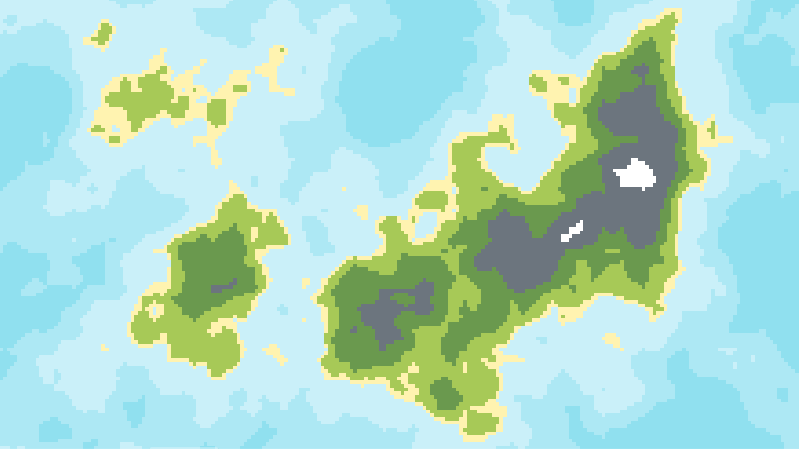
2D Procedural Terrain (Can be pixelart)

Procedurally generates some 2D terrain with different biomes. The colours of biomes, number of biomes, and thresholds are all easy to edit, so this shader is easy to use and change for your own needs. If you don’t want the shader to be pixelart, just set the pixel_amount at a very high number. How to use:
Create a Sprite2D node, and make it a square. Assign it’s texture as a NoiseTexture2D, deselect normalise and generate_mipmaps (they mess up offsetting), and assign a noise to the NoiseTexture2D (I used perlin).
Now, set the Sprite2D’s material to a ShaderMaterial, and make a shader. Paste this shader in.
Plar around. You can easily edit the colours and thresholds for each biome from the editor, and although changing the number of biomes is a bit more complex, it’s still very easy if you know basic shaders (add or remove the if statements).
That’s it. This is my first shader so thanks for checking it out.
Shader code
shader_type canvas_item;

uniform int pixel_amount = 1400;

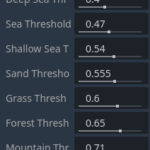
uniform float deepSeaThreshold : hint_range(0.0, 1.0) = 0.4;
uniform float seaThreshold : hint_range(0.0, 1.0) = 0.47;
uniform float shallowSeaThreshold : hint_range(0.0, 1.0) = 0.54;
uniform float sandThreshold : hint_range(0.0, 1.0) = 0.555;
uniform float grassThreshold : hint_range(0.0, 1.0) = 0.6;
uniform float forestThreshold : hint_range(0.0, 1.0) = 0.65;
uniform float mountainThreshold : hint_range(0.0, 1.0) = 0.71;
uniform float snowThreshold : hint_range(0.0, 1.0) = 0.9;

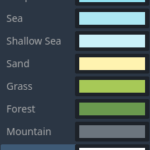
uniform vec4 DEEP_SEA : source_color = vec4(0.5647, 0.8784, 0.9373, 1);
uniform vec4 SEA : source_color = vec4(0.678, 0.910, 0.957, 1.0);
uniform vec4 SHALLOW_SEA : source_color = vec4(0.792, 0.941, 0.976, 1.0);
uniform vec4 SAND : source_color = vec4(1.0, 0.953, 0.690, 1.0);
uniform vec4 GRASS : source_color = vec4(0.654, 0.788, 0.341, 1.0);
uniform vec4 FOREST : source_color = vec4(0.416, 0.600, 0.306, 1.0);
uniform vec4 MOUNTAIN : source_color = vec4(0.424, 0.459, 0.493, 1.0);
uniform vec4 SNOW : source_color = vec4(1.0, 1.0, 1.0, 1.0);

void vertex() {
}

void fragment() {
	vec2 grid_uv = round(UV * float(pixel_amount)) / float(pixel_amount);
	vec4 c = texture(TEXTURE, grid_uv);
	COLOR = vec4(1.0f);
	if(c.r < deepSeaThreshold) {
	COLOR = DEEP_SEA ;
	}
	else if(c.r < seaThreshold) {
	COLOR = SEA ;
	}
	else if(c.r < shallowSeaThreshold) {
	COLOR = SHALLOW_SEA ;
	}
	else if(c.r < sandThreshold) {
	COLOR = SAND ;
	}
	else if(c.r < grassThreshold) {
	COLOR = GRASS ;
	}
	else if(c.r < forestThreshold) {
	COLOR = FOREST ;
	}
	else if(c.r < mountainThreshold) {
	COLOR = MOUNTAIN ;
	}
	else if(c.r < snowThreshold) {
	COLOR = SNOW ;
	}
}
Live Preview

If you liked it, drop a comment!
For 2d shaders the texture should be canvas texture I’m pretty sure? You’d use
uniform sampler2D noise;and replacingTEXTUREwithnoiseis the way I see the docs showing how to get noise into a shader. Doing that and assigning NoiseTexture2D to it, and in that texture setting Noise to FastNoiseLite got it working for me thoughDoing this would also help with getting a proper Live Preview.