
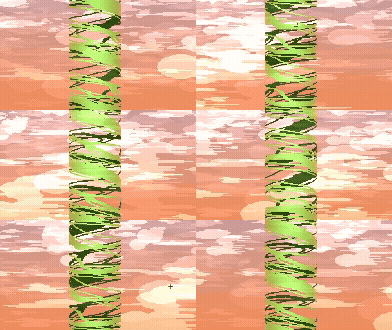
3D faker cylinder spin

This shader was an attempt to recreate a fake 3D cylinder effect. I noticed a similar effect in Deltarune and decided to recreate it in a CanvasItem shader for Godot.
Parameters
-
Spin Speed — Controls how fast the cylinder rotates.
-
Manual Rotation — Lets you set the rotation manually instead of using time.
-
Repeat Count — Controls how many times the texture wraps around the cylinder.
-
Curvature — Adjusts how rounded or flat the cylinder appears.
-
Shading Strength — Darkens the edges to create the illusion of depth.
-
Shadow Color — Defines the color used for edge shading.
-
Highlight Strength — Adds a subtle fake specular highlight to the center.
-
Cull Back Face — Hides the back side of the cylinder.
-
Show Back Through Transparency — Renders the back side wherever the front texture is transparent.
-
Back Darken — Controls how dark the back side appears.
How it works
The shader maps the sprite onto a virtual cylinder using trigonometry (asin, cos, and TAU). It then simulates depth with edge shading, a central highlight, optional back-face culling, and the ability to render the back side through transparent pixels, creating the illusion of a rotating 3D cylinder while remaining entirely 2D.
Shader code
shader_type canvas_item;

// ===========================================================
// FAKE 3D CYLINDER (2D) - Horizontal Rotation
// Apply this shader to a Sprite2D / TextureRect with the
// texture you want to wrap around the cylinder.
// ===========================================================

// Rotation speed (positive = one direction, negative = the other)
uniform float spin_speed : hint_range(-5.0, 5.0) = 1.0;

// Allows manual rotation control instead of using time.
// If "use_manual_rotation" is true, uses "manual_rotation"
// (0.0 to 1.0 = one full revolution)
uniform bool use_manual_rotation = false;
uniform float manual_rotation : hint_range(0.0, 1.0) = 0.0;

// How many times the texture wraps around the cylinder
// (1 = the entire image makes one full revolution)
uniform float repeat_count : hint_range(0.1, 10.0) = 1.0;

// How "thick" the cylinder appears (curvature).
// 1.0 = fully curved, 0.0 = almost flat
uniform float curvature : hint_range(0.0, 1.0) = 1.0;

// Side shading (darkens the edges to add volume)
uniform float shading_strength : hint_range(0.0, 1.0) = 0.4;
uniform vec4 shadow_color : source_color = vec4(0.0, 0.0, 0.0, 1.0);

// Fake specular highlight in the center
uniform float highlight_strength : hint_range(0.0, 1.0) = 0.15;

// If true, hides the back side of the cylinder.
// Useful when the texture shouldn't wrap around
// (e.g. a logo only visible on the front)
uniform bool cull_back_face = false;

// --- Back side visible through transparent pixels ---
// Wherever the front of the sprite is transparent,
// the back side of the cylinder is rendered instead.
uniform bool show_back_through_transparency = true;
uniform float back_darken : hint_range(0.0, 1.0) = 0.7; // 0 = unchanged, 1 = almost black

void fragment() {
    // UV ranges from 0.0 to 1.0.
    // Convert X into the -1.0 to 1.0 range.
    float x = UV.x * 2.0 - 1.0;

    // Current rotation angle (in radians, one full revolution = TAU)
    float rotation;
    if (use_manual_rotation) {
        rotation = manual_rotation * TAU;
    } else {
        rotation = TIME * spin_speed;
    }

    // X represents the horizontal position on screen.
    // Convert it into an angle on the cylinder using asin(),
    // which creates the curved appearance by compressing the edges.
    float clamped_x = clamp(x, -0.999, 0.999);
    float base_angle = asin(clamped_x * curvature);
    float angle_on_cylinder = base_angle + rotation * repeat_count;

    // Convert the angle back into a wrapped U coordinate.
    float new_u = fract(angle_on_cylinder / TAU);

    // Surface depth (used for shading and optional back-face culling)
    float z = cos(base_angle);

    // Optionally discard the back side of the cylinder.
    if (cull_back_face) {
        float front_angle = mod(angle_on_cylinder, TAU);
        if (front_angle > PI * 0.5 && front_angle < PI * 1.5) {
            discard;
        }
    }

    vec2 final_uv = vec2(new_u, UV.y);
    vec4 tex_color = texture(TEXTURE, final_uv);

    // --- Volume shading (darkens the sides) ---
    float shade = mix(1.0 - shading_strength, 1.0, z);
    tex_color.rgb = mix(shadow_color.rgb, tex_color.rgb, shade);

    // --- Fake specular highlight ---
    float highlight = pow(max(z, 0.0), 4.0) * highlight_strength;
    tex_color.rgb += vec3(highlight);

    // --- Render the back side where the front is transparent ---
    if (show_back_through_transparency && tex_color.a < 1.0) {

        // Angle of the equivalent point on the opposite side
        // of the cylinder.
        float back_angle_on_cylinder = (PI - base_angle) + rotation * repeat_count;
        float back_u = fract(back_angle_on_cylinder / TAU);

        vec2 back_uv = vec2(back_u, UV.y);
        vec4 back_color = texture(TEXTURE, back_uv);

        // Darken the back side to make it feel internal/hidden.
        back_color.rgb *= (1.0 - back_darken);

        // Blend depending on the front alpha.
        tex_color.rgb = mix(back_color.rgb, tex_color.rgb, tex_color.a);
        tex_color.a = max(tex_color.a, back_color.a);
    }

    COLOR = tex_color;
}
Really cool psuedo 3d effect: alongside the aforementioned use of this in Deltarune, I recall seeing this same kind of effect show in a lot of Genesis and SNES titles (one that comes to mind off the top of my head is Mickey Mania) and this does a really good job at replicating that look! Good stuff!