
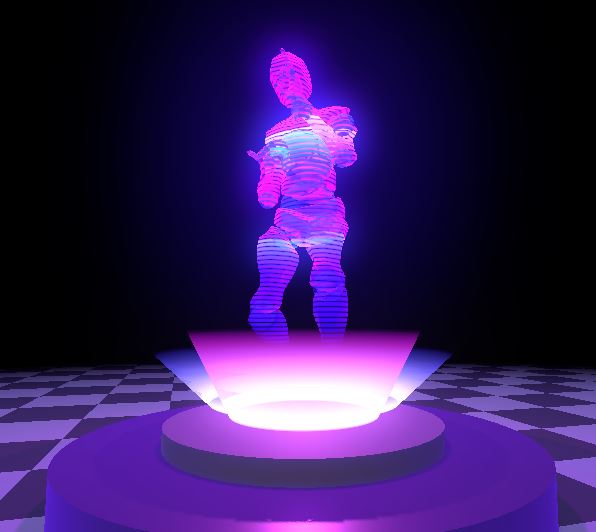
3D Hologram Shader

A simple 3D hologram Shader
works for static and animated objects
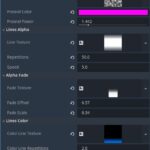
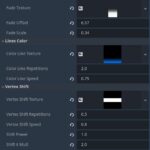
the screen shoots show the params that I used to achieve the cover image
CC0
Enjoy !
Shader code
shader_type spatial;

uniform float Emission_Power = 1.0;
uniform vec3 Color:source_color;

group_uniforms Fresnel;
uniform sampler2D Fresnel_Noise_Texture:source_color;
uniform vec3 Fresnel_Color : source_color;
uniform float Fresnel_Power : hint_range(0.1, 10.0) = 3.0;

group_uniforms Lines_Alpha;
uniform sampler2D Line_Texture:source_color;
uniform float Repetitions = 2.0;
uniform float Speed = 1.0;

group_uniforms Alpha_Fade;
uniform sampler2D Fade_Texture:source_color;
uniform float Fade_Offset = 0.0;
uniform float Fade_Scale = 1.0;

group_uniforms Lines_Color;
uniform sampler2D Color_Line_Texture:source_color;
uniform float Color_Line_Repetitions = 2.0;
uniform float Color_Line_Speed = 1.0;

group_uniforms Vertex_Shift;
uniform sampler2D Vertex_Shift_Texture:source_color;
uniform float Vertex_Shift_Repetitions = 2.0;
uniform float Vertex_Shift_Speed = 1.0;
uniform float Shift_Power = 0.2;
uniform float Shift_X_Mult = 1.0;
uniform float Shift_Z_Mult = 1.0;


varying vec3 Wave_WorldCoords;
void vertex() {

	Wave_WorldCoords = (MODEL_MATRIX * vec4(VERTEX, 1.0)).xyz;

	vec2 uv = UV;
	uv.y = Wave_WorldCoords.y;
	uv.y = fract(uv.y * Vertex_Shift_Repetitions);
	uv.y += fract(TIME * -Vertex_Shift_Speed);
	float shift = texture(Vertex_Shift_Texture, uv).r * Shift_Power;

	VERTEX.x += shift * Shift_X_Mult;
	VERTEX.z += shift * Shift_Z_Mult;

}

void fragment() {
	float Fresnel = pow(1.0 - dot(NORMAL, VIEW), Fresnel_Power);
	float Noise_Value = texture(Fresnel_Noise_Texture,UV).r;
	float Noise_Fresnel = Fresnel * Noise_Value;

	vec3 Final_Color = mix(Color,Fresnel_Color,Noise_Fresnel);


	vec2 uv = UV;
	uv.y = Wave_WorldCoords.y;
	uv.y = fract(uv.y * Repetitions);
	uv.y += fract(TIME * -Speed);
	float Line_Alpha = texture(Line_Texture,uv).a;


	vec2 uv2 = UV;
	uv2.y = Wave_WorldCoords.y;
	uv2.y = fract(uv2.y * Color_Line_Repetitions);
	uv2.y += fract(TIME * -Color_Line_Speed);
	vec3 Line_Color = texture(Color_Line_Texture,uv2).rgb;

	Final_Color += Line_Color;


	vec2 uv3 = UV;
	uv3.y = (Wave_WorldCoords.y + Fade_Offset) * Fade_Scale;
	float Fade_Value = texture(Fade_Texture,uv3).a;

	ALBEDO = Final_Color;
	EMISSION = Final_Color * Emission_Power;
	ALPHA = Line_Alpha * Fade_Value;

}
Live Preview

This is an awesome shader. Thanks for sharing. I made some improvements including making the vertex shifts based on the size of the model, cleaning up the shader, fixing depth, and making the vertex shifts more customizable.
shader_type spatial;
render_mode depth_draw_always;
uniform float emission_power = 1.0;
uniform vec3 color : source_color;
group_uniforms fresnel;
uniform sampler2D fresnel_noise_texture : source_color;
uniform vec3 fresnel_color : source_color;
uniform float fresnel_power : hint_range(0.0, 10.0) = 3.0;
group_uniforms lines_alpha;
uniform sampler2D line_texture : source_color;
uniform float repetitions = 2.0;
uniform float speed = 1.0;
group_uniforms alpha_fade;
uniform sampler2D fade_texture : source_color;
uniform float fade_offset = 0.0;
uniform float fade_scale = 1.0;
group_uniforms lines_color;
uniform sampler2D color_line_texture : source_color;
uniform float color_line_repetitions = 2.0;
uniform float color_line_speed = 1.0;
group_uniforms vertex_shift;
uniform sampler2D vertex_shift_texture : source_color;
uniform float vertex_shift_repetitions = 2.0;
uniform float vertex_shift_speed = 1.0;
uniform vec3 shift_power = vec3(0.2, 0.0, 0.2);
varying vec3 wave_world_coords;
void vertex() {
wave_world_coords = (MODEL_MATRIX * vec4(VERTEX, 1.0)).xyz;
vec2 uv = UV;
uv.y = wave_world_coords.y;
uv.y = fract(uv.y * vertex_shift_repetitions);
uv.y += fract(TIME * -vertex_shift_speed);
vec3 shift = texture(vertex_shift_texture, uv).rgb * shift_power;
vec3 model_scale = vec3(
length(MODEL_MATRIX[0].xyz),
length(MODEL_MATRIX[1].xyz),
length(MODEL_MATRIX[2].xyz)
);
shift /= model_scale;
VERTEX += shift;
}
void fragment() {
float fresnel = pow(1.0 – dot(NORMAL, VIEW), fresnel_power);
float noise_value = texture(fresnel_noise_texture, UV).r;
float noise_fresnel = fresnel * noise_value;
vec3 final_color = mix(color, fresnel_color, noise_fresnel);
vec2 uv = UV;
uv.y = wave_world_coords.y;
uv.y = fract(uv.y * repetitions);
uv.y += fract(TIME * -speed);
float line_alpha = texture(line_texture, uv).a;
vec2 uv2 = UV;
uv2.y = wave_world_coords.y;
uv2.y = fract(uv2.y * color_line_repetitions);
uv2.y += fract(TIME * -color_line_speed);
vec3 line_color = texture(color_line_texture, uv2).rgb;
final_color += line_color;
vec2 uv3 = UV;
uv3.y = (wave_world_coords.y + fade_offset) * fade_scale;
float fade_value = texture(fade_texture, uv3).a;
ALBEDO = final_color;
EMISSION = final_color * emission_power;
ALPHA = line_alpha * fade_value;
}