

border-radius or corner-radius for an image

youtube demo: here
power by deepseek . allowing the use of a Panel as the parent of a TextureRect ensures that the Panel’s corner radius is perfectly aligned with the border radius in the TextureRect’s shader code. just do go too much ^_^
base on :
– set corner radius for texture
intro to shaders: Godot Shaders : An Introduction
godot 3.6 doc: your_first_2d_shader
Shader code
shader_type canvas_item;

uniform vec2 size 		= vec2(90.0, 90.0);
uniform float top 		= 0.0;
uniform float right 	= 0.0;
uniform float bottom 	= 0.0;
uniform float left 		= 0.0;

bool isOut(float x, float y, float corner_scale) {
    // Optimized circle distance check
    return (x * x + y * y) > (corner_scale * corner_scale);
}

bool isTopLeft(vec2 uv, float radius) {
    if (radius <= 0.0) return false;
    vec2 corner_pos = vec2(radius, radius);
    vec2 dist = uv * size - corner_pos;
    return all(lessThan(uv * size, corner_pos)) && isOut(dist.x, dist.y, radius);
}

bool isTopRight(vec2 uv, float radius) {
    if (radius <= 0.0) return false;
    vec2 corner_pos = vec2(size.x - radius, radius);
    vec2 dist = uv * size - corner_pos;
    return (uv.x * size.x > corner_pos.x && uv.y * size.y < corner_pos.y) && isOut(dist.x, dist.y, radius);
}

bool isBottomRight(vec2 uv, float radius) {
    if (radius <= 0.0) return false;
    vec2 corner_pos = vec2(size.x - radius, size.y - radius);
    vec2 dist = uv * size - corner_pos;
    return all(greaterThan(uv * size, corner_pos)) && isOut(dist.x, dist.y, radius);
}

bool isBottomLeft(vec2 uv, float radius) {
    if (radius <= 0.0) return false;
    vec2 corner_pos = vec2(radius, size.y - radius);
    vec2 dist = uv * size - corner_pos;
    return (uv.x * size.x < corner_pos.x && uv.y * size.y > corner_pos.y) && isOut(dist.x, dist.y, radius);
}

void fragment() {
    // Convert UV coordinates to pixel coordinates
    vec2 pixel_uv = UV * size;

    // Check each corner with individual radius values
    bool discard_pixel =
        isTopLeft(UV, top) ||
        isTopRight(UV, right) ||
        isBottomRight(UV, bottom) ||
        isBottomLeft(UV, left);

    if (discard_pixel) {
        COLOR.a = 0.0;
    } else {
        COLOR = texture(TEXTURE, UV);
    }

}
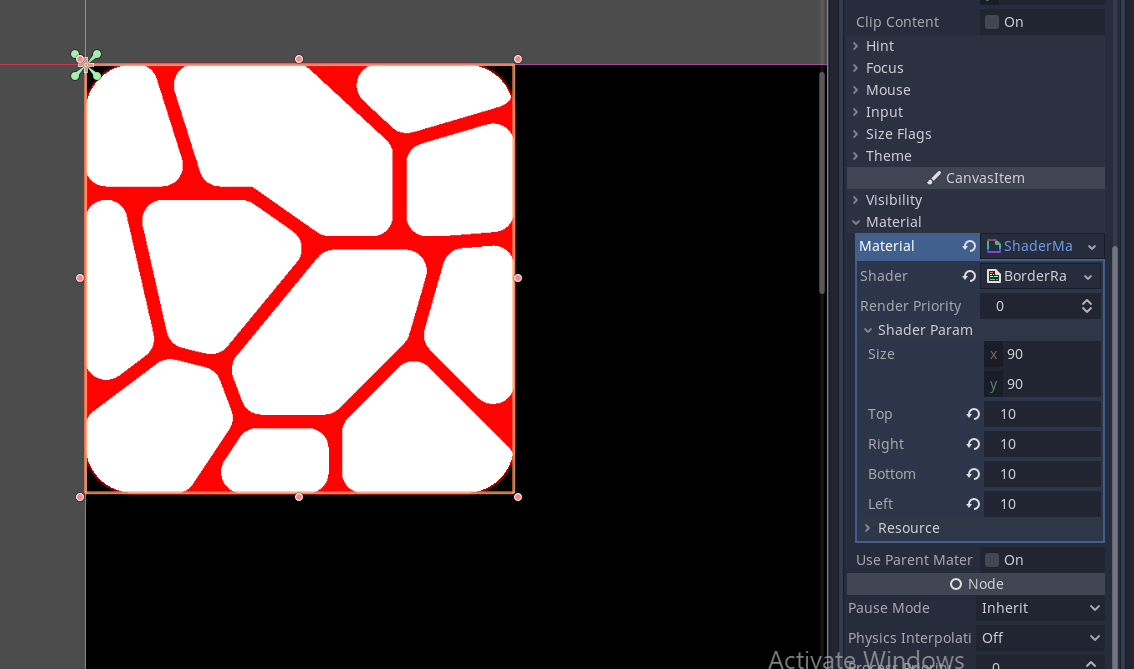
Live Preview

Comments 1
Sometimes the corners might not align. First, make sure that the border-radius values in the
TextureRectshader code are the same as in thePanel. Also, ensure that both have the same size. Finally, try adjusting the size values if needed.For example, my
TextureRecthas a size of(90, 90)withvec4(90, 0, 0, 0), and thePaneluses the same values. However, the panel’s top corner was slightly off, so I adjusted the size in the shader to(100, 100), and it aligned perfectly.