
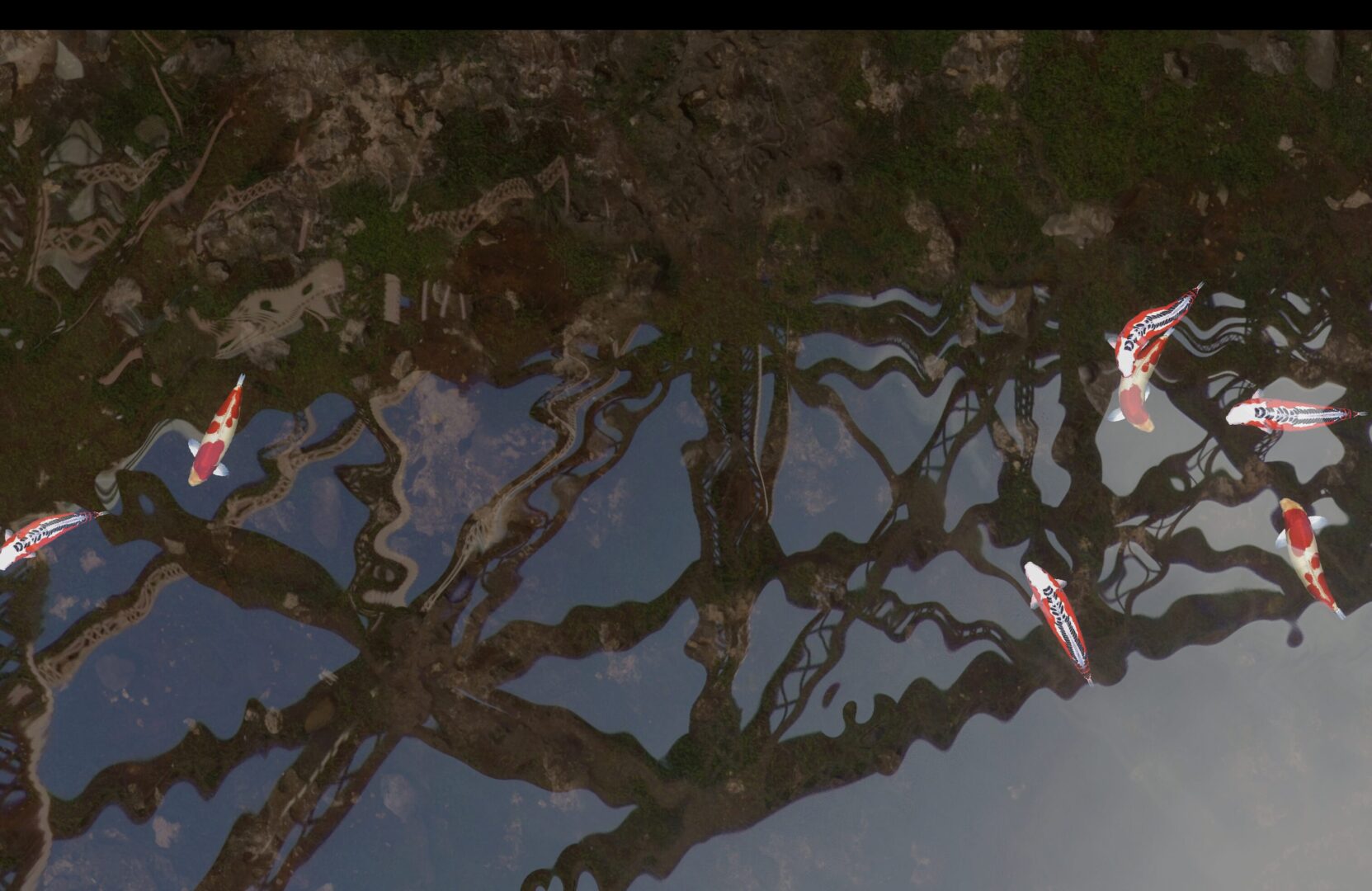
Cubemap Reflective Water Surface

Hey guys,
A reflective water shader that I modified and used for my own project:
The original idea was to create a shader that by inputing an HDRI could simulate some sort of natural water with reflection and lighting physics that looks like real water but in 2d.
In the end I found that it works better with cubemap than HDRI, that was originally supported in godot.
After some optimization. now it could run 120fps on my old m1 macbook laptop(not owning a windows laptop these days is really a headache sometimes, but talking about the quality of windows11 today…).
iChannel0 would be your screen texture you can put anything under the shader, then it will look like under the water surface.
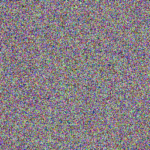
iChannel1 need to be an rgb noise(if you dont have it you can use the third pic in the screenshots, or you can generate one yourself)
iChannel2 is where you put your cubemap(If you don’t have any on hand, you can download one from here:
https://www.humus.name/index.php?page=Textures&start=0
this guy has a lot cool stuff on his website :)
BTW:
This shader only runs well in Forward+!!(DEMO project below since it’s rendered on web it’s in compatible mode so the reflection was a bit broken)
Here’s my project:
Tranquil Koi: https://store.steampowered.com/app/3184080/Tranquil_Koi/
Original shader:
https://www.shadertoy.com/view/ldB3Wd
Shader code
shader_type canvas_item;

// Uniforms - External parameters
uniform sampler2D iChannel0 : hint_screen_texture, repeat_disable, filter_nearest; // Screen texture
uniform sampler2D iChannel1; // Animation texture (contains position, time offset, speed parameters)
uniform samplerCube iChannel2; // Cubemap for reflection
uniform vec4 tint_color : source_color; // Tint color

// ========== Utility Functions ==========

// Bias function - Adjusts curve offset
float bias(float x, float b) {
    return x / ((1.0 / b - 2.0) * (1.0 - x) + 1.0);
}

// Gain function - Adjusts curve gain
float gain(float x, float g) {
    float t = (1.0 / g - 2.0) * (1.0 - (2.0 * x));
    return x < 0.5 ? (x / (t + 1.0)) : (t - x) / (t - 1.0);
}

// Degamma correction - Convert from linear to sRGB space
vec3 degamma(vec3 c) {
    return pow(c, vec3(2.2));
}

// Gamma correction - Convert from sRGB to linear space
vec3 gamma(vec3 c) {
    return pow(c, vec3(1.0 / 1.5));
}

// Grid division count
#define DIVS 4

void fragment() {
    // Calculate UV coordinates (flip Y-axis and correct aspect ratio)
    vec2 uv = SCREEN_UV;
    uv.y = 1.0 - uv.y;
    uv.x *= (1.0 / SCREEN_PIXEL_SIZE).x / (1.0 / SCREEN_PIXEL_SIZE).y;

    float h = 0.0; // Water surface height
    float time = TIME; // Current time

    // Iterate through all wave source points
    for (int iy = 0; iy < DIVS; iy++) {
        for (int ix = 0; ix < DIVS * 2; ix++) {
            // Read wave source parameters from animation texture
            vec4 t = texture(iChannel1, vec2(float(ix), float(iy)) * (4.0 / 256.0), 100.0);

            // Calculate wave source position (with animation offset)
            vec2 p = vec2(float(ix), float(iy)) * (1.0 / float(DIVS - 1));
            p += (0.75 / float(DIVS - 1)) * (t.xy * 2.0 - 1.0);

            // Calculate distance to current pixel
            vec2 v = uv - p;
            float d = dot(v, v);
            d = pow(d, 0.7);

            // Wave propagation calculation
            float life = 10.0; // Wave lifecycle
            float n = time * 2.0 * (t.w + 0.05) - t.z * 10.0; // Normalized time
            n *= 0.01 + t.w; // Apply speed factor
            n = mod(n, life * 0.5 + t.z * 3.0 + 2.0); // Loop time

            float x = d * 99.0; // Scaled distance
            float T = x < (2.0 * PI * n) ? 1.0 : 0.0; // Wave front threshold
            float e = max(1.0 - (n / life), 0.0); // Decay factor
            float F = e * x / (2.0 * PI * n); // Amplitude

            // Sine wave calculation
            float s = sin(x - (2.0 * PI * n) - PI * 0.5);
            s = s * 0.5 + 0.5;
            s = bias(s, 0.5);

            // Accumulate wave height
            s = (F * s) / (x + 1.1) * T;
            h += s * 100.0 * (0.5 + t.w);
        }
    }

    // Calculate water surface normal (for reflection and refraction)
    vec3 n = vec3(dFdx(h), 15.0, dFdy(h));
    n = normalize(n);

    // Calculate view vector
    vec3 e = normalize(vec3(-uv.y * 1.0 + 1.0, 1.0, uv.x * 1.0 - 1.0));

    // Calculate reflection vector and reflection color
    vec3 rv = reflect(-e, n);
    vec3 reflect_color = degamma(texture(iChannel2, rv).xyz);

    // Calculate refraction vector and LOD level
    vec3 fn = refract(vec3(0.0, 1.0, 0.0), n, 2.5);
    float lod = length(fn.xz) * 10.0;

    // Apply refraction and sample background
    vec3 c = degamma(textureLod(iChannel0, SCREEN_UV + fn.xz * 0.05, lod).xyz);

    // Mix reflection and refraction based on water height
    c *= 1.0 - h * 0.0125;
    c += reflect_color * 0.2;

    // Apply lighting
    vec3 L = normalize(vec3(1.0, 1.0, 1.0));
    float dl = max(dot(n, L), 0.0) * 0.7 + 0.3;
    c *= dl;

    // Apply gamma correction and output
    c = gamma(c);
    COLOR = vec4(c, 1.0);
}
Live Preview

Hey, great shader! By the way, here is a cubemap generator from hdri. Good job!