
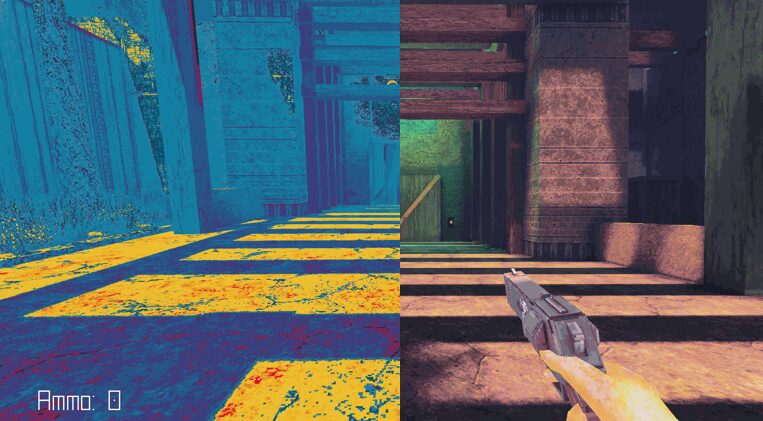
False Color Shader

False Color shader for Godot 4 that visualizes scene luminance as color-coded exposure levels.
This shader samples the final screen image, calculates accurate luminance using perceptual weights, and remaps brightness values to distinct colors. It helps identify overexposed areas, clipping, crushed shadows, and midtone balance instantly.
Useful for:
-
Lighting and exposure debugging
-
Preventing blown highlights and lost shadow detail
-
Achieving consistent visuals across different displays
Designed as a fullscreen CanvasItem shader, easy to toggle during runtime.
No guesswork — see actual brightness values instead of relying on your monitor.
How to use
Add this script to ColorRect Node:
extends ColorRect
func _ready():
visible = false
func _input(event):
if event is InputEventKey and event.pressed and event.keycode == KEY_X:
visible = !visible
Steps:
-
Create overlay
-
Add
ColorRectnode -
Set anchors to full screen (Layout → Full Rect)
-
Assign shader
-
Create
ShaderMaterial -
Paste shader code
-
Assign material to
ColorRect
-
Run scene
-
You will see false color overlay
-
Toggle on/off (optional)
-
Attach script to
ColorRect -
Use your key (e.g. X) to show/hide
How to read it:
#FFFFFF (white) — fully blown out
#FFCCCC (light red)
#FF0000 (red) — clipping
#FF8000 (orange)
#FFCC00 (yellow-orange)
#FFFF00 (yellow) — bright
#CCFF00 (yellow-green)
#80FF00 (lime)
#33FF33 (light green)
#00FF00 (green) — lower midtones
#4D4D4D (gray) — mid range
#33CCCC (light cyan)
#00CCFF (cyan)
#0080FF (light blue)
#0033FF (blue)
#0000FF (deep blue) — shadows
#4D00CC (violet)
#800099 (purple)
#33004D (dark purple)
#0D001A (near black) — crushed shadows
How to use it:
-
Turn it ON
-
Look for:
-
too much red/white → reduce light
-
too much blue/purple → increase light
-
-
Aim for balanced distribution (some gray, controlled highlights)
-
Turn it OFF and check final look
Shader code
shader_type canvas_item;

uniform sampler2D screen_texture : hint_screen_texture;

void fragment() {
    vec3 rgb = texture(screen_texture, SCREEN_UV).rgb;
    float lum = dot(rgb, vec3(0.2126, 0.7152, 0.0722));

    vec3 c;

    if (lum > 0.95)      c = vec3(1.0);                // white
    else if (lum > 0.90) c = vec3(1.0, 0.8, 0.8);      // light red
    else if (lum > 0.85) c = vec3(1.0, 0.0, 0.0);      // red
    else if (lum > 0.80) c = vec3(1.0, 0.5, 0.0);      // orange
    else if (lum > 0.75) c = vec3(1.0, 0.8, 0.0);      // yellow-orange
    else if (lum > 0.70) c = vec3(1.0, 1.0, 0.0);      // yellow
    else if (lum > 0.65) c = vec3(0.8, 1.0, 0.0);      // yellow-green
    else if (lum > 0.60) c = vec3(0.5, 1.0, 0.0);      // lime
    else if (lum > 0.55) c = vec3(0.2, 1.0, 0.2);      // green light
    else if (lum > 0.50) c = vec3(0.0, 1.0, 0.0);      // green
    else if (lum > 0.45) c = vec3(0.3);                // mid gray
    else if (lum > 0.40) c = vec3(0.2, 0.8, 0.8);      // cyan light
    else if (lum > 0.35) c = vec3(0.0, 0.8, 1.0);      // cyan
    else if (lum > 0.30) c = vec3(0.0, 0.5, 1.0);      // blue light
    else if (lum > 0.25) c = vec3(0.0, 0.2, 1.0);      // blue
    else if (lum > 0.20) c = vec3(0.0, 0.0, 1.0);      // deep blue
    else if (lum > 0.15) c = vec3(0.3, 0.0, 0.8);      // violet
    else if (lum > 0.10) c = vec3(0.5, 0.0, 0.6);      // purple
    else if (lum > 0.05) c = vec3(0.2, 0.0, 0.3);      // dark purple
    else                 c = vec3(0.05, 0.0, 0.1);     // near black

    COLOR = vec4(c, 1.0);
}
Live Preview

Can I play your game? What’s the name?
Unfortunately, Not yet. Work in progress.
We don’t have enough debug shaders. Great upload.