
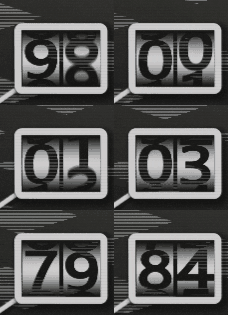
Fancy Number Counter!!!

apply to color rect and stuff
use gds to control how blur when you are moving those number
uniform sampler2D text1 : repeat_enable;
this texture i can not provide here, it is a picture with 0 ~ 9 verticaly in it, should space evenly (every number take the same amount of space, even the last one, just like a spritesheet)
Shader code
shader_type canvas_item;
uniform sampler2D text1 : repeat_enable;
uniform float num = 0;
uniform float motion_blur = 0.0;
void fragment() {
	vec2 uv = UV;
	uv.y = UV.y * 0.2 + (num * 0.5 - 0.25) * 0.2;
	float disttyedge = 1.0 - abs(UV.y - 0.5);
	//uv.y += pow((UV.y - 0.5), 1.0) * step(0.5, UV.y) * 0.05;
	//uv.y -= pow((0.5 - UV.y), 1.0) * step(UV.y, 0.5) * 0.05;
	uv.y += cos((UV.y) * PI) * 0.025;
	vec4 samsam = texture(text1, uv);
	// motion blur
	samsam *= 0.1;
	for(int i=0;i<9;i++){
		samsam += 0.1 * texture(text1, uv + vec2(0.0, float(i-4)*0.005*motion_blur));
	}
	//
	samsam.rgb = vec3(1.0 - samsam.a);
	samsam.a = 1.0 - samsam.a;
	// fade color
	float fade = smoothstep(0.4, 1.0, disttyedge);
	samsam.rgb *= fade;

	COLOR *= samsam;
}
