
Hex Grid Transition Shader

Hex Grid Transition Shader
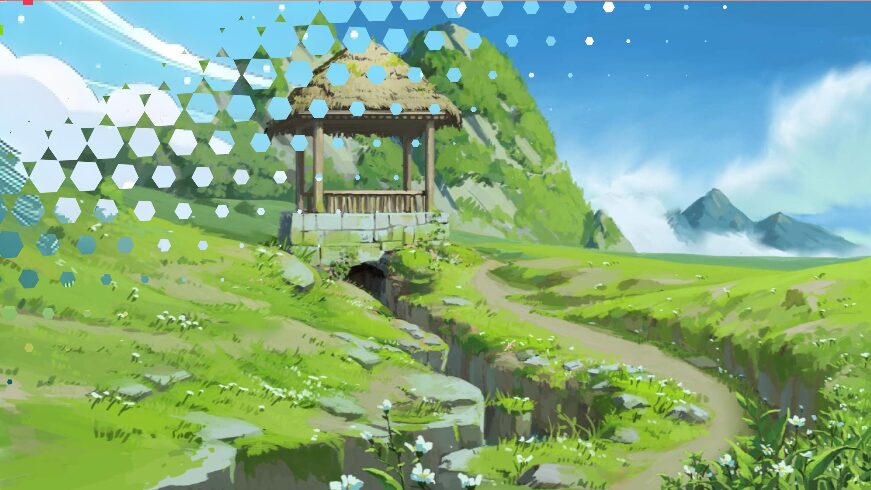
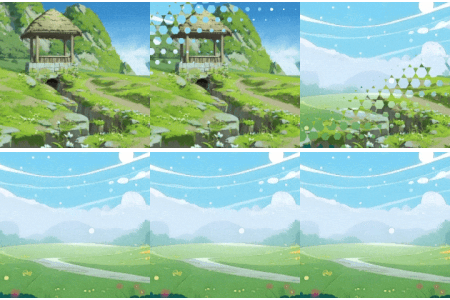
This shader creates a hexagonal tile–based transition between two textures.
It gradually reveals the new texture over the old one using hex-shaped tiles, producing a smooth and visually appealing scene swap.
Usage Notes:
-
Scene transitions: provide snapshots of the current scene and the target scene as
from_texandto_tex. -
The shader then animates the hex grid to reveal the new scene.
Parameters:
-
from_tex – Snapshot of the original scene/image
-
to_tex – Snapshot of the target scene/image
-
progress – Transition progress from 0.0 (show
from_tex) to 1.0 (showto_tex) -
hex_size – Size of the hex tiles
-
randomness – Variation in tile reveal timing
-
edge_softness – Smoothness of hex edges
-
transition_speed – Speed of the hex animation
Shader code
shader_type canvas_item;

// ========================
// 输入纹理
// ========================
uniform sampler2D from_tex;
uniform sampler2D to_tex;

// ========================
// 过渡控制
// ========================
uniform float progress : hint_range(0.0, 1.0) = 0.0;

// ========================
// 六边形参数
// ========================
uniform float hex_size : hint_range(0.01, 0.5) = 0.08; // 缩小尺寸,紧密排列
uniform float randomness = 0.05; // 低随机,保证规整
uniform float edge_softness = 0.01; // 锐利边缘,匹配目标
uniform float transition_speed = 0.3;

// ========================
// 工具函数
// ========================
float hash(vec2 p) {
    return fract(sin(dot(p, vec2(127.1, 311.7))) * 43758.5453123);
}

vec2 hextile(inout vec2 p) {
    const vec2 s = vec2(1.0, 1.7320508);
    const vec2 hs = s * 0.5;

    vec2 a = mod(p, s) - hs;
    vec2 b = mod(p - hs, s) - hs;

    vec2 c = dot(a, a) < dot(b, b) ? a : b;
    vec2 id = (c - p + hs) / s;

    p = c;
    return floor(id);
}

float hex(vec2 p, float r) {
    p = abs(p);
    return max(p.x * 0.866025 + p.y * 0.5, p.y) - r;
}


void fragment() {
    vec2 uv = UV;
    vec4 final_color = texture(from_tex, uv);

    if (progress > 0.0) {
        vec2 screen_size = vec2(1.0) / SCREEN_PIXEL_SIZE;
        vec2 p = uv - 0.5;
        float aspect = screen_size.x / screen_size.y;
        p.x *= aspect * 0.9;
        vec2 hp = p / hex_size;
        vec2 id = hextile(hp);

        float delay = (uv.x + uv.y) * 0.5;
        float hex_progress = progress >= 1.0 ? 1.0 : smoothstep(
            delay - transition_speed,
            delay + transition_speed,
            progress * (1.0 + transition_speed)
        );
        hex_progress = clamp(hex_progress, 0.0, 1.0);

        float r = hash(id);
        float t = progress >= 1.0 ? 1.0 : clamp(hex_progress - r * randomness, 0.0, 1.0);
        float h = hex(hp, t * 0.9);
        float mask = smoothstep(edge_softness, -edge_softness, h);
        mask = progress >= 1.0 ? 1.0 : mask;

        // 纹理混合
        vec3 from_col = texture(from_tex, uv).rgb;
        vec3 to_col = texture(to_tex, uv).rgb;
        vec3 col = mix(from_col, to_col, mask);

        final_color = vec4(col, 1.0);
    }

    if (progress >= 1.0) {
        final_color = texture(to_tex, uv);
    }

    COLOR = final_color;
}
Live Preview

不错, 感谢分享