
Highlight the Mouse Tile in an Hexagon Tile Map

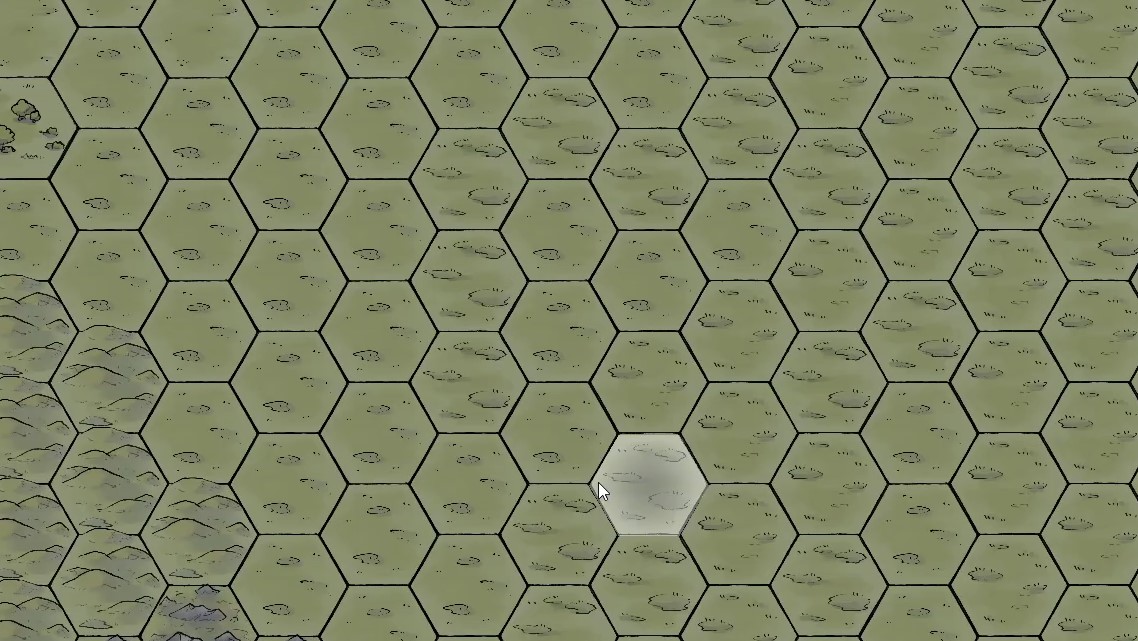
The shader in this example project will highlight a hexagon tile where the mouse is in a Godot TileMapLayer.
Features:
– Works for *irregular* hexagons (e.g. when height != width in Godot tilemap settings)
– Works for vertical offset, aka “flat top” layout
– Highlight the hexagon tile where the mouse pointer is
More details and demo project: Demo Project
Shader code
shader_type canvas_item;

// this should be set by outside script
uniform vec2 active_hex_center = vec2(0.0, 0.0);

// note this would be half the size in Godot settings
uniform vec2 hex_size = vec2(60.0, 50.0);
uniform vec2 grid_offset = vec2(0.0, 0.0);
varying vec2 frag_pos;


void vertex() {
	// Called for every vertex the material is visible on.
	frag_pos = (MODEL_MATRIX * vec4(VERTEX, 0.0, 1.0)).xy;
}

void fragment() {
	// Called for every pixel the material is visible on.
	// Flag to determine if the current fragment is within any hexagon
    float norm_length = max(hex_size.x, hex_size.y);
    // Use grid_offset if needed (for overall grid positioning)
    vec2 hex_center = active_hex_center + grid_offset;
    float c0 = 2.0 * hex_size.y;
    float c1 = c0 / hex_size.x * frag_pos.x;
    float c2 = c0 * hex_center.x / hex_size.x;
    bool insideHex = frag_pos.y < (hex_center.y + hex_size.y)
        && frag_pos.y > (hex_center.y - hex_size.y)
        && frag_pos.y > (c1 - c2 - c0 + hex_center.y)
        && frag_pos.y < (c1 - c2 + c0 + hex_center.y)
        && frag_pos.y > (c2 - c1 - c0 + hex_center.y)
        && frag_pos.y < (c2 - c1 + c0 + hex_center.y);
	vec4 texture_color = texture(TEXTURE, UV);

    // Discard fragments with low alpha
    if (texture_color.a < 0.1) {
        discard;
    }

    // Apply a fixed white highlight mix if inside any hex
    if (insideHex) {
        // more opaque in the center to highlight bounds
        float norm_dist = length(frag_pos - hex_center) / norm_length;
        float alpha = smoothstep(0.0, 1.0, norm_dist);
        COLOR = mix(texture_color, vec4(1.0, 1.0, 1.0, alpha), 0.4);
    } else {
        COLOR = texture_color;
    }
}