
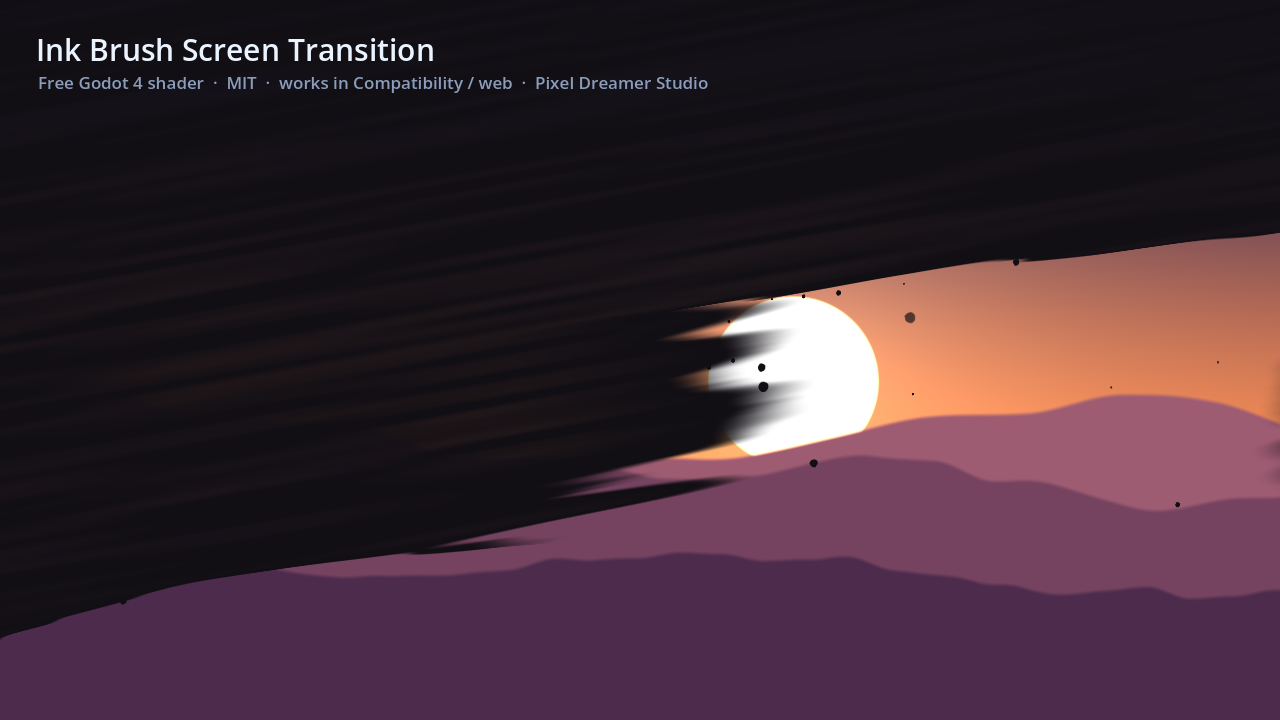
Ink Brush Screen Transition (procedural, no textures)

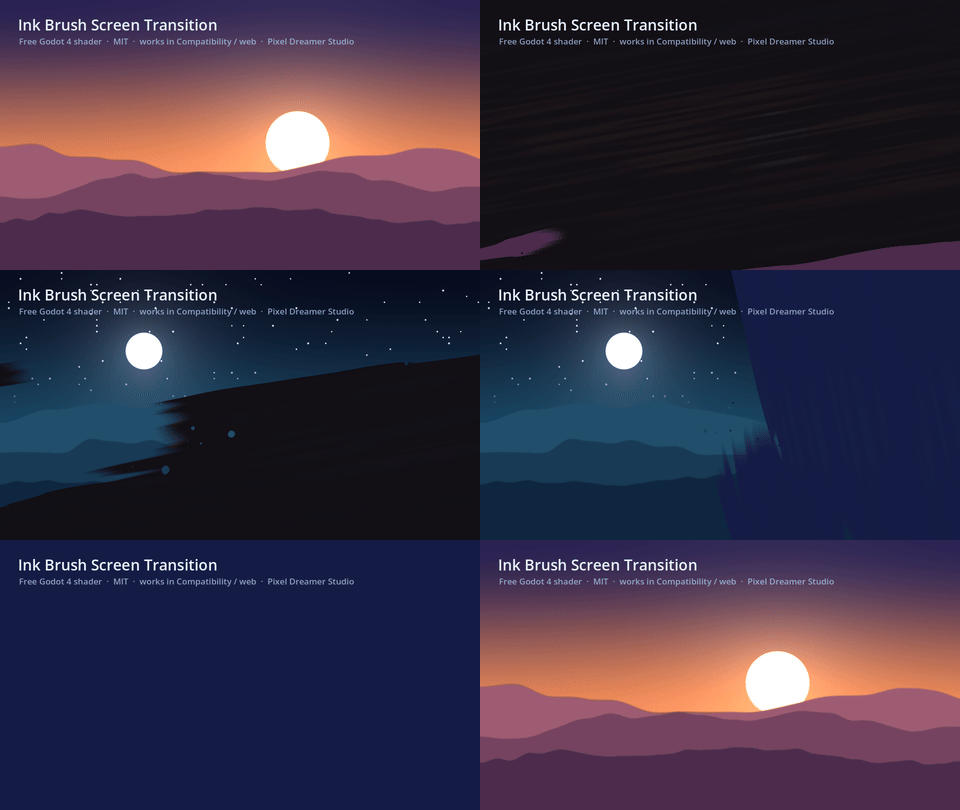
A screen transition painted with an ink brush, for Godot 4. Brush strokes sweep across the screen one after another until the whole screen is ink, then the same strokes wipe it away again. Each stroke has a rounded brush head, dry-brush streaks, rough bristly edges and a few ink drops. Fully procedural, no textures, and nothing depends on TIME.
One parameter (progress) drives it: 0 = nothing drawn, 1 = solid ink over the whole rect with no holes, so you can change the scene behind it. Turn on invert and the same strokes wipe the ink away instead (0 = solid ink, 1 = clear).
Tested by hand in Godot 4.7 with the Compatibility renderer, so it also works in web exports. Checked at 16:9 and 9:16, at several angles and with 1, 5 and 12 strokes: progress 0 leaves every pixel untouched and progress 1 covers every pixel.
How to use
- Add a CanvasLayer (above your game and UI) with a ColorRect set to Full Rect.
- Give the ColorRect a ShaderMaterial with this shader, and set Mouse > Filter to Ignore so it does not block clicks.
- Set rect_aspect to width / height of the rect (1.7778 for 16:9, 0.5625 for 9:16).
- Animate progress from 0 to 1, change the scene, then turn on invert and animate progress from 0 to 1 again.
Example (script on the CanvasLayer; make it an autoload scene so it survives the scene change):
@onready var ink: ShaderMaterial = $ColorRect.material

func change_scene(path: String) -> void:
	await _paint(false)
	get_tree().change_scene_to_file(path)
	await _paint(true)
	ink.set_shader_parameter("invert", false)
	ink.set_shader_parameter("progress", 0.0)

func _paint(wipe: bool) -> void:
	ink.set_shader_parameter("invert", wipe)
	var set_progress := func(v: float) -> void: ink.set_shader_parameter("progress", v)
	await create_tween().tween_method(set_progress, 0.0, 1.0, 0.7).finished
Parameters
- angle: stroke direction in degrees (0 = horizontal strokes, 90 = vertical).
- stroke_count: 1 to 12 strokes. 1 is a single big sweep.
- ink_color: any colour (black ink, indigo, white paint, red).
- dry_brush: how streaky the head and the edges of each stroke are.
- splatter: amount of ink drops (0 = none).
- wash: slightly see-through streaks inside the ink while it is being painted. It always ends fully solid.
- edge_softness, and seed (a different seed gives different strokes).
Code written with AI assistance, tested by hand in Godot 4.7.
If you want 8 ink brush scene transitions (one line of code each) and 12 ink looks for your whole game, that is PD Ink Wash (also part of our Godot 4 Ready Kit): https://pixeldreamerstd.gumroad.com/l/inkwash?utm_source=godotshaders
Shader code
// Ink Brush Screen Transition (2D, procedural) — Pixel Dreamer Studio · MIT
// canvas_item shader: put it on a full-screen ColorRect (on a CanvasLayer above your game) and tween `progress`.
// No textures needed. Brush strokes sweep across the screen one after another (zigzag), with a rounded
// brush head, dry-brush streaks, rough stroke edges, small ink drops and a faint streaky wash inside the ink.
// `progress`: 0 = nothing drawn · 1 = the whole rect is solid ink (no holes), so you can swap scenes behind it.
// `invert` = the same strokes wipe the ink away instead (0 = solid ink · 1 = clear), for the way back in.
// Works in the Compatibility renderer (web exports too). Nothing depends on TIME, so it is fully deterministic.
shader_type canvas_item;

uniform float progress : hint_range(0.0, 1.0) = 0.0;
uniform vec4 ink_color : source_color = vec4(0.045, 0.04, 0.055, 1.0);
uniform float angle : hint_range(-180.0, 180.0) = -10.0; // stroke direction, in degrees
uniform int stroke_count : hint_range(1, 12) = 5;
uniform float edge_softness : hint_range(0.0, 1.0) = 0.2;
uniform float dry_brush : hint_range(0.0, 1.0) = 0.6; // streaks at the head and along the edges of each stroke
uniform float splatter : hint_range(0.0, 1.0) = 0.5;
uniform float wash : hint_range(0.0, 1.0) = 0.4; // streaky, slightly see-through ink while it is being painted
uniform bool invert = false;
uniform float rect_aspect : hint_range(0.25, 4.0) = 1.7778; // rect width / height (keeps strokes and drops unstretched)
uniform float seed : hint_range(0.0, 100.0) = 0.0;

const float TAIL = 0.2; // part of the progress kept for streaks and edges to fill in
const float STAGGER = 0.5; // next stroke starts when the previous one is half way

float hash(vec2 p) {
	p = fract(p * vec2(123.34, 456.21));
	p += dot(p, p + 45.32);
	return fract(p.x * p.y);
}

float vnoise(vec2 p) {
	vec2 i = floor(p);
	vec2 f = fract(p);
	vec2 u = f * f * (3.0 - 2.0 * f);
	float a = hash(i);
	float b = hash(i + vec2(1.0, 0.0));
	float c = hash(i + vec2(0.0, 1.0));
	float d = hash(i + vec2(1.0, 1.0));
	return mix(mix(a, b, u.x), mix(c, d, u.x), u.y);
}

// When the ink reaches this point, as a value of `progress` (0..1).
// sl = (distance along the strokes in rect heights, position across the strokes in stroke widths)
float arrival(vec2 uv, out vec2 sl) {
	vec2 p = (uv - 0.5) * vec2(rect_aspect, 1.0);
	float a = radians(angle);
	vec2 dir = vec2(cos(a), sin(a));
	vec2 nor = vec2(-dir.y, dir.x);
	float hu = 0.5 * (rect_aspect * abs(dir.x) + abs(dir.y));
	float hv = 0.5 * (rect_aspect * abs(nor.x) + abs(nor.y));
	float su = dot(p, dir) / (2.0 * hu) + 0.5; // 0..1 along the strokes
	float sv = dot(p, nor) / (2.0 * hv) + 0.5; // 0..1 across the strokes
	float n = float(stroke_count);
	float lane = mix(0.1, n - 0.1, sv);
	float len = 2.0 * hu; // stroke length in rect heights (keeps streaks the same size at any angle)
	float lw = 2.0 * hv / n; // stroke width in rect heights
	sl = vec2(su * len, lane);
	float d = (1.0 - TAIL) / (1.0 + (n - 1.0) * STAGGER); // time one stroke takes
	float lag = min(0.5 * d, TAIL * 0.7);
	float t = 9.0;
	float k0 = floor(lane);
	for (int i = -1; i <= 1; i++) {
		float k = k0 + float(i);
		if (k < 0.0 || k > n - 0.5) {
			continue;
		}
		float ks = k * 17.31 + seed * 7.13;
		float x = su * len;
		float centre = k + 0.5 + 0.26 * (vnoise(vec2(x * 1.3 + ks, ks)) - 0.5);
		float half_w = 0.74 + 0.16 * vnoise(vec2(x * 2.2 + ks + 31.7, ks + 3.0));
		// bristles: thin lines running along the stroke (fast across it, slow along it)
		float across = lane * lw;
		float bristle = vnoise(vec2(x * 1.6 + ks, across * 55.0 + ks));
		float fine = vnoise(vec2(x * 5.0 + ks, across * 170.0 - ks));
		float streak = bristle * bristle * (0.7 + 0.3 * fine);
		float dv = abs(lane - centre) + 0.14 * dry_brush * (bristle * 0.7 + fine * 0.3 - 0.5); // rough, bristly edge
		float edge = clamp(dv / half_w, 0.0, 1.0);
		float along = mod(k, 2.0) < 0.5 ? su : 1.0 - su;
		// the brush runs dry toward the end of the stroke and near its edges
		float dry = dry_brush * streak * (0.25 + 0.75 * along) * (0.5 + 1.0 * edge * edge);
		float head = 0.07 * edge * edge; // rounded brush head: the middle leads
		float outside = max(dv - half_w, 0.0) * 2.0; // only a little ink creeps past the edge
		float tk = k * STAGGER * d + d * (along * 0.9 + head) + lag * min(dry, 1.0) + outside;
		t = min(t, tk);
	}
	return clamp(t, 0.0, 1.0);
}

// One layer of ink drops that land a little ahead of the brush.
float drops(vec2 uv, float cells, float pm, float soft, float layer_seed) {
	vec2 p = uv * vec2(rect_aspect, 1.0) * cells;
	vec2 cell = floor(p);
	vec2 f = fract(p);
	vec2 cs = cell + layer_seed + seed * 3.7;
	float h = hash(cs);
	if (h > splatter * 0.5) {
		return 0.0;
	}
	vec2 c = 0.25 + 0.5 * vec2(hash(cs + 1.7), hash(cs + 5.3));
	float h2 = hash(cs + 9.1);
	float r = 0.035 + 0.17 * h2 * h2 * h2;
	vec2 centre_uv = (cell + c) / (vec2(rect_aspect, 1.0) * cells);
	vec2 unused;
	float td = max(arrival(centre_uv, unused) - 0.01 - 0.035 * hash(cs + 2.9), 0.0);
	float grow = smoothstep(td - soft, td + soft, pm);
	vec2 dd = f - c;
	float rr = r * (1.0 + 0.25 * (vnoise(vec2(atan(dd.y, dd.x) * 1.6, h * 50.0)) - 0.5)); // slightly lumpy outline
	return (1.0 - smoothstep(rr * 0.7, rr, length(dd))) * grow;
}

void fragment() {
	float pr = clamp(progress, 0.0, 1.0);
	float soft = 0.002 + 0.03 * edge_softness;
	float pm = mix(-soft, 1.0 + soft, pr);
	vec2 sl;
	float t = arrival(UV, sl);
	float cover = smoothstep(t - soft, t + soft, pm);
	if (splatter > 0.001) {
		cover = max(cover, drops(UV, 9.0, pm, soft, 0.0));
		cover = max(cover, drops(UV, 21.0, pm, soft, 37.0));
	}

	float alpha = invert ? 1.0 - cover : cover;
	float full = invert ? 1.0 - pr : pr; // 1 = the rect must be solid ink
	float settle = smoothstep(0.7, 0.95, full);

	// wash: the ink is a touch thinner along the bristle lines, dense at the wet edge, until it settles
	float lw = 1.0 / float(stroke_count);
	float inside = invert ? t - pm : pm - t;
	float rim = 1.0 - smoothstep(0.0, 0.05, inside);
	float lines = vnoise(vec2(sl.x * 2.5 + seed, sl.y * lw * 120.0)) * 0.65 + vnoise(vec2(sl.x * 0.9 - seed, sl.y * lw * 26.0)) * 0.35;
	float body = 1.0 - wash * 0.16 * smoothstep(0.35, 0.8, lines) * (1.0 - rim);

	alpha *= mix(body, 1.0, settle);
	COLOR = vec4(ink_color.rgb, ink_color.a * alpha);
}
Live Preview

Comments 0
No comments yet.