
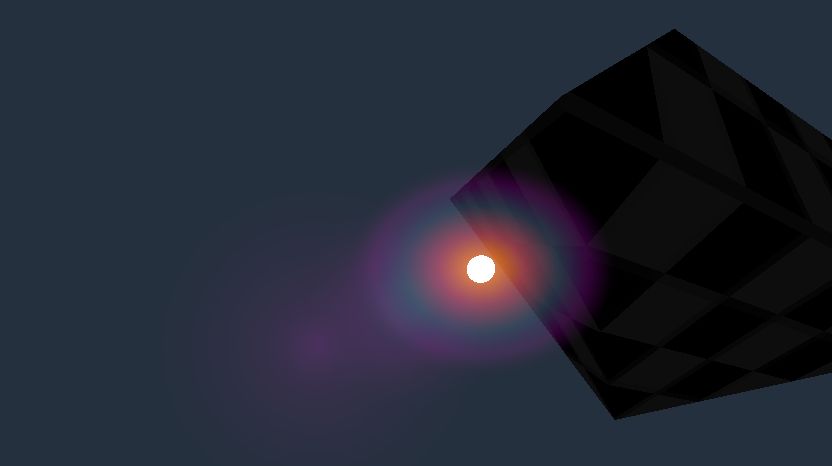
Lens Flare

Most of the other lens flares listed here were canvas shaders instead of spatial. So if you wanted them to track the position of something in 3D you’d have to do that in script.
This one can be attached to a MeshInstance3D quad at the position of a light in 3D space and it will automatically orient to face the camera.
It does three samples on the depth texture to decide whether the light is being occluded by something. More samples could give it smoother transition from fully occluded to fully visible, but at lower performance.
If you want a multi-part lens flare, you can use the Next Pass with additional shader materials with a lower Flare Spread and a higher or lower Screen Mult. Or you can use multiple quads at the same position and make some smaller, but still give some a different Screen Mult.
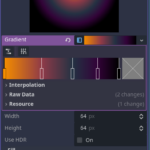
In the screenshots I included settings for a GradientTexture2D assigned to the Display Texture. If you want circular flares you can use that sort of thing. If you want non-circular shapes like stars or hexagons you can assign other textures.
Shader code
shader_type spatial;
// lens flare shader
// Attach this to a MeshInstance3D at the position of your light source.
// Mesh can be a default QuadMesh. The thing you'll most likely want to change is the size.
// The shader orients towards the camera.
// It disables depth test so it can render in front of opaque materials.
// But then it does its own sample on the depth texture so it's obscured by the position of the light.
// It does three samples along a horizontal line under an assumption the camera is mostly moving horizontally.
// That could be changed to something else if that assumption is wrong.
// More samples will make the fade-in-out smoother at the expense of performance.
render_mode blend_add, unshaded, depth_test_disabled, depth_draw_never;

/** depth offset towards camera when testing for whether light is obscured
 if light flare is positioned in the centre of an opaque light mesh, we need to
 offset enough that it isn't obscured by that light mesh itself */
uniform float depth_offset = 0.1;

//** offset in world space that will be used for multiple depth offsets */
uniform float sample_offset = 0.1;

/* flare size spread in screen-space,
 will be added on top of size of mesh, but doesn't scale with distance from camera */
uniform vec2 flare_spread = vec2(0.3, 0.3);

/* distance in metres flare starts to fade out from being too far */
uniform float distance_fade_start = 20.0;

/* distance in metres flare should be completely faded out */
uniform float distance_fade_end = 80.0;

/* distance in metres flare starts to fade out from being too near */
uniform float near_fade_start = 0.3;

/* distance in metres flare should be completely faded out */
uniform float near_fade_end = 0.1;

/* multiply screen position, useful for secondary flares that extend away from the light position */
uniform float screen_mult = 1.0;

uniform sampler2D display_texture: repeat_disable, source_color;

// samples depth texture to test for whether light is obscured
uniform sampler2D depth_texture:hint_depth_texture;

// how much of the depth tests are visible
varying float v_visible_count;

// gets depth from depth texture and converts it to linear value
float test_depth(vec2 uv, float p2w, float p3w) {
	float sampled_depth = texture(depth_texture, uv).r;
	float linear_depth = 1.0 / (sampled_depth * p2w + p3w);
	return linear_depth;
}

void vertex() {
	vec3 view_pos = (MODELVIEW_MATRIX * vec4(0.0, 0.0, 0.0, 1.0)).xyz;

	// get position to sample depth
	vec4 clip_pos = PROJECTION_MATRIX * vec4(view_pos, 1.0);
	vec3 ndc = clip_pos.xyz / clip_pos.w;
	vec2 screen_uv = ndc.xy * 0.5 + 0.5;

	vec4 sample_pos = PROJECTION_MATRIX * vec4(view_pos + vec3(sample_offset, 0.0, 0.0), 1.0);
	float l_sample_offset = length(ndc - sample_pos.xyz / clip_pos.w);

	// samples depth texture to decide if light is obscured
	// assumes horizontal direction is most important
	// you could add vertical if that assumption is false
	float centre_depth = test_depth(screen_uv.xy, INV_PROJECTION_MATRIX[2].w, INV_PROJECTION_MATRIX[3].w);
	float left_depth = test_depth(screen_uv.xy - vec2(l_sample_offset, 0.0), INV_PROJECTION_MATRIX[2].w, INV_PROJECTION_MATRIX[3].w);
	float right_depth = test_depth(screen_uv.xy + vec2(l_sample_offset, 0.0), INV_PROJECTION_MATRIX[2].w, INV_PROJECTION_MATRIX[3].w);
	v_visible_count = 0.0;

	// gives middle point slight more weight
	// should add up to 1.0
	v_visible_count += (-view_pos.z > centre_depth + depth_offset) ? 0.0: 0.4;
	v_visible_count += (-view_pos.z > left_depth + depth_offset) ? 0.0: 0.3;
	v_visible_count += (-view_pos.z > right_depth + depth_offset) ? 0.0: 0.3;


	// fades out when very far or very near the camera
	float distance_fade = smoothstep(distance_fade_end, distance_fade_start, -view_pos.z);
	float near_fade = smoothstep(near_fade_end, near_fade_start, -view_pos.z);

	v_visible_count *= distance_fade * near_fade;

	// prevents the flare spread from being changed by size of viewport
	// matches height of s
	float aspect_ratio = VIEWPORT_SIZE.x / VIEWPORT_SIZE.y;

	vec4 screen_offset = vec4(flare_spread * VERTEX.xy * clip_pos.w * vec2(1.0 / aspect_ratio, -1.0), 0.0, 0.0);

	// gets screen position for vertex that faces camera, adds screen_offset and multiplies
	POSITION = (PROJECTION_MATRIX * vec4(view_pos + VERTEX, 1.0) + screen_offset) * vec4(screen_mult, screen_mult, 1.0, 1.0);
}


void fragment() {
	ALBEDO = texture(display_texture, UV).rgb * v_visible_count;
}
Live Preview


great shader but i’m really struggling to position it to work properly on a 3D platformer where the camera orbits around the player
do you have an example file available somewhere?
You position it where the light source is that is supposed to cause a lense flare.
So for example if you have a light bulb, you put it where the light bulb is. If you also have an opaque material on the bulb you might need to adjust the depth_offset high enough that it isn’t obscured by the light bulb mesh.
If you want the multi-part lens flare you use the next pass for a variant on the shader with higher or lower values on the screen_mult parameter, but the mesh is still positioned where the light source is.