
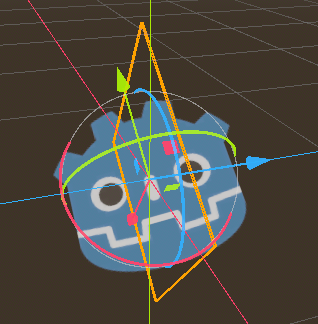
Local Space Y-Billboard Shader

This shader uses a modified version of the StandardMaterial3D’s Y-Billboard option, which is normally restricted to the world-space Y axis. This allows for the option to create billboards that rotate along the node’s local Y axis instead.
Shader code
shader_type spatial;
render_mode blend_add,cull_disabled,unshaded;
uniform vec4 albedo : source_color;
uniform sampler2D texture_albedo : source_color,repeat_enable;


void vertex() {
	vec3 local_up = MODEL_MATRIX[1].xyz;
	//cross of:
	//	local_transform.basis.y     and    to_world(view_space.forward)
	//normalized
	//(represents right direction)
	vec4 ax = vec4(normalize(cross(local_up, INV_VIEW_MATRIX[2].xyz)), 0.0);
	//local_transform.basis.y
	//(represents up direction)
	vec4 ay = vec4(local_up.xyz, 0.0);
	//cross of:
	//	to_world(view_space.right)    and    local_transform.basis.y
	//(represents forward direction)
	vec4 az = vec4(normalize(cross(INV_VIEW_MATRIX[0].xyz, local_up)), 0.0);
	MODELVIEW_MATRIX = VIEW_MATRIX * mat4(ax, ay, az, MODEL_MATRIX[3]);
	MODELVIEW_NORMAL_MATRIX = mat3(MODELVIEW_MATRIX);
}

void fragment() {
	vec2 base_uv = UV;
	vec4 albedo_tex = texture(texture_albedo,base_uv);
	ALBEDO = albedo.rgb * albedo_tex.rgb;
	ALPHA = albedo_tex.a * albedo.a;
}
except the fact that it doesn’t work?
it defaults to a black albedo and an additive blend mode, so changing the line with blend mode to mix or the albedo color to white in the editor should make it show up just fine
This is really useful! I was gonna use it on the “shine” streaks of some anime-style explosion effects, but i noticed that the mesh now only responds to changes in its y-scale, with x and z scales doing nothing, so i cant get it to thin out as it fades like i want… any idea how one would fix that? Thanks!
Can I make it a basic Billboard instead of a Y-Billboard?