
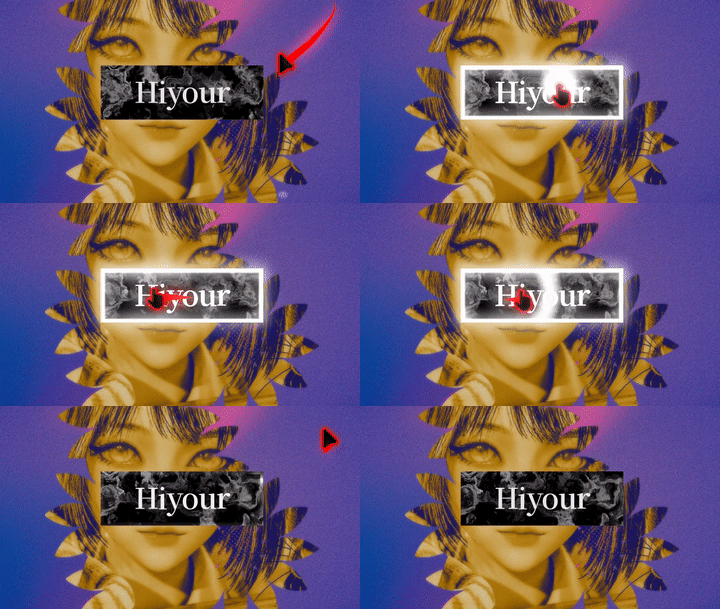
Glow & Click Ripple | UI Effect V2.0

Reference code: https://godotshaders.com/shader/ripple-effect-2/
I have ported the Ripple Effect from Godot Shaders to Godot 4.5. This shader requires a companion script to function and currently offers the following features:
• Mouse Glow Effect: Triggered when hovering with the mouse
• Automatically matches the parent’s modulate color for perfect visual harmony
• HDR brightness automatically increases when the mouse enters for enhanced visual impact
• Smooth Fade-out Animation: When the mouse leaves, the highlight effect follows the exit direction and fades out naturally instead of disappearing instantly, creating a more fluid transition
• Highlight size is controlled by time parameters: expands to its maximum at 0.5 and completely disappears at 0 or 1
Personal Notes: This is my first published shader, featuring personalized modifications to the original concept. Special thanks to the Godot community for their inspiration and contributions. If you have any suggestions for improvement, please share them in the comments! I have several other interesting shaders that I may upload gradually in the future.
GDScript:
extends Button
var _exit_tween: Tween  # 退出动画的补间动画引用
var _is_mouse_over = false  # 标记鼠标是否悬停在按钮上
var _original_brightness = {}  # 存储子节点原始亮度值的字典
var _center1 = Vector2(0.5, 0.5)  # 点击效果的中心点坐标
var _center2 = Vector2(0.5, 0.5)  # 鼠标悬停效果的中心点坐标

func _ready():
	material.set("shader_parameter/size", size); material.set("shader_parameter/time1", 1.0); material.set("shader_parameter/time2", 0.0)  # 初始化着色器参数
	pressed.connect(_on_pressed); mouse_exited.connect(_on_mouse_exited); mouse_entered.connect(_on_mouse_entered)  # 连接按钮信号到处理函数
	material.set("shader_parameter/center1", _center1); material.set("shader_parameter/center2", _center2)  # 设置中心点参数

	# 检查样式盒是否存在且为StyleBoxFlat类型,若存在,则计算圆角参数
	var normal_style = get_theme_stylebox("normal")  # 获取正常状态的样式盒
	if normal_style and normal_style is StyleBoxFlat: material.set("shader_parameter/corner_radius", normal_style.corner_radius_top_left / size.y * 2)
	var text_color = modulate if modulate != Color(1,1,1,1) else Color(1,1,1,1)  # 获取按钮颜色或使用默认白色
	material.set("shader_parameter/color", text_color)  # 设置着色器颜色参数

func _process(_delta):
	var local_mouse = (get_global_transform().affine_inverse() * get_global_mouse_position()) / size  # 转换鼠标位置到局部坐标
	if _is_mouse_over: _center2 = local_mouse; material.set("shader_parameter/center2", _center2)  # 鼠标悬停时更新悬停中心点
	material.set("shader_parameter/center1", _center1)  # 更新点击中心点

func _on_pressed():
	_center1 = (get_global_transform().affine_inverse() * get_global_mouse_position()) / size  # 设置点击位置为中心点
	create_tween().tween_property(material, "shader_parameter/time1", 1.0, 0.5).from(0.0)  # 创建点击动画

func _on_mouse_entered():
	_is_mouse_over = true  # 标记鼠标悬停
	if _exit_tween: _exit_tween.kill()  # 停止退出动画
	create_tween().tween_property(material, "shader_parameter/glow", 2.0, 0.2)  # 使用补间动画设置辉光强度为2
	for node in _get_all_children(self):  # 遍历所有子节点
		if node is Label or node is RichTextLabel:  # 检查是否为文本节点
			var path = node.get_path()  # 获取节点路径
			if not _original_brightness.has(path): _original_brightness[path] = node.modulate  # 存储原始亮度
			node.modulate = _original_brightness[path] * 2  # 提高文本亮度
	set_process(true)  # 启用_process函数
	create_tween().tween_property(material, "shader_parameter/time2", 0.35, 0.2)  # 创建悬停进入动画

func _on_mouse_exited():
	_is_mouse_over = false  # 标记鼠标离开
	var center = Vector2(0.5, 0.5)  # 中心点坐标
	var exit_target = center + (_center2 - center).normalized() * 2.0  # 计算退出目标位置
	_exit_tween = create_tween()  # 创建退出动画
	_exit_tween.parallel().tween_property(self, "_center2", exit_target, 0.3)  # 移动中心点
	_exit_tween.parallel().tween_property(material, "shader_parameter/time2", 0.0, 0.3)  # 重置时间参数
	_exit_tween.parallel().tween_property(material, "shader_parameter/glow", 0.0, 0.2)  # 使用补间动画设置辉光强度为0
	_exit_tween.tween_callback(func(): _center2 = Vector2(0.5, 0.5); set_process(false))  # 动画完成后重置中心点
	for node in _get_all_children(self):  # 遍历所有子节点
		if (node is Label or node is RichTextLabel) and _original_brightness.has(node.get_path()):  # 检查是否为文本节点且已存储亮度
			node.modulate = _original_brightness[node.get_path()]  # 恢复原始亮度

func _get_all_children(node: Node) -> Array:
	var children = []  # 子节点数组
	for child in node.get_children(): children.append(child); children.append_array(_get_all_children(child))  # 递归获取所有子节点
	return children  # 返回子节点数组
Shader code
shader_type canvas_item;

uniform vec2 size = vec2(0.);
uniform vec2 center1 = vec2(0.);
uniform vec2 center2 = vec2(0.);
uniform float time1 : hint_range(0., 1.) = 0.;
uniform float time2 : hint_range(0., 1.) = 0.;
uniform float width1 : hint_range(0., 0.5) = 0.05;
uniform float width2 : hint_range(0., 0.5) = 0.1;
uniform float corner_radius : hint_range(0., 1.) = 0.0; // 圆角参数,0-1范围
uniform float glow : hint_range(0., 10.) = 0.;
uniform vec4 color : source_color = vec4(1.);

// 圆角矩形距离场函数
float rounded_box(vec2 p, vec2 b, float r) {
    vec2 d = abs(p) - b + r;
    return min(max(d.x, d.y), 0.0) + length(max(d, 0.0)) - r;
}

// 胶囊形状距离场函数
float capsule(vec2 p, float r, float length) {
    p.x = abs(p.x) - length/2.0;
    p.x = max(p.x, 0.0);
    return length(p) - r;
}

void fragment() {
	float aspect_ratio = size.x / size.y;
	vec2 uv = UV - vec2(0.5);
	uv.x *= aspect_ratio;

	// 根据圆角参数平滑过渡
	float capsule_distance;

	if (corner_radius == 0.0) {
		// 完全矩形
		vec2 rect_size = vec2(aspect_ratio * 0.5, 0.5);
		capsule_distance = rounded_box(uv, rect_size, 0.0);
	} else if (corner_radius == 1.0) {
		// 完全胶囊形状
		float capsule_radius = 0.5;
		float capsule_length = aspect_ratio - 1.0;
		capsule_distance = capsule(uv, capsule_radius, capsule_length);
	} else {
		// 平滑过渡:使用圆角矩形,圆角半径从0到0.5线性变化
		float radius_factor = corner_radius;
		float actual_radius = 0.5 * radius_factor; // 最大圆角半径为0.5(胶囊形状)

		vec2 rect_size = vec2(aspect_ratio * 0.5, 0.5);
		capsule_distance = rounded_box(uv, rect_size, actual_radius);
	}

	bool in_capsule = capsule_distance <= 0.0;

	// 计算辉光效果 - 使用主颜色作为辉光颜色
	float glow_alpha = 0.0;
	if (glow > 0.0) {
		// 辉光从胶囊边缘向外扩散
		float glow_distance = -capsule_distance;
		float glow_falloff = smoothstep(0.0, width2, glow_distance);
		glow_alpha = (1.0 - glow_falloff) * color.a * glow;

		// 限制辉光只在胶囊外部显示
		glow_alpha *= step(0.0, glow_distance);
	}

	// 计算涟漪和高光效果
	vec2 center1_uv = (UV - center1);
	center1_uv.x *= aspect_ratio;
	float center1_d = length(center1_uv);

	vec2 center2_uv = (UV - center2);
	center2_uv.x *= aspect_ratio;
	float center2_d = length(center2_uv);

	float max_center1_radius = max(aspect_ratio, 1.0) * 0.8;

	// 修改涟漪效果为模糊圆环
	float outer_radius = 0.1 + (max_center1_radius - 0.1) * time1;

	// 修改:内圆半径随时间从0.1倍到1.2倍逐渐缩小
	float inner_radius_factor = mix(0.1, 1.2, time1);
	float inner_radius = outer_radius * inner_radius_factor;

	// 使用模糊边缘创建圆环效果
	float ring = smoothstep(inner_radius - 0.20, inner_radius + 0.20, center1_d) -
				 smoothstep(outer_radius - 0.20, outer_radius + 0.20, center1_d);

	// 高光效果保持不变
	float circle2_blur = smoothstep(center2_d - 0.2, center2_d + 0.2, 0.1 + (max_center1_radius - 0.1) * time2 - 0.2);

	// 边缘区域检测
	bool in_edge_area = abs(capsule_distance) <= width1 && in_capsule;

	if (in_capsule) {
		float circle1_alpha = max(ring - max(time1, 0.1), 0.0);
		float circle2_alpha = in_edge_area ? circle2_blur : circle2_blur * 0.05;  // 内圆透明度

		vec3 final_color = color.rgb;
		float final_alpha = max(circle1_alpha, circle2_alpha);

		// 混合辉光效果 - 使用相同的颜色
		vec4 base_color = vec4(final_color, final_alpha);
		vec4 glow_layer = vec4(color.rgb, glow_alpha);

		COLOR = base_color + glow_layer;
	} else {
		// 只在胶囊外部显示辉光 - 使用相同的颜色
		COLOR = vec4(color.rgb, glow_alpha);
	}
}