
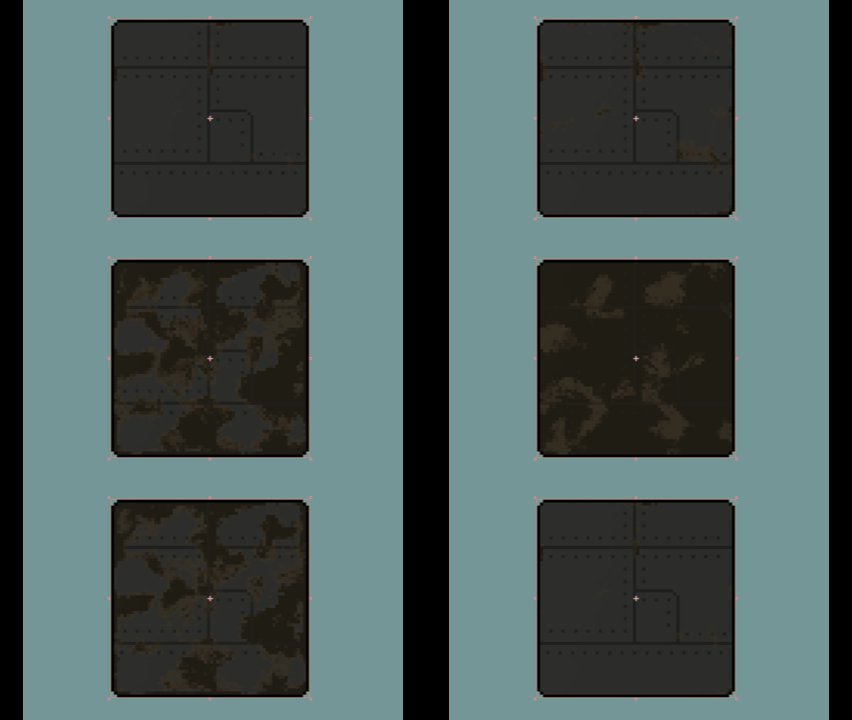
Pixel-art noise damage texture with edge bias

Use a noise texture to apply procedural damage (or similar looking) on a pixel-art sprite.
This shader was mainly made for use with metal textures, and it is able to take an edge distance map (more on that below) to bias the the damage towards the edges, or seems of a sprite, to achieve a more accurate look of damage/rust usually spreading from edges/seems of a surface.
Parameters:
- sensitivity: master control of damage strength
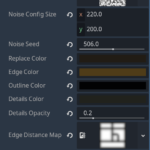
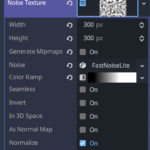
- noise_texture: must set to a NoiseTexture2D (can be done inline), see screenshots for the configurations of the noise texture I used
- noise_config_size: can be used to scale the noise (and therefore damage) texture
- replace_color: color for the main damage section
- edge_color: color for the edge of the damage section
- outline_color: if your sprite has an outline, set this to that color (for example black), this will prevent the shader to draw over it.
- details_color: same with outline_color, but with details that you want damaged, but only slightly (still preserve details,…)
- details_opacity: how much of the details color should be preserved (1 means the shader will completely not draw over the details color, like outline_color; 0 means it’s treated as normal surface)
- edge_distance_map: a DISTANCE map of the edges of the sprite – a black and white texture that is basically the sprite, but is black where the edges are, and fade smoothly outwards. A easy way to generate this is to color all your edges black on a white background, then apply a (guassian) blur filter over it (blur radius depends on the size of your sprite, demo uses 8px). See screenshot for the map used in demo.
- edge_bias_strength: How strongly should the edge map be applied and therefore affecting edge bias. Tweak this to your liking.
- edge_remap_min: Depends on how you generated the edge distance map, you may need to remap the range of the black-white gradient used. This basically tells the shader, this value or whiter means zero edge (furthest away from any edge)
- edge_remap_max: Same as above – this value or blacker means closer to an edge
This shader is based on the wonderful work here: https://godotshaders.com/shader/color-replacer-pixel-perfect-damage-shader/
Shader code
shader_type canvas_item;

// Uniform parameters from both scripts
uniform float sensitivity : hint_range(0.0, 1.0) = 0.5;
const float edge_width = .15;
uniform sampler2D noise_texture : repeat_enable;
uniform vec2 noise_config_size = vec2(86.0, 120.0); // reference size the noise was designed at
uniform float noise_seed : hint_range(0.0, 999.0) = 0.0;

uniform vec4 replace_color : source_color = vec4(0, 0, 0, 1); // Default replace color
uniform vec4 edge_color : source_color = vec4(0.4, 0.4, 0.4, 1); // Default edge color
uniform vec4 outline_color : source_color = vec4(0.0, 0.0, 0.0, 1.0); // Outline color (ignored during replacement)
uniform vec4 details_color : source_color = vec4(1, 1, 1, 1); // Details overlay color (minimally affected by damage)
uniform float details_opacity : hint_range(0.0, 1.0) = 0.1; // Opacity of details overlay

// Edge distance map for biasing damage toward edges
uniform sampler2D edge_distance_map : repeat_enable, filter_nearest;
uniform float edge_bias_strength : hint_range(0.0, 1.0) = 0.5; // Bias sensitivity threshold toward edges

// Edge map remapping (to compensate for blur: remap from [edge_min, edge_max] -> [0, 1])
uniform float edge_remap_min : hint_range(0.0, 1.0) = 0.0;  // value at true edge (darker)
uniform float edge_remap_max : hint_range(0.0, 1.0) = 1.0;  // value in interior (lighter)

// Small tolerance value for color comparison
const float epsilon = 0.01;

// Function to compare colors with a small tolerance
bool compare_colors(vec4 c1, vec4 c2) {
    return abs(c1.r - c2.r) < epsilon && abs(c1.g - c2.g) < epsilon && abs(c1.b - c2.b) < epsilon && abs(c1.a - c2.a) < epsilon;
}

float seeded_noise(float seed) {
    return fract(sin(seed * 12.9898) * 43758.5453);
}

void fragment() {
    // Sample the original texture
    vec4 color = texture(TEXTURE, UV);

    // Check if the pixel is transparent or matches the outline color to ignore
    if (color.a < 0.01 || compare_colors(color, outline_color)) {
        // Output the pixel as is
        COLOR = color;
    } else {
        // Get the size of the texture in pixels
        float size_x = float(textureSize(TEXTURE, 0).x);
        float size_y = float(textureSize(TEXTURE, 0).y);

        // Create a new UV coordinate that snaps to pixel grid for pixel-perfect effect
        vec2 UVr = vec2(floor(UV.x * size_x) / size_x, floor(UV.y * size_y) / size_y);

        // Normalize according to sprite vs. reference noise size so the pattern scales correctly
        vec2 sprite_size = vec2(size_x, size_y);
        vec2 base_noise_size = max(noise_config_size, vec2(1.0));
        vec2 noise_scale = sprite_size / base_noise_size;
        vec2 random_offset = vec2(seeded_noise(noise_seed), seeded_noise(noise_seed + 1.0));
        vec2 noise_uv = vec2(UVr.x * noise_scale.x, UVr.y * noise_scale.y) + random_offset;

        // Sample the noise texture at the adjusted UV coordinates
        float noise_value = texture(noise_texture, noise_uv).r; // Assuming a grayscale noise texture

        // Sample edge distance map (white = edge, black = interior)
        float edge_distance = texture(edge_distance_map, UV).r;

        // Remap edge_distance range to account for blur: stretch [edge_remap_min, edge_remap_max] -> [0, 1]
        edge_distance = clamp((edge_distance - edge_remap_min) / (edge_remap_max - edge_remap_min), 0.0, 1.0);

        // Bias sensitivity threshold toward edges (easier to damage at edges)
        // After remap: 0 = edge, 1 = interior, so (1.0 - edge_distance) weights edges
        float edge_bias = (1.0 - edge_distance) * edge_bias_strength;
        float biased_sensitivity = sensitivity + edge_bias;
        biased_sensitivity = clamp(biased_sensitivity, 0.0, 1.0);

        // Define thresholds for smoothstep using biased sensitivity
        float edge_lower = biased_sensitivity - edge_width;
        float edge_upper = biased_sensitivity + edge_width;

        // Calculate the interpolation factor using smoothstep
        float factor = smoothstep(edge_lower, edge_upper, noise_value);

        // Interpolate between colors based on the factor
        // First, interpolate between replace_color and edge_color
        vec4 color1 = mix(replace_color, edge_color, factor);
	    vec4 finalColor = mix(color1, color, factor);

        if (compare_colors(color, details_color)) {
            finalColor = mix(finalColor, details_color, details_opacity);
        }

        // Preserve the original alpha
        COLOR = vec4(finalColor.rgb, color.a);
    }
}
Live Preview


can this be used for 3d textures?
I haven’t tried it myself, it might need lots of tweaking to get it working. Although if the texture is pixel art, the concept should still apply. You are welcome to test it yourself and see how it behaves 🙂