

Pixel-Perfect Shader for Godot 3.x!

This can be put on any texture-like node in Godot, such as: Sprite, TextureRect, etc.
just make a new ShaderMaterial in the Material section, and copy-paste the code below.
NOTE: The “Live Demonstration” feature on Godot Shaders is mega busted. AKA it doesn’t anything that’s not in godot 4.x+ format lol.
orginally inspired by the 4.x version from C4-621_Raven’s Pixel Perfect Shader.
https://godotshaders.com/shader/2d-pixel-perfect-adapted-to-rotation-and-scaling/
Shader code
shader_type canvas_item;
uniform float pixelation:hint_range(1.0,16.0)=1.0;
uniform bool controlEdges=false;
varying vec2 p_world;
void vertex(){
	p_world=(WORLD_MATRIX*vec4(VERTEX,0.0,1.0)).xy;
}
void fragment(){
	vec2 p_snapped=floor(p_world/pixelation)*pixelation+pixelation/2.0;
	vec2 delta=p_snapped-p_world;
	mat2 M_p=mat2(dFdx(p_world),dFdy(p_world));
	mat2 M_uv=mat2(dFdx(UV),dFdy(UV));
	mat2 J=M_uv*inverse(M_p);
	vec2 delta_uv=J*delta;
	vec2 uv=UV+delta_uv;
	vec4 color=texture(TEXTURE,uv);
	if(controlEdges){
		float margin_x=(abs(J[0].x)+abs(J[1].x))*pixelation*0.5;
		float margin_y=(abs(J[0].y)+abs(J[1].y))*pixelation*0.5;
		if(uv.x<margin_x||uv.x>1.0-margin_x||uv.y<margin_y||uv.y>1.0-margin_y){
			color.a=0.0;
		}else{
			color.a=step(0.5,color.a);
		}
	}else{
		color.a=step(0.5,color.a);
	}
	COLOR=color;
}
Live Preview

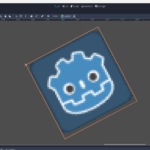
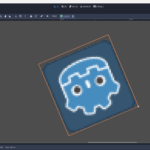

to make this shader godot 4 compatible just change WORLD_MATRIX to MODEL_MATRIX and it should work.