
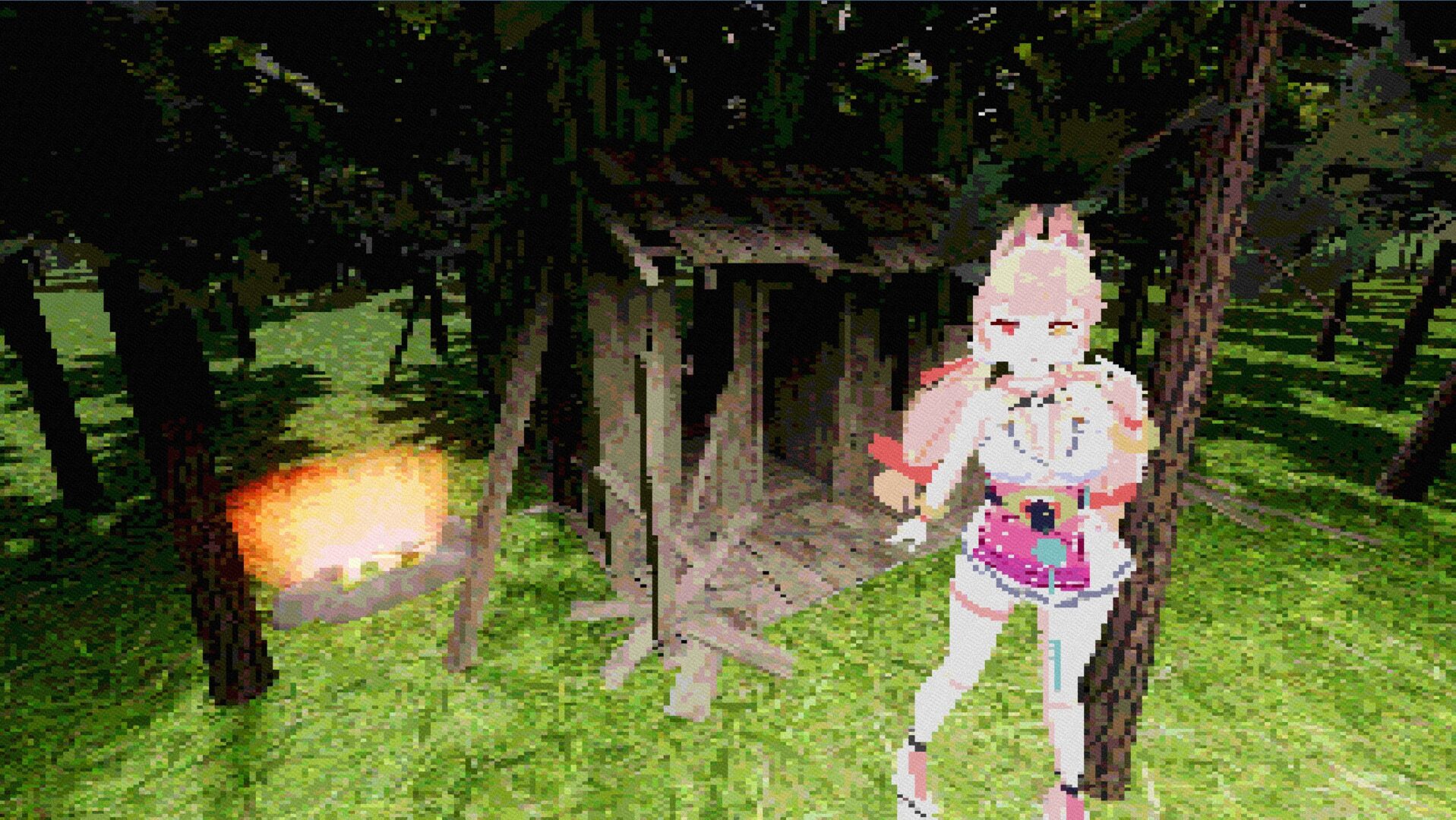
Kimi retro game(PS1) shader
Updated!
Create a ColorRect that covers your viewport
Layout → Anchors: Full Rect
Create a ShaderMaterial in the ColorRect’s Material slot
Create a Shader in the material and paste the code
Shader code
shader_type canvas_item;

// PSX crunch messes up your screen real good
uniform sampler2D SCREEN_TEXTURE : hint_screen_texture, filter_nearest;

// rez controls - don't push too high or it'll look clean we don't want that lol
uniform int resolution_x = 320; // psx standard
uniform int resolution_y = 240;
uniform int color_bit_depth = 4; // 16 colors per channel feels right
uniform float dither_strength = 0.03; // grain to hide banding

// jitter section - this is where the magic happens
uniform float jitter_amount = 0.008;
uniform float jitter_speed = 1.2;
uniform float jitter_frequency = 180.0;

// chromatic mess & vignette
uniform float chromatic_aberration_strength : hint_range(0.0, 0.1) = 0.015;
uniform float vignette_strength : hint_range(0.0, 1.0) = 0.8;
uniform float vignette_radius : hint_range(0.0, 2.0) = 0.9;

float hash(vec2 p){
    return fract(sin(dot(p, vec2(127.1, 311.7))) * 43758.5453123);
}

vec2 psx_jitter(vec2 uv){
    float t = floor(TIME * jitter_speed * 8.0) / 8.0; // snap time

    // horizontal shake per scanline
    float h_shake = hash(vec2(floor(uv.y * jitter_frequency), t)) - 0.5;
    h_shake *= jitter_amount * 0.75;

    // vertical wobble
    float v_shake = hash(vec2(floor(uv.x * jitter_frequency * 0.4), t)) - 0.5;
    v_shake *= jitter_amount * 0.35;

    // micro-shake for crunchy feel
    float micro = hash(uv * 600.0 + t) - 0.5;
    micro *= jitter_amount * 0.1;

    return uv + vec2(h_shake + micro, v_shake + micro);
}

void fragment(){
    // snap to pixel grid
    vec2 px = vec2(1.0 / float(resolution_x), 1.0 / float(resolution_y));
    vec2 uv = floor(SCREEN_UV / px) * px + px * 0.5;

    uv = psx_jitter(uv); // apply that sweet jitter

    vec3 col;
    if(chromatic_aberration_strength > 0.001){
        vec2 offset = (uv - 0.5) * chromatic_aberration_strength;
        col.r = texture(SCREEN_TEXTURE, uv + offset).r;
        col.g = texture(SCREEN_TEXTURE, uv).g;
        col.b = texture(SCREEN_TEXTURE, uv - offset).b;
    }else{
        col = texture(SCREEN_TEXTURE, uv).rgb;
    }

    // crush colors
    float levels = pow(2.0, float(color_bit_depth));
    col = floor(col * levels) / levels;

    // vignette
    if(vignette_strength > 0.0){
        float dist = distance(SCREEN_UV, vec2(0.5));
        float vignette = 1.0 - vignette_strength * smoothstep(vignette_radius * 0.5, vignette_radius, dist);
        col *= vignette;
    }

    // dither noise
    if(dither_strength > 0.0){
        float noise = hash(SCREEN_UV * 80.0 + floor(TIME * 50.0));
        col += (noise - 0.5) * dither_strength;
    }

    COLOR = vec4(col, 1.0);
}
Live Preview


Nice shader this is perfect for my dream game I’m almost finished with makes for a nice late annivery present for the Voltitan series.
Thank you, good luck with your game :3
Perfect for any psx-style horror game 😀
Wait, when I added it in my game, it literally amazing! Way better than I thought, and thanks so much for sharing this great shader!
You can play around with the settings, also i just updated it
我的朋友!你是一个真正的天才!这个shader可以将我平平无奇的模型变得非常有氛围!期待你的更多作品!
This is very cool!
troon moment
.
goat
do u have any published games or yt chanel or something else
genuinely so peak I had to make an account for this site