
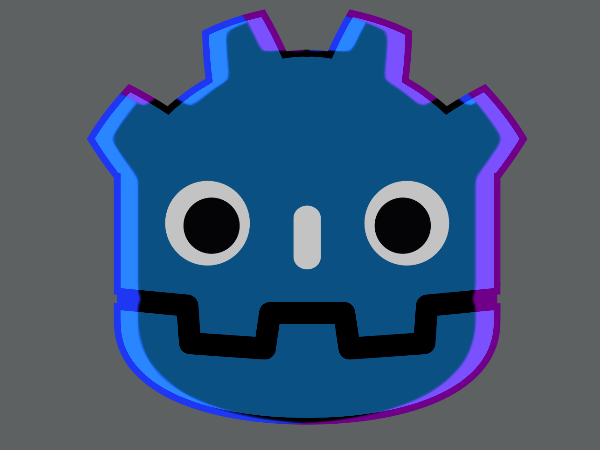
Rimlight / Drop shadow

Inspired by a shader from “Friday night funkin”, functioning similarly to it but with two rim lights instead of one + a blur effect to smooth it out more. also includes stuff for modifying the colors with HSBC ! *do note that this shader may not work properly on sprites that use Region/Region_rect.
Shader code
shader_type canvas_item;
//DUAL RIMLIGHT BY MABLE / MAE / MABLE YEAH
//hi :p

group_uniforms general_config;

//0.25 or 0.8 me likey
uniform float blur_strength : hint_range(0.0,5.0,0.01) = 0.25;

group_uniforms DropShadow_general;
uniform float inline_scale :hint_range(1.0,2.0) = 1.0;
uniform float strength : hint_range(0.0,1.5) = 1.0;
uniform float rim_mix : hint_range(-10.0, 3.0, 0.1) = 2.0;
uniform bool affect_black = false;
uniform bool pixel_perfect = false;


group_uniforms DropShadow_general.specifics;
uniform vec4 shadow_color : source_color = vec4(vec3(0.5),0.5);
uniform vec4 shadow_color_2 : source_color = vec4(0.0);
uniform float angle : hint_range(-360, 360,0.1) = 0.0;
uniform float angle_2 : hint_range(-360, 360,0.1) = 0.0;
uniform float dist :  hint_range(0.0,50.0,0.001) = 0.5;
uniform float dist_2 :  hint_range(0.0,50.0,0.001) = 0.0;

//if on, it prioritizes the first drop shadow over the second one
uniform int blend_mode : hint_enum("None","PRIORITY") = 1;


group_uniforms HSBC_config;
uniform float hue :hint_range(-300, 300) = 0;
uniform float saturation  :hint_range(-100, 500) = 0;
uniform float brightness  :hint_range(-280, 280) = 0;
uniform float contrast  :hint_range(-500, 500) = 0;
uniform float alpha  :hint_range(0, 1) = 1;


//just kinda took both of these color related functions from FNF
vec3 applyHue(vec3 aColor, float aHue)
{
	float angle_ = radians(aHue);
	vec3 k = vec3(0.57735, 0.57735, 0.57735);
	float cosAngle = cos(angle_);
	return aColor * cosAngle + cross(k, aColor) * sin(angle_) + k * dot(k, aColor) * (1.0 - cosAngle);
}

vec3 applyHSBCEffect(vec3 color)
{
	color = clamp(color + ((brightness) / 255.0), 0.0, 1.0);
	color = applyHue(color, hue);
	color = clamp((color - 0.5) * (1.0 + ((contrast) / 255.0)) + 0.5, 0.0, 1.0);
	vec3 intensity = vec3(dot(color, vec3(0.30980392156, 0.60784313725, 0.08235294117)));
	color = clamp(mix(intensity, color, (1.0 + (saturation / 100.0))), 0.0, 1.0);
	return color;
}

float clamp_uv(vec2 uv, float _alpha)
{
	float edge_softness = 0.05 * blur_strength;
	float fade_x = smoothstep(0.0, edge_softness, uv.x) * (1.0 - smoothstep(1.0 - edge_softness, 1.0, uv.x));
	float fade_y = smoothstep(0.0, edge_softness, uv.y) * (1.0 - smoothstep(1.0 - edge_softness, 1.0, uv.y));
	float fade = fade_x * fade_y;
	return _alpha * fade;
}

//based on /https://www.shadertoy.com/view/Xltfzj and https://xorshaders.weebly.com/tutorials/blur-shaders-5-part-2
vec4 blur_b(sampler2D Texture,vec2 uv,float val){
	float Pi = PI * 2.0;
	vec2 Texture_pixel_size = 1.0/vec2(textureSize(Texture,0));
	float Directions = 12.0;
	float Quality = 6.0;
	float Size = 8.0 * val;

	vec2 radius = Size/Texture_pixel_size.xy;
	vec4 Color = texture(Texture,uv);
	for( float d=0.0;d<Pi;d+=Pi/float(Directions) )
	{
		for( float i=1.0/float(Quality);i<=1.0;i+=1.0/float(Quality) )
		{
			vec2 this_uv = uv+vec2(cos(d),sin(d))*radius*i;
			Color += texture(Texture,this_uv);
		}
	}
	Color /= float(Quality)*float(Directions)+1.0;
	Color.rgb = applyHSBCEffect(Color.rgb);
	return Color;
}

vec3 dropShadow(sampler2D Texture,vec2 Uv,float ang,float shadow_dist){
	vec2 Texture_pixel_size = 1.0/vec2(textureSize(Texture,0));
	vec2 uv = Uv;
	if (pixel_perfect) {
	uv = floor(uv / Texture_pixel_size + 0.5) * Texture_pixel_size;
	}
	mat2 scale = mat2(vec2(inline_scale + (blur_strength/100.0), 0.0), vec2(0.0, inline_scale + (blur_strength/100.0)));
	uv -= 0.5;
	vec2 rotation = vec2(
		(cos(-ang/100.))
		,
		(sin(-ang/100.))
		);
	uv = uv * scale;
	uv += 0.5;
	uv += (rotation * Texture_pixel_size) * shadow_dist;

	vec4 inner = blur_b(Texture,uv,abs(sin(blur_strength * .00001)));
	inner.rgb = vec3(0.0);
	inner.a = clamp_uv(uv,inner.a);

	vec4 shadow = texture(Texture,Uv);
	shadow.rgb = vec3(1.0);

	float blend = smoothstep(0.5 + 1.15 ,rim_mix - 1.15, inner.a  / 0.5);
	vec3 shadow_blend = mix(inner, shadow, blend).rgb;

	return (shadow_blend * strength);
}


vec3 mix_shadow_and_base(vec3 base,vec3 blend,vec4 this_shadow_color){
	float factor = affect_black ? 1.0 : smoothstep(0.05, 0.5, length(base));
	float factor_2 = affect_black ? 1.0 : smoothstep(0.05, 0.5, length(blend));
	return mix(base, mix(base,this_shadow_color.rgb,factor_2 * this_shadow_color.a), factor);
}

vec3 apply_mode(vec3 bg, vec3 src,int blendMode) {
	if (blendMode == 0){
		return bg;
	}

	float feather_size = 0.5;
	vec3 Luminance = vec3(0.2126, 0.7152, 0.0722);
	float src_lum = dot(src,Luminance);
	float bg_lum = dot(bg, Luminance);

	float low  = bg_lum - feather_size;
	float high = bg_lum + feather_size;
	float feather = smoothstep(low, high, src_lum);
	return mix(bg, vec3(0.0), feather);
}


void fragment() {

	COLOR.rgb = applyHSBCEffect(COLOR.rgb);

	if (abs(inline_scale) > 1.0 || abs(dist + dist_2) > 0.0001) {
		vec3 rimlight = dropShadow(TEXTURE,UV,angle,dist);
		vec3 rimlight_2 = dropShadow(TEXTURE,UV,-angle_2,-dist_2);

		vec3 blend_rim_2 = rimlight_2 * ((blend_mode == 1) ? 0.5 : 1.0);
		rimlight_2 = apply_mode(blend_rim_2,rimlight,blend_mode);
		rimlight = apply_mode(rimlight,rimlight_2,blend_mode);

		COLOR.rgb = mix_shadow_and_base(COLOR.rgb,rimlight_2,shadow_color_2);
		COLOR.rgb = mix_shadow_and_base(COLOR.rgb,rimlight,shadow_color);
	}

	if (!pixel_perfect){
		COLOR = mix(COLOR,blur_b(TEXTURE,UV,abs(sin(blur_strength/10.0 * .00001))),blur_strength/5.0);
	}

	COLOR.a *= alpha;
}
Live Preview



how do I use this?
It seems it doesn’t work with all white texture. The texture must have some kind of RGB values below 255. Can anybody confirm this?
I can confirm this issue existed, i have now updated/patched the shader to address it! (along with a couple of fixes for color accuracy issues i had with it too)