
Screen HSL Adjustment

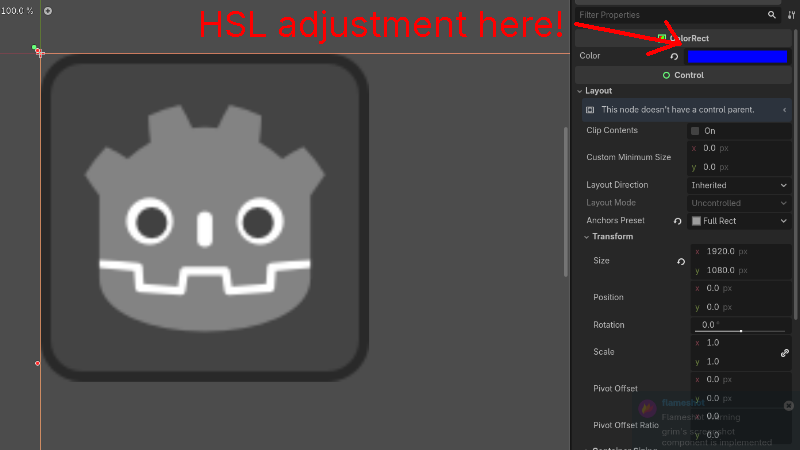
Adjust the colors of the screen behind the ColorRect (or other CanvasItem node) used to hold this shader using HSL by changing ONLY the color property of the ColorRect node. Also works with Modulate.
Hue is additive via the red channel. Saturation, luminosity, and alpha are multiplicitive via the green, blue, and alpha channels, respectively.
I made this so that you can more easily manipulate the colors of the screen. For instance, it’s compatible with tweens.
For instance, to desaturate the screen over 3 seconds in GDScript:
get_tree().create_tween().tween_property($YourColorRect, "color", Color(0.0, 0.0, 1.0), 3.0)Or, to double the luminosity while shifting the hue by 180 degrees over 5 seconds in C#:
GetTree().CreateTween().TweenProperty(GetNode("YourColorRect"), "color", new Color(0.5f, 1f, 2f), 5f);To set it up, make a ColorRect node in front of your screen. Add the shader to the materials. You use (HDR) values as inputs in the color (or modulate) property of the node to adjust the colors of the screen behind the node.
Shader code
// By Amy Gilhespy.
// I hereby dedicate this shader to the public domain.
// https://creativecommons.org/publicdomain/zero/1.0/


shader_type canvas_item;

uniform sampler2D SCREEN_TEXTURE : hint_screen_texture, filter_linear_mipmap;

vec3 hsl2rgb(vec3 hsl)
{
	float l = clamp(hsl.z, 0.0, 1.0);
    vec3 rgb = clamp(abs(mod(fract(hsl.x) * 6.0 + vec3(0.0, 4.0, 2.0), 6.0) - 3.0) - 1.0, 0.0, 1.0);
    return l + clamp(hsl.y, 0.0, 1.0) * (rgb - 0.5) * (1.0 - abs(2.0 * l - 1.0));
}

vec3 rgb2hsl(in vec3 rgb)
{
	float h = 0.0;
	float s = 0.0;
	float l = 0.0;
	float r = rgb.r;
	float g = rgb.g;
	float b = rgb.b;
	float cMin = min(r, min(g, b));
	float cMax = max(r, max(g, b));
	l = (cMax + cMin) * 0.5;
	if (cMax > cMin) {
		float cDelta = cMax - cMin;
		float invCDelta = 1.0 / cDelta;
		s = l < 0.5 ? cDelta / (cMax + cMin) : cDelta / (2.0 - (cMax + cMin));
		if (r == cMax) {
			h = (g - b) * invCDelta;
		} else if (g == cMax) {
			h = 2.0 + (b - r) * invCDelta;
		} else {
			h = 4.0 + (r - g) * invCDelta;
		}
		if ( h < 0.0) {
			h += 6.0;
		}
		h = h * (1.0 / 6.0);
	}
	return vec3(h, s, l);
}

void fragment() {
	// Get the color behind the ColorRect (or whatever CanvasItem you use):
	vec4 source = texture(SCREEN_TEXTURE, SCREEN_UV);

	// Get the color chosen in the ColorRect (also works with Modulate, textures, etc):
	vec4 shift = vec4(COLOR.rgb / texture(TEXTURE, UV).rgb, COLOR.a);

	// Convert and shift the color as HSL (Hue is added, Sat/Lum are multiplied):
	vec3 rgb = hsl2rgb(rgb2hsl(source.rgb) * vec3(1.0, shift.gb) + vec3(shift.r, 0.0, 0.0));

	float alpha = source.a * shift.a;
	COLOR = vec4(rgb, alpha);
}
