
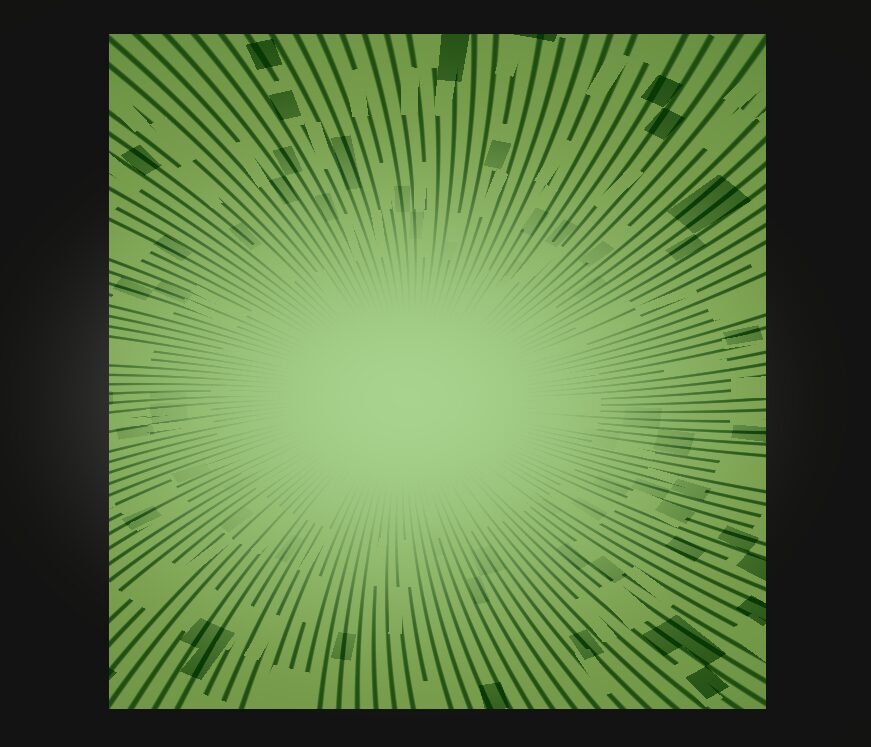
Screen-Sampled Black-and-White Manga Hit Impact Post-Process Shader

A screen-sampled black-and-white manga hit impact post-process shader for Godot 4.
This shader is designed for CanvasItem nodes, usually a fullscreen or local ColorRect. It samples the already-rendered screen behind the CanvasItem through screen_texture, then converts the sampled image into a stylized manga impact frame with high-contrast tones, radial speed lines, a bright burst area, and blocky comic-style fragments.
The shader can be used as a localized manga action panel or as a fullscreen combat hit effect. When placed on a smaller ColorRect, the effect only appears inside that rectangle. When placed on a fullscreen ColorRect inside a CanvasLayer, it works as a screen-space post-process overlay.
The main control parameter is “impact”. Keeping impact near 1.0 displays the full manga impact panel. Animating impact from 1.0 to 0.0 creates a short hit flash for attacks, critical hits, cut-ins, or dramatic transitions. The “impact_center” parameter controls the origin point of the radial speed lines and burst, using normalized screen coordinates.
The visible color comes mainly from the sampled screen content behind the shader. In the demo screenshots, green objects under the overlay are sampled by the shader, so the impact effect appears strongly over those areas. The shader does not use color keying and does not require a green texture.
Shader code
shader_type canvas_item;
render_mode unshaded;

uniform sampler2D screen_texture : hint_screen_texture, repeat_disable, filter_nearest;

uniform float impact : hint_range(0.0, 1.0) = 0.0;
uniform vec2 impact_center = vec2(0.5, 0.5);

uniform float zoom_strength : hint_range(0.0, 0.2) = 0.045;
uniform float shake_strength : hint_range(0.0, 0.05) = 0.012;

uniform float line_density : hint_range(10.0, 160.0) = 72.0;
uniform float line_cut : hint_range(0.0, 1.0) = 0.82;
uniform float line_distortion : hint_range(0.0, 80.0) = 24.0;

uniform float posterize_steps : hint_range(2.0, 8.0) = 3.0;
uniform float contrast : hint_range(0.5, 4.0) = 2.6;
uniform float flash_strength : hint_range(0.0, 1.0) = 0.35;
uniform float vignette_strength : hint_range(0.0, 1.0) = 0.55;

uniform vec4 ink_color : source_color = vec4(0.02, 0.018, 0.015, 1.0);
uniform vec4 paper_color : source_color = vec4(1.0, 0.96, 0.86, 1.0);

float hash21(vec2 p) {
	p = fract(p * vec2(123.34, 456.21));
	p += dot(p, p + 45.32);
	return fract(p.x * p.y);
}

void fragment() {
	vec2 uv = SCREEN_UV;
	vec2 dir = uv - impact_center;
	float dist = length(dir);

	float hit = clamp(impact, 0.0, 1.0);

	vec2 shake = vec2(
		hash21(vec2(TIME * 48.0, 1.7)) - 0.5,
		hash21(vec2(2.3, TIME * 51.0)) - 0.5
	) * shake_strength * hit;

	vec2 zoom_uv = impact_center + dir * (1.0 - zoom_strength * hit);
	vec2 sample_uv = zoom_uv + shake;

	vec3 base = texture(screen_texture, sample_uv).rgb;

	float gray = dot(base, vec3(0.299, 0.587, 0.114));
	gray = clamp((gray - 0.5) * contrast + 0.5, 0.0, 1.0);

	float stepped = floor(gray * posterize_steps) / posterize_steps;
	vec3 manga = mix(ink_color.rgb, paper_color.rgb, stepped);

	float angle = atan(dir.y, dir.x);

	float line_raw = abs(sin(
		angle * line_density
		+ dist * line_distortion
		- TIME * 18.0
	));

	float radial_mask = smoothstep(0.08, 0.30, dist)
		* (1.0 - smoothstep(0.78, 1.05, dist));

	float broken = step(
		0.18,
		hash21(vec2(floor(angle * 24.0), floor(dist * 18.0)))
	);

	float speed_line = smoothstep(line_cut, 1.0, line_raw)
		* radial_mask
		* broken
		* hit;

	float crack_seed = hash21(vec2(floor(angle * 18.0), floor(dist * 32.0)));
	float crack = step(0.91, crack_seed)
		* smoothstep(0.12, 0.5, dist)
		* (1.0 - smoothstep(0.5, 0.9, dist))
		* hit;

	vec3 ink_layer = mix(manga, ink_color.rgb, clamp(speed_line + crack, 0.0, 1.0));

	float center_flash = (1.0 - smoothstep(0.0, 0.38, dist)) * flash_strength * hit;
	ink_layer = mix(ink_layer, vec3(1.0), center_flash);

	float vignette = smoothstep(0.18, 0.95, dist) * vignette_strength * hit;
	ink_layer *= 1.0 - vignette;

	vec3 final_color = mix(base, ink_layer, hit);

	COLOR = vec4(final_color, 1.0);
}
Live Preview


