
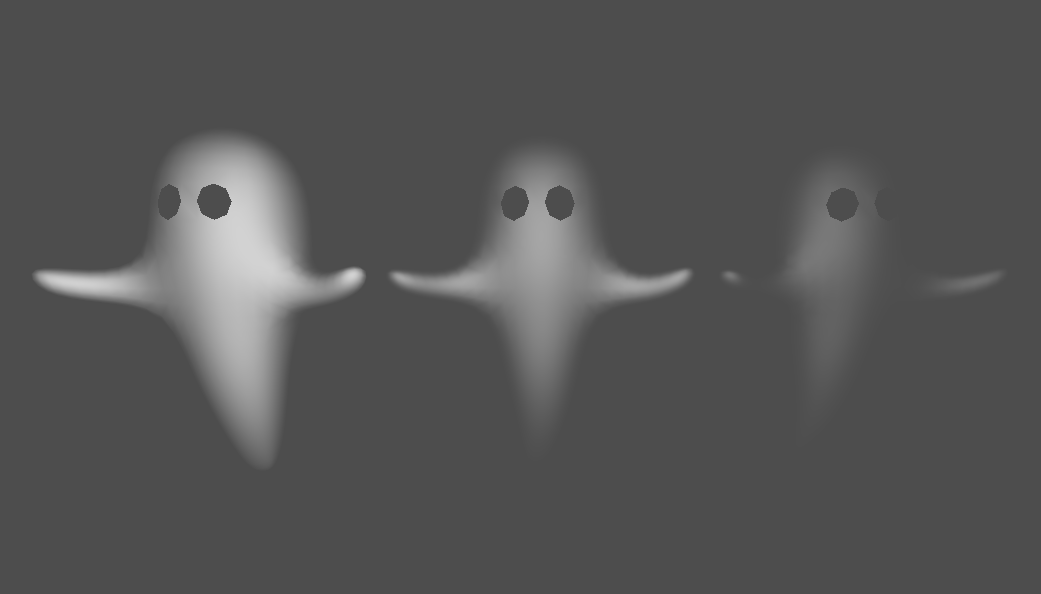
simple fresnel transparency

A cut-down inverted fresnel function used to provide smoothly disappearing edges, to give a ghostly effect.
It has 2 controls;
edgefade controls the fading of the edges, ranging from 0 (no fading) to 1 (lots of fading)
globalfade is essentially just inverted ALPHA, ranging from 0 (fully visible) to 1 (fully invisible)
Example is unshaded and uses no texture, but you can uncomment the commented lines if your model should have one. ( and comment out / modify the render mode if you want lighting )
Shader code
shader_type spatial;
render_mode unshaded;

uniform lowp float edgefade : hint_range(0, 1) = 0.2;
uniform lowp float globalfade : hint_range(0, 1) = 0.5;
//uniform sampler2D texture: source_color, filter_linear, repeat_disable;

void fragment () {
	float sinvresnel = pow(dot(normalize(NORMAL), normalize(VIEW)), (edgefade*25.0))*(1.0-globalfade);
	ALPHA = sinvresnel;
//	ALBEDO = texture(texture, UV).rgb;
}
Live Preview


Good idea, thanks for sharing! I had to clamp the fresnel because of oversampling though.
By adding a noise texture to the alpha and fiddling with UV, this also makes for some nice-looking cheap volumetric fog/clouds:
shader_type spatial;
render_mode blend_mix,depth_draw_opaque,cull_back,diffuse_lambert,specular_schlick_ggx, shadows_disabled;

uniform bool animate_noise = true;
uniform vec2  uv_scroll_speed = vec2(0.01, 0.01);
uniform sampler2D noise;
uniform lowp float edgefade : hint_range(0, 1) = 0.2;
uniform lowp float globalfade : hint_range(0, 1) = 0.5;
varying vec2 uv_scrolled;


void vertex ()
{
uv_scrolled = ( UV + TIME * uv_scroll_speed );
}

void fragment () {
    float sinvresnel = pow(dot(normalize(NORMAL), normalize(VIEW)), (edgefade*25.0))*(1.0-globalfade);
    sinvresnel = clamp(sinvresnel, 0.0, 1.0);
    if(animate_noise){
    vec3 noise_tex = texture(noise, uv_scrolled).rgb;
    ALPHA = sinvresnel * noise_tex.r;
    ALBEDO += noise_tex.rgb;
    }
    else{
    vec3 noise_tex = texture(noise, UV).rgb;
    ALPHA = sinvresnel * noise_tex.r;
    ALBEDO += noise_tex.rgb;
    }
}