
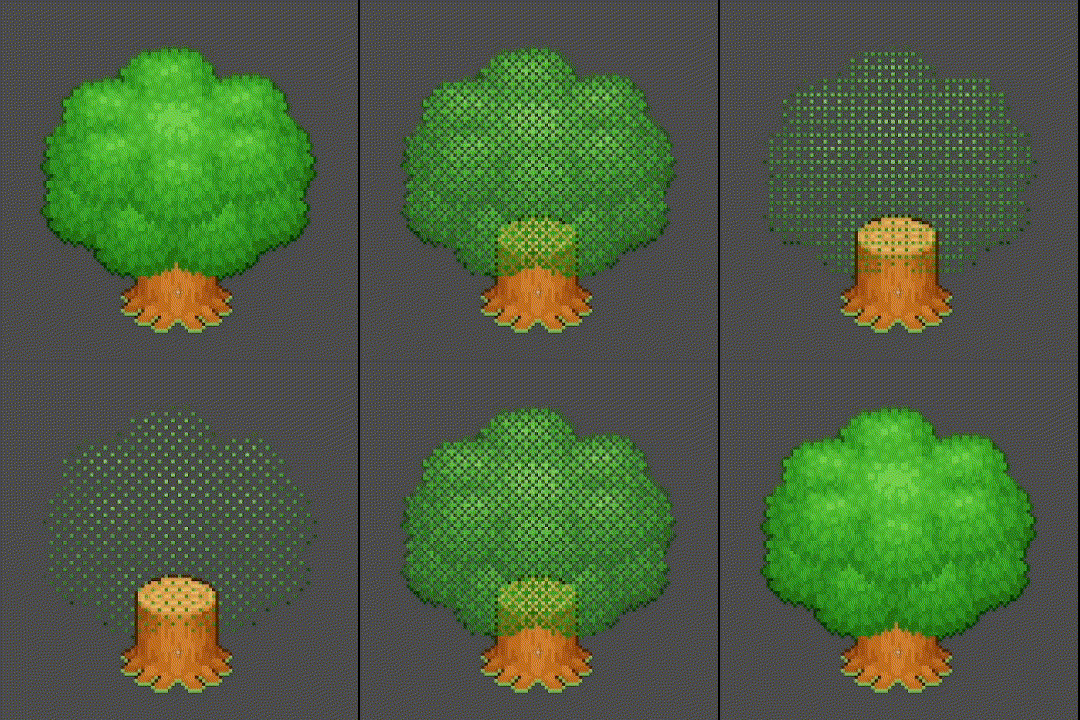
Dithering / Screen Door Transparency

An alternative to alpha transparency using order dithering / screen-door technique
Uniforms:
Player Position: The (normalized) position of the player – from (0,0) to (1,0)
Player Influence: How strong the player affects the transparency (higher = more transparent)
Radius: How far the player’s influence goes
Intensity: How transparent the image is (higher = more transparent)
Note:
This shader includes commented-out code for a “player position” parameter. To activate this functionality, uncomment the code in the uniform secion, and in the fragment function.
Shader code
shader_type canvas_item;

// --- Uniforms --- //
//global uniform vec2 player_position;

uniform float intensity: hint_range(0.0, 1.0, 0.05) = 0.0;

//group_uniforms player;
//uniform float player_influence: hint_range(0.0, 1.0, 0.05) = 0.60;
//uniform float radius: hint_range(0.0, 1.0, 0.05) = 0.05;

// --- Constants --- //
const mat4 THRESHOLD_MATRIX = mat4(
		vec4(1.0 / 17.0,  9.0 / 17.0,  3.0 / 17.0, 11.0 / 17.0),
		vec4(13.0 / 17.0,  5.0 / 17.0, 15.0 / 17.0,  7.0 / 17.0),
		vec4(4.0 / 17.0, 12.0 / 17.0,  2.0 / 17.0, 10.0 / 17.0),
		vec4(16.0 / 17.0,  8.0 / 17.0, 14.0 / 17.0,  6.0 / 17.0));

// --- Functions --- //
void fragment() {
	vec2 uv = UV / TEXTURE_PIXEL_SIZE;
	//float player_dist = (clamp(1.0 - distance(SCREEN_UV / SCREEN_PIXEL_SIZE, player_position / SCREEN_PIXEL_SIZE) * SCREEN_PIXEL_SIZE.x / radius, 0.0, 1.0)) * player_influence * step(0.01, intensity);
	//COLOR.a *= step(0.0, THRESHOLD_MATRIX[int(uv.x) % 4][int(uv.y) % 4] - intensity - player_dist);
	COLOR.a *= step(0.0, THRESHOLD_MATRIX[int(uv.x) % 4][int(uv.y) % 4] - intensity);
}
amazing shader!!! Works great for my pixel art game!!
I had a bit of an issue with it, specifically, the dithering effect was done in 2×2 portions, instead of affecting single pixels, but I figured out that this can be fixed by adding “/ vec2(0.5, 0.5)” at the end of the first line in fragment() function:
you could probably include variables to increase and decrease pixel size, if that’s an effect people might want
This can be adapted for use on a spatial shader using screen UVs and the viewport’s size (or probably a number of other options I’m unfamiliar with):
This maintains access to the matrix used in the above shader which gives the consistent and aesthetic pixel falloff pattern, while keeping pixels directly tied to the screen. Mesh UVs in 3D space result in inconsistent pixel sizing which produces a lot of aliasing. As long as dithered pixels are 1 perfect screen pixel in size, the sliding that occurs when you move the camera isn’t noticeable.