
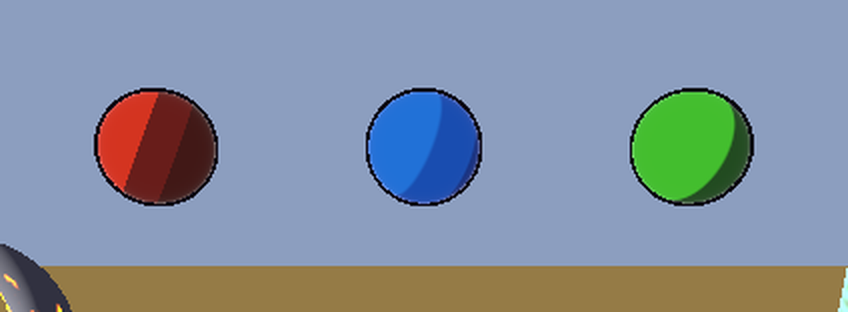
Simple Inverted-Hull Outline

A small outline shader for 3D meshes. It pushes a copy of the mesh out along its normals, draws only the back faces in one flat colour, and the result reads as an outline around the object. Two settings: colour and width.
It works best on smooth, closed meshes. On hard-edged meshes like a default cube the hull splits at the corners; smoothing the normals fixes that.
How to use
1. Select your mesh and open its material (StandardMaterial3D or ShaderMaterial).
2. In the material, set Next Pass to a new ShaderMaterial.
3. Assign this shader to that ShaderMaterial.
4. Tune Outline Color and Outline Width (0.01 to 0.05 is a good start for a 1 m object).
License
MIT, Agentica
Part of Stylo Godot, a small stylized shader pack for Godot 4.4+ (Forward+, Mobile and Compatibility). If you want toon shading, water with foam, dissolve, hologram and a 2D hit-flash to go with it, the full pack is here: https://agentica.itch.io/stylo-godot?utm_source=godotshaders&utm_medium=post&utm_campaign=ex065&utm_content=sample_shader
Shader code
// Stylo Outline Sample
// Inverted-hull outline for Godot 4. Add it as the Next Pass of a mesh's material.
// MIT License. Copyright (c) 2026 Agentica
//
// Permission is hereby granted, free of charge, to any person obtaining a copy
// of this software and associated documentation files (the "Software"), to deal
// in the Software without restriction, including without limitation the rights
// to use, copy, modify, merge, publish, distribute, sublicense, and/or sell
// copies of the Software, and to permit persons to whom the Software is
// furnished to do so, subject to the following conditions:
// The above copyright notice and this permission notice shall be included in
// all copies or substantial portions of the Software.
// THE SOFTWARE IS PROVIDED "AS IS", WITHOUT WARRANTY OF ANY KIND, EXPRESS OR
// IMPLIED. IN NO EVENT SHALL THE AUTHORS OR COPYRIGHT HOLDERS BE LIABLE FOR ANY
// CLAIM, DAMAGES OR OTHER LIABILITY ARISING FROM THE SOFTWARE OR ITS USE.

shader_type spatial;
render_mode unshaded, cull_front, depth_draw_opaque;

uniform vec4 outline_color : source_color = vec4(0.05, 0.03, 0.08, 1.0);
uniform float outline_width : hint_range(0.0, 0.2) = 0.03;

void vertex() {
	VERTEX += normalize(NORMAL) * outline_width;
}

void fragment() {
	ALBEDO = outline_color.rgb;
}

GodotShaders should have a moderation to filter out this kind of user