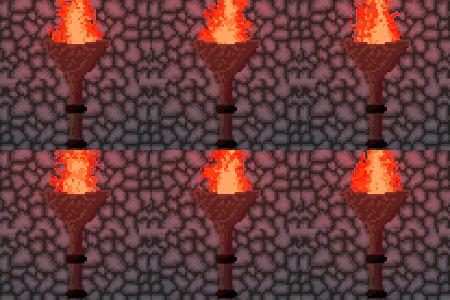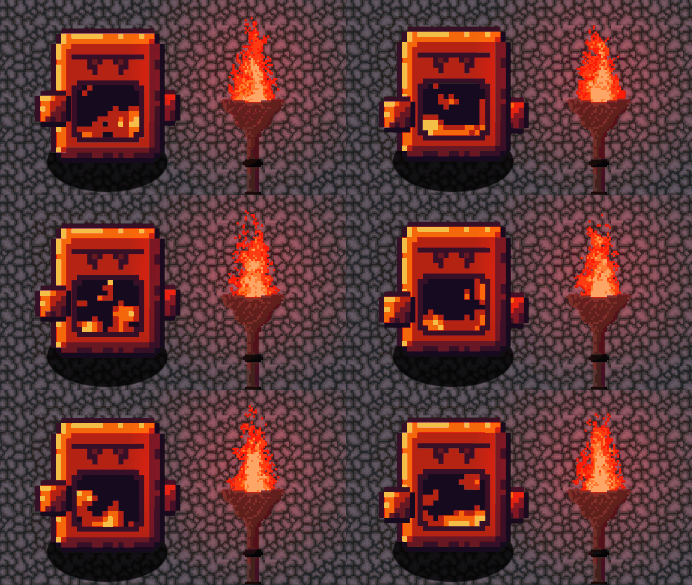
Simple Pixelated Fire shader

A flexible pixel fireshader. can be easily expanded to use less or more colors via the pallett_size parameter.
This shader was built in Godot 4.5 but it could can probably be refactored to a lower verision, but i dont have any support for this. Feel free to ask me questions or submit issues to the demo project github.
IMPORTANT TO NOTE THAT THIS SHADER IS GRADIENT AND NOISE DRIVEN.
make sure to set your gradients and noise texture sizes to the same size as your sprite.
please ignore any spelling mistakes in the code lmfao
Shader code
shader_type canvas_item;

//shows resulting map texture before pallet_swapping
uniform bool debug;

//sets the number of colors you would like to use. 0 is none.
uniform int pallet_size;


//###MAKE SURE ALL OF THE FOLLOWING TEXTURES ARE SET TO THE SAME SIZE AS YOUR SPRITE###
//Theses are the input textures for shaping the flame.
//White turns into the background color, usually transparent, and the less "bright" it is,
//it's assigned a different color
//noise_tex is a seamless noise texture that scrolls its UV up on the Y axis
	//modify this texture until you find some setting that give the flame
	//the "flow" that you are looking for.
//grad_tex is a gradient texture that controls how strong the "base" of the flame instance
//frame_grad_1 and frame_grad_2 are additional gradient textures used to
//frame in the shape of the resulting flame
uniform sampler2D noise_tex: filter_nearest, repeat_enable;
uniform sampler2D grad_tex: filter_nearest;
uniform sampler2D frame_grad_1: filter_nearest;
uniform sampler2D frame_grad_2: filter_nearest;


//This is where all of the relevant colors for pallet swapping are set.
//mask_color is the color on your sprite that needs to be replaced.
	//This needs to be exact and it needs to also not be anywhere else in your sprite.
//bg_color is what it will set anything higher than your "brightness" thresholds
	//Unless you need it, i would set this to 100% transparent
//flame_Xs are all of your flame colors. ordered from center color to outer color.
//Note that if pallet_size equals 3, flame_0 -> flame_2 (ie the first 3) are the only ones used
uniform vec4 mask_color: source_color;
uniform vec4 bg_color: source_color;
uniform vec4 flame_0: source_color;
uniform vec4 flame_1: source_color;
uniform vec4 flame_2: source_color;
uniform vec4 flame_3: source_color;
uniform vec4 flame_4: source_color;

//scroll_speed is essentially used to set your sprites "fps".
//If you are using this on an animated sprite then i would set it to the same fps as your animation,
//otherwise higher number = smoother animation
uniform float scroll_speed;

//###ALL OF THESES VALUES SHOULD BE BETWEEN 0.0 AND 1.0###
//thresh_fXs are your "brightness" thresholds. Any value under its threshold, ie darker,
//has its color replaced by the corresponding "flame_X" color.
//Note that if pallet_size equals 3, thresh_f0 -> thresh_f2 (ie the first 3) are the only ones used
uniform float thresh_f0;
uniform float thresh_f1;
uniform float thresh_f2;
uniform float thresh_f3;
uniform float thresh_f4;


void fragment() {

	//Before doing any logic it checks if the color its working on is the same as what it should be masking out.
	if (COLOR == mask_color) {

		//This set the "scroll" increment and its speed for the noise texture.
			//It makes sure its rounded to the nearest whole pixel,
			//so that it matches your pixel art's scale.
		float y_offset = UV.y + floor(TIME*scroll_speed)*TEXTURE_PIXEL_SIZE.y;
		vec2 offset_uv = vec2(UV.x, y_offset);

		//Getting all of the respective values of the sample textures
		vec4 noise_color = texture(noise_tex, offset_uv);
		vec4 grad_color = texture(grad_tex, UV);
		vec4 frame_grad_color1 = texture(frame_grad_1, UV);
		vec4 frame_grad_color2 = texture(frame_grad_2, UV);

		//Here the "luminance" is calculated. aka how bright is the pixel we are working on.
			//This isnt real luminace but its quick and dirty and works
			//##EXPLAINATION##
			//The grad_color and the noise color are multiplied because we want to "blend" theses
			//two values. The frame_grad_colors are added after because we want them to be absolute
			//shapers. Remember that the values theses textures give are 0.0-1.0 or "normalized",
			//doing this calulation *does* gives us values greater than 1.0 but because we are already
			//setting the threshold below that, those resulting values will be set to bg_color anyway.
		vec4 map_color = (grad_color*noise_color)+frame_grad_color1+frame_grad_color2;
		float map_lum = (map_color.r+map_color.g+map_color.b)/3.0;

		//Next we step through every threshold and if its "lumincance" is less than the threshold we set
			//then the pixel's color is set to match the corrisponding flame color (ie flame_X)
			//At the end, if it doesnt fall below any of the threshold values its set to the bg_color.
		//During the check we also check the pallet_size to make sure we only use the pallets intended.
		if (map_lum < thresh_f0 && pallet_size >= 1) {
			COLOR = flame_0;
		} else if (map_lum < thresh_f1 && pallet_size >= 2) {
			COLOR = flame_1;
		} else if (map_lum < thresh_f2 && pallet_size >= 3) {
			COLOR = flame_2;
		} else if (map_lum < thresh_f3 && pallet_size >= 4) {
			COLOR = flame_3;
		} else if (map_lum < thresh_f4 && pallet_size >= 5) {
			COLOR = flame_4;
		} else {
			COLOR = bg_color;
		}

	//If the debug is turned on it shows the raw "luminance" map
	//Its useful for setting your gradients
	if (debug == true) {
		COLOR = map_color;
	}

	}
}
Live Preview