
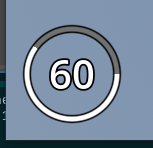
Simple Radial Progress Bar

Put it on a ColorRect
Shader code
shader_type canvas_item;

// RADIAL PROGRESSBAR BY PENGGRIN (<https://github.com/penggrin12>)
// (INTENDED FOR A HEALTH BAR)

// ORIGINAL SHADER: https://www.shadertoy.com/view/WdcGRM
// BY <https://www.shadertoy.com/user/calx>

#define TWO_PI 6.28318530718

uniform vec3 primary_color: source_color = vec3(1.0);
uniform vec3 outline_color: source_color = vec3(0.0);
uniform vec3 unfilled_color: source_color = vec3(0.443);
uniform float value: hint_range(0.0, 1.0, 0.01) = 1.0;

uniform float smooth_ = 0.005;
uniform float width_in = 0.85;
uniform float width_out = 0.95;
uniform float border_width = 0.03;

vec4 radial_progress(vec2 UV_, float VAL, float SMOOTH, float IR, float OR)
{
	vec2 uv = (UV_ * 2.0) - 1.0;
	vec2 origin = vec2(0.0, 0.0);

	float ir = IR;
	float or = OR;
	float d = length(uv);
	float ring = smoothstep(or + SMOOTH, or - SMOOTH, d) - smoothstep(ir + SMOOTH, ir - SMOOTH, d);
	float a = atan(uv.y - origin.y, uv.x - origin.x);
	float theta = (a < 0.0) ? (a + TWO_PI) / TWO_PI : a / TWO_PI;
	float bar = step(theta, VAL);
	float ui = ring * bar;

	vec4 colour = vec4(ui);

	return colour;
}

void fragment()
{
	vec4 primary = vec4(primary_color, 1.0) * radial_progress(UV, value, smooth_, width_in, width_out);
	vec4 outline = vec4(outline_color, 1.0) * radial_progress(UV, 100, smooth_, width_in - border_width, width_out + border_width);

	vec4 unfilled = vec4(unfilled_color, 1.0) * radial_progress(UV, 100, smooth_, width_in, width_out);

	if (primary != vec4(0.0, 0.0, 0.0, 0.0))
		unfilled = vec4(0.0, 0.0, 0.0, 0.0);

	COLOR = primary + (unfilled + outline);
}

Hello! Thanks for the code. If I wanted the bar to start from “12 o’clock” and go clockwise, what values would I need to change? Thanks.
Rotate the color rect 270 degrees?
Alternatively change line# 30 to this: