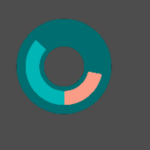
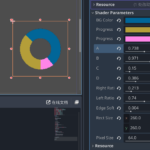
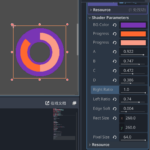
Symmetric Pixelated Dual-Progress Ring

A customizable circular progress ring shader for Godot.
Features:
-
Dual-color progress arcs (left/right side independently controllable)
-
Smooth edges and soft blending
-
Adjustable background ring
-
Symmetric pixelation for a retro-styled effect
-
Ratio-based radii (A–D) to easily fit any rectangular container
Ideal for stylized HUDs such as fuel bars, health indicators, or energy meters.
I have only tested on Godot 4.5 stable.
Shader code
shader_type canvas_item;

uniform vec4 bg_color : source_color = vec4(0.2, 0.2, 0.25, 1.0);
uniform vec4 progress_color_right : source_color = vec4(0.9, 0.7, 0.2, 1.0);
uniform vec4 progress_color_left  : source_color = vec4(0.3, 0.8, 0.9, 1.0);

uniform float A : hint_range(0.0, 1.0) = 0.48; // Outer radius ratio of background
uniform float B : hint_range(0.0, 1.0) = 0.42; // Outer radius ratio of progress ring
uniform float C : hint_range(0.0, 1.0) = 0.38; // Inner radius ratio of progress ring
uniform float D : hint_range(0.0, 1.0) = 0.30; // Inner radius ratio of background

uniform float right_ratio : hint_range(0.0, 1.0) = 1.0; // Right side progress ratio
uniform float left_ratio  : hint_range(0.0, 1.0) = 1.0; // Left side progress ratio

uniform float edge_softness : hint_range(0.0, 0.02) = 0.002; // Soft transition width
uniform vec2 rect_size = vec2(256.0, 256.0); // External node size (for aspect correction)
uniform float pixel_size : hint_range(1.0, 64.0) = 4.0; // Pixel block size (larger = chunkier)

void fragment() {
    // === Step 1: Generate symmetric pixelated coordinates ===
    // UV centered at (0,0) in [-1,1]
    vec2 uv = UV * 2.0 - 1.0;

    // Maintain circular aspect ratio
    float aspect = rect_size.x / rect_size.y;
    if (aspect > 1.0) {
        uv.x /= aspect;
    } else {
        uv.y *= aspect;
    }

    // === Step 2: Pixelation ===
    // Quantize coordinates into square pixel grid
    float pixels = pixel_size;
    uv = floor(uv * pixels) / pixels;

    // === Step 3: Compute radius and angle ===
    float r = length(uv);
    float angle = atan(uv.y, uv.x); // [-PI, PI]
    float theta = mod(angle + 1.5 * PI, 2.0 * PI); // Top = 0°, increasing clockwise

    float s = edge_softness;

    // === Step 4: Define ring regions ===
    float bg_mask = smoothstep(D - s, D + s, r) - smoothstep(A - s, A + s, r);
    float progress_mask = smoothstep(C - s, C + s, r) - smoothstep(B - s, B + s, r);

    // === Step 5: Always draw background ring ===
    vec4 col = bg_color * bg_mask;

    // === Step 6: Color left and right progress arcs ===
    bool in_right = false;
    bool in_left = false;

    if (theta < PI) {
        if (theta < left_ratio * PI) in_right = true;
    } else {
        if (theta > 2.0 * PI - right_ratio * PI) in_left = true;
    }

    if (in_right) {
        col = mix(col, progress_color_right, progress_mask);
    }
    if (in_left) {
        col = mix(col, progress_color_left, progress_mask);
    }

    // === Step 7: Transparent outside/inside ===
    if (r < D - s || r > A + s) {
        col.a = 0.0;
    }

    COLOR = col;
}
Live Preview