
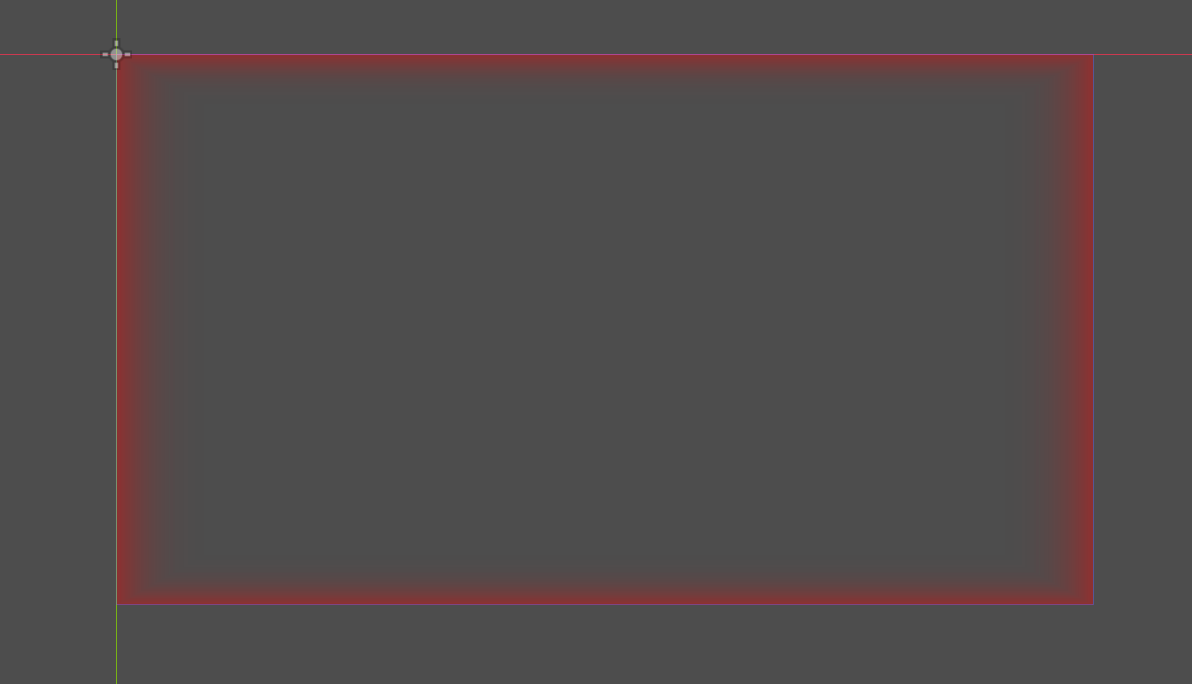
Screen Damage Flash (Square Gradient Hit Effect)

A lightweight full-screen hit flash shader for 2D games.
This shader creates a red (or any color) damage-flash overlay when the player gets hit.
The effect appears stronger at the screen edges and fades toward the center, using a smooth square-shaped gradient instead of a circular one.
Perfect for HUDs, player damage feedback, and cinematic impact flashes.
💡 Features
-
Center-to-edge smooth gradient (square shape).
-
Configurable flash color and intensity.
-
Adjustable center size, feather width, and edge hardness.
-
Works with any screen resolution (uses UV coordinates).
-
Fully GPU-driven — no texture sampling, minimal performance cost.
⚙️ Usage
-
Add a
CanvasLayerwith a full-screenColorRect. -
Assign this shader to the
ColorRect’s material. -
Trigger the flash by animating the
intensityparameter (e.g. with a Tween).
Example GDScript:
🎨 Parameters
| Name | Type | Description |
|---|---|---|
flash_color |
vec4 |
The color of the flash. |
intensity |
float |
Current flash strength (animate this). |
inner_ratio |
float |
Size of the light center area. |
feather |
float |
Width of the soft transition area. |
edge_power |
float |
Edge contrast (higher = harder edge). |
Only tested on Godot 4.5 stable, and I am not sure about its availablity on other version of Godot.
Shader code
shader_type canvas_item;

uniform vec4  flash_color : source_color = vec4(1.0, 0.0, 0.0, 1.0);
uniform float intensity   : hint_range(0.0, 1.0) = 0.0;
uniform float edge_power  : hint_range(0.1, 4.0) = 2.5;
uniform float inner_ratio : hint_range(0.0, 1.0) = 0.75;
uniform float feather     : hint_range(0.01, 1.0) = 0.4;

void fragment() {

    vec2 uv = UV * 2.0 - 1.0;


    float dist = max(abs(uv.x), abs(uv.y));


    float a = smoothstep(inner_ratio, inner_ratio + feather, dist);
    a = pow(a, edge_power);
    a *= intensity;

    COLOR = vec4(flash_color.rgb, a * flash_color.a);
}

Thank you!
It works on Godot v3.5.3.
Thanks.