
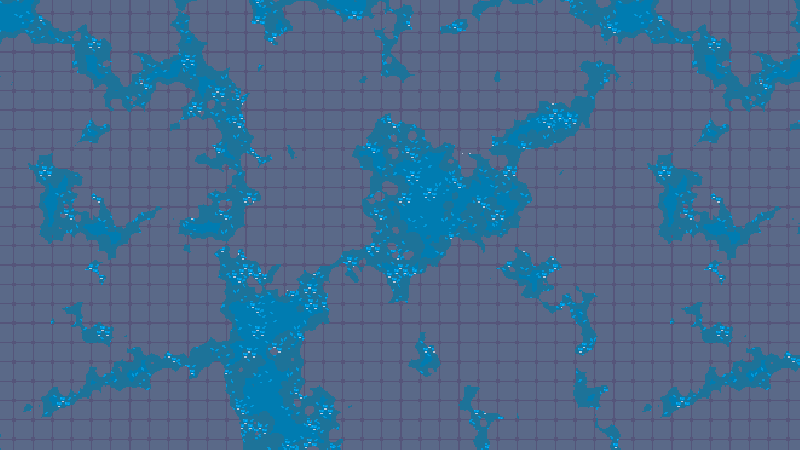
Tileset Worldspace Noise/Decal Overlay

Ever wanted to spice up your 2D tilesets and add some texture? This worldspace tileset shader will overlay a noise texture and decal on top of tilesets in worldspace. This is great for adding in foliage, moss, sand, or any other kind of texture on top of your tilesets. This shader is also pixel aligned so that your texture will align with the pixels in your tiles.
Uniforms
- Noise – A noise texture to be overlaid (should have transparency).
- Decal – A tileable decal texture to be overlaid whever there is visible noise (should be larger than your tile size)
- Display Decal – A bool to denote whether or not to show the decal texture.
The cover image above is a tileset with 16×16 tiles, setup using a NoiseTexture2D with Simplex Smooth for the noise and a 512×512 decal texture for the decal.
Instructions
Create and save a material, and copy the shader code over into it. Add a noise texture and a decal texture (optional). In your tileset settings, select all the tiles you want the shader to apply to, and add your shader material into the material box under Rendering.
Shader code
shader_type canvas_item;

// Noise and decal tileset shader by Big Boy Games (Jesse)

uniform sampler2D noise : repeat_enable, filter_nearest;
uniform sampler2D decal : repeat_enable, filter_nearest;
uniform bool displayDecal = false;
varying vec2 worldUV;

void vertex() {
	worldUV = (MODEL_MATRIX*vec4(VERTEX, 0.0, 1.0)).xy;
}

void fragment() {
	vec2 noiseCorrect = vec2(1.0,1.0)/vec2(textureSize(noise, 0));
	vec2 decalCorrect = vec2(1.0,1.0)/vec2(textureSize(decal, 0));

	COLOR.rgb = mix(COLOR.rgb, texture(noise, worldUV*noiseCorrect).rgb, texture(noise, worldUV*noiseCorrect).a);

	if (displayDecal) {
		COLOR.rgb = mix(COLOR.rgb, texture(decal, worldUV*decalCorrect).rgb, texture(decal, worldUV*decalCorrect).a * texture(noise, worldUV*noiseCorrect).a);
	}
}
Live Preview



So, first of all your shader looks cool and this is exactly something I have been looking for but I tried your shader and I think I am missing something (sorry, completely new to shaders and the math behind those). My Problem is that the decal texture renders in every tile of the TileMapLayer fully.
So to be able to fix this I might need additional information for instance like:
Could you provide examples of your setup?
I did:
Happy to help! To answer your questions:
It’s likely that the decal sprite is showing up on every tile since it’s the same size as the tile. For example, my decal texture is around 512×512, whereas my tiles are 16×16. The decal will just be drawn straight onto the tiles, so its good to make it big so it doesn’t repeat too often.
Try expanding out the resolution of your decal texture, and see if that achieves the results you’re looking for. I’m happy to help out further if you still run into issues.
Thanks for your reply and sorry for the late answer. I think I found the issue I am experiencing.
When using the NoiseTexture2D I do not seem to have any transparency in the texture and thats why it just repeats the texture without the noise applied.