
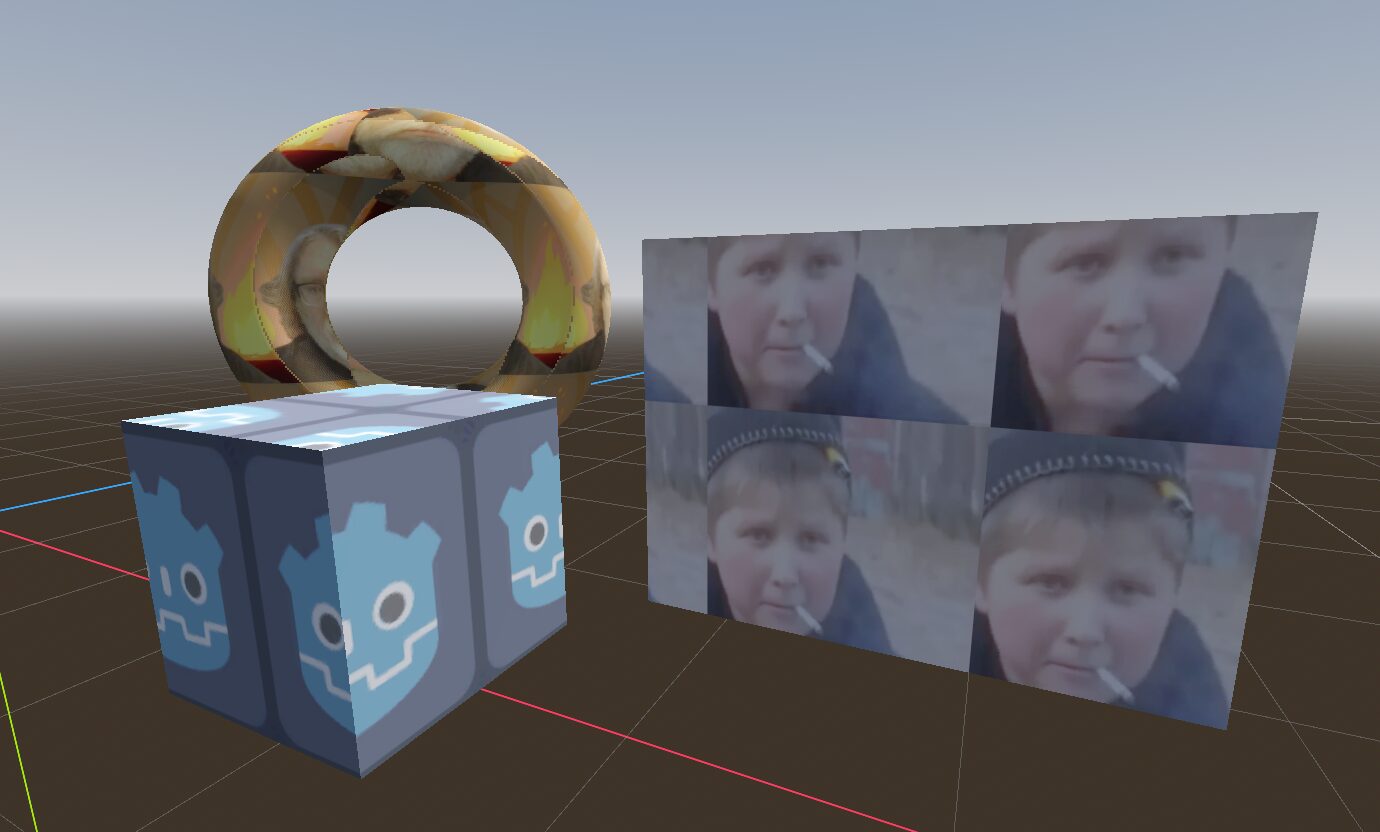
Triplanar Texture Shader (Doom-style)

This shader implements triplanar texturing — a technique that projects a texture onto a 3D object without distortion, regardless of its orientation in space.
Key Features:
1. Triplanar Projection:
– The texture is projected along all three axes (X, Y, Z)
– The best projection is selected for each face
– Smooth blending between projections at edges
2. Parameters:
– texture_albedo – Main texture to be applied
– tile_scale (default: 1.0) – Controls texture tiling
– blend_sharpness (default: 4.0) – Sharpness of transitions between projections
3. How It Works:
– The vertex shader computes world position and normal
– The fragment shader determines the dominant projection (X, Y, or Z)
– UV coordinates are calculated for all three projections
– The texture is blended based on normal weights
4. Optimization:
– Instead of full triplanar blending, it selects the strongest projection for better performance
– Blending only occurs in transitional areas
Use Cases:
This shader is particularly useful for:
– Low-poly models (Doom-style aesthetic)
– Procedurally generated terrain
– Objects with sharp edges
– Performance-sensitive scenes
The shader creates a blocky, retro look similar to Doom’s original wall/floor/ceiling texturing, where textures were applied separately to different surfaces.
Shader code
shader_type spatial;

uniform sampler2D texture_albedo;
uniform float tile_scale = 1.0;
uniform float blend_sharpness = 4.0;

varying vec3 world_position;
varying vec3 world_normal;

void vertex() {
    world_position = (MODEL_MATRIX * vec4(VERTEX, 1.0)).xyz;
    world_normal = normalize(mat3(MODEL_MATRIX) * NORMAL);
}

void fragment() {
    vec3 n = normalize(world_normal);
    vec3 abs_normal = abs(n);

    float top_weight = pow(abs_normal.y, blend_sharpness);
    float side_x_weight = pow(abs_normal.x, blend_sharpness);
    float side_z_weight = pow(abs_normal.z, blend_sharpness);
    float total_weight = top_weight + side_x_weight + side_z_weight;

    top_weight /= total_weight;
    side_x_weight /= total_weight;
    side_z_weight /= total_weight;

    vec2 uv_top = world_position.xz / -tile_scale;
    vec2 uv_side_x = world_position.zy / -tile_scale;
    vec2 uv_side_z = world_position.xy / -tile_scale;

    vec2 uv = (top_weight > side_x_weight && top_weight > side_z_weight) ? uv_top :
               (side_x_weight > side_z_weight) ? uv_side_x : uv_side_z;
    ALBEDO = texture(texture_albedo, uv).rgb;
}
Live Preview

You should add the
source_colorhint to your albedo texturetextures goes hard
Just simply works