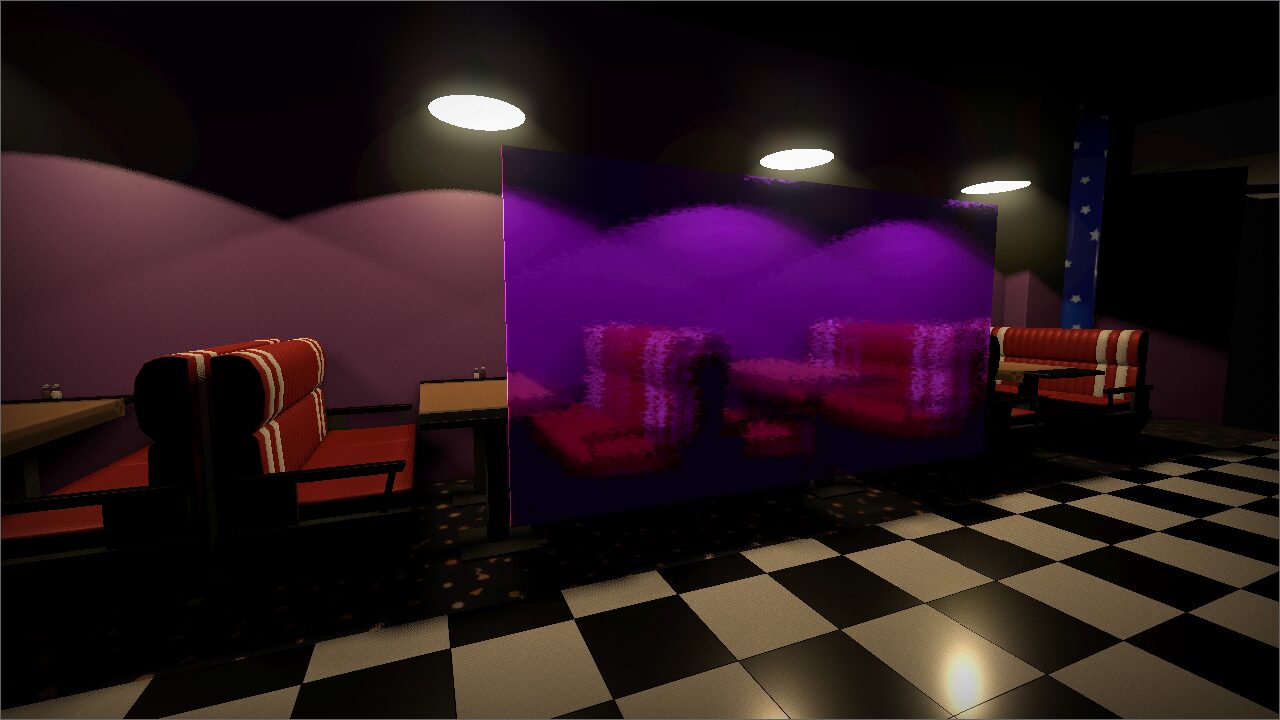
Universal 3D Glass Shader

The shader has proven itself well on glass panels and windows.
If necessary, it is able to blur the image and distort it using a normal map. You can also adjust the color and transparency of the glass.
Shader code
shader_type spatial;
render_mode shadows_disabled, vertex_lighting;

uniform sampler2D SCREEN_TEXTURE : hint_screen_texture, filter_linear_mipmap;

group_uniforms blur_settings;
// Set it to FALSE, if you don't want the shader to calculate the blur
uniform bool blur_enable = true;
// RGB change color of image. Alpha change the transparent of glass
uniform vec4 glass_color : source_color = vec4(1.0, 1.0, 1.0, 0.0);

// The image is copied 9 times.
// This parameter determines how far apart the copies will be
uniform int blur_radius : hint_range(1, 100, 1) = 25;

// Change level of visibility (transparent) of the copies
uniform float blur_strength : hint_range(0.1, 1.0, 0.001) = 1.0;

// If your image is too dark or bright
uniform float bright : hint_range(0.1, 100.0, 0.001) = 1.0;


group_uniforms material_simplings;
uniform bool shaded;
uniform float metallic : hint_range(0.0, 1.0, 0.001) = 0.2;
uniform float roughness : hint_range(0.0, 1.0, 0.001) = 0.5;
uniform float specular : hint_range(0.0, 1.0, 0.001) = 0.0;


group_uniforms normal;
uniform bool normal_enable;
uniform sampler2D normal_map;
uniform float normal_map_strength : hint_range(0.0, 1.0, 0.0001) = 1.0;


void fragment() {
	// This is haven't any effect, if "normal_enable" is disabled
	float normal = 0.0;
	if (normal_enable) normal = texture(normal_map, UV).g * normal_map_strength / 10.0;

	float blur_level = 1.0;
	vec3 new_view = texture(SCREEN_TEXTURE, vec2(SCREEN_UV.x + normal, SCREEN_UV.y + normal)).rgb;
	if (blur_enable) {
		blur_level = blur_strength;

		// Take some color from near pixels: 2, 4, 6 and 8 (if 5 is center)
		new_view += texture(SCREEN_TEXTURE, vec2(SCREEN_UV.x, SCREEN_UV.y + normal + float(blur_radius) / 5000.0)).rgb * blur_level;
		new_view += texture(SCREEN_TEXTURE, vec2(SCREEN_UV.x + normal + float(blur_radius) / 10000.0, SCREEN_UV.y)).rgb * blur_level;
		new_view += texture(SCREEN_TEXTURE, vec2(SCREEN_UV.x, SCREEN_UV.y - normal - float(blur_radius) / 5000.0)).rgb * blur_level;
		new_view += texture(SCREEN_TEXTURE, vec2(SCREEN_UV.x - normal - float(blur_radius) / 10000.0, SCREEN_UV.y)).rgb * blur_level;

		// Take some color from near pixels: 3, 7, 9 and 1 (if 5 is center)
		new_view += texture(SCREEN_TEXTURE, vec2(SCREEN_UV.x + normal + float(blur_radius) / 10000.0, SCREEN_UV.y + normal + float(blur_radius) / 5000.0)).rgb * blur_level;
		new_view += texture(SCREEN_TEXTURE, vec2(SCREEN_UV.x + normal + float(blur_radius) / 10000.0, SCREEN_UV.y - normal - float(blur_radius) / 5000.0)).rgb * blur_level;
		new_view += texture(SCREEN_TEXTURE, vec2(SCREEN_UV.x - normal - float(blur_radius) / 10000.0, SCREEN_UV.y - normal - float(blur_radius) / 5000.0)).rgb * blur_level;
		new_view += texture(SCREEN_TEXTURE, vec2(SCREEN_UV.x - normal - float(blur_radius) / 10000.0, SCREEN_UV.y + normal + float(blur_radius) / 5000.0)).rgb * blur_level;
	}
	// If the blur option is not used, the image will be dark
	// This thing just make it bright
	else {
		blur_level = 1.0;
		new_view *= 16.0;
	}

	// Albedo and simple material sets
	if (shaded) {
		vec3 new_color = (((new_view * 10.0 / blur_level) / 2.0) * (glass_color.rgb) - (vec3(1.0) - 1.0 + glass_color.a));
		if (new_color.r <= 0.0 && new_color.g <= 0.0 && new_color.b <= 0.0) ALBEDO = (vec3(0.0, 0.0, 0.0) + glass_color.rgb * glass_color.a) * bright;
		else ALBEDO = (new_color + glass_color.rgb * glass_color.a) * bright;
		SPECULAR = specular;
		METALLIC = metallic;
		ROUGHNESS = roughness;
	}
	else {
		// I don't even know, how I get this...
		ALBEDO = (((new_view * 10.0 / blur_level) / 2.0) * (glass_color.rgb) - (vec3(1.0) - 1.0 + glass_color.a) + glass_color.rgb * glass_color.a) * bright;
	}


	// Normal Map sets
	if (normal_enable) {
		NORMAL += texture(normal_map, UV).g * normal_map_strength;
	}
}
Live Preview