
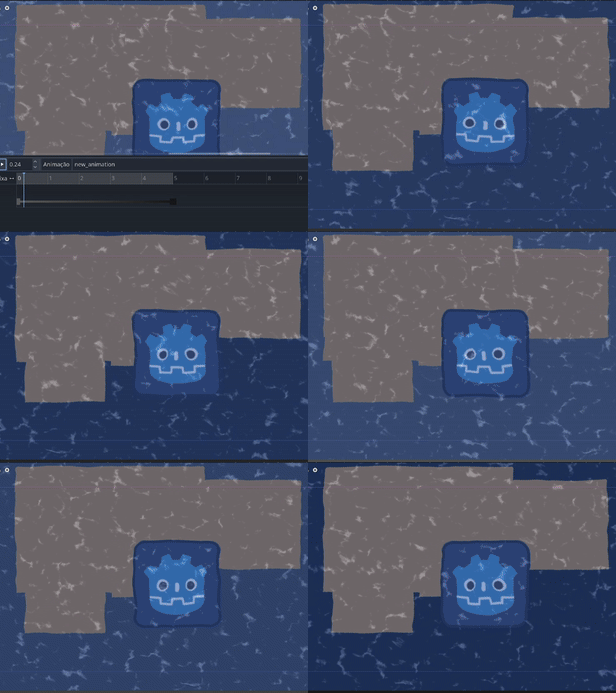
Water 2D + Distortion 4.x

If you want a shader with reflection, check out this one: link -> https://godotshaders.com/profile-page/?saved_post=10640
How to Use:
1. Add the shader to a node with a texture, such as a ColorRect or Sprite2D.
2. Assign two TextureNoise resources to the water_noise and water_distortion variables.
3. Adjust the variables to achieve the look you want.
4. Important: The water only distorts the background of what is already rendered. Adjust the Z Index accordingly to get the desired effect.
Credits / What Helped Me Create This:
This video helped me create the water distortion effect:
🎥 Water Distortion Tutorial: https://www.youtube.com/watch?v=N9ilhL8JFes&ab_channel=onetupthree
PS: There is a small visual bug I couldn’t fix. Occasionally, a transition line appears across the image when the water is moving. I believe it’s caused by the edge of the noise texture. If anyone figures out how to fix it, I’d really appreciate it!
Shader code
shader_type canvas_item;

uniform sampler2D SCREEN_TEXTURE : hint_screen_texture, repeat_enable, filter_nearest;

group_uniforms water;
uniform sampler2D waterNoise : repeat_enable, filter_nearest;
uniform sampler2D waterDistortionNoise : repeat_enable, filter_nearest;
uniform vec4 waterColor : source_color = vec4(0.117, 0.27, 0.58, 1);
uniform float colorCorection : hint_range(0.0, 1.0, 0.01) = 0.35;

group_uniforms water_waves;
uniform float distortionForce : hint_range(0.00, .1, 0.001) = .01;
uniform float WDBrightness : hint_range(0, 3, 0.05) = 1.5;
uniform float WDFreq : hint_range(0.2, .9, 0.05) = 0.6;
uniform float WDSize : hint_range(0.6, 1.2, 0.05) = .9;
uniform float WDSpeed : hint_range(1, 20, 0.05) = 4;
uniform vec2 tiling = vec2(1);
uniform vec2 offSetSpeed = vec2(.1);

group_uniforms BG_distortion;
uniform float backGroundDirX : hint_range(-0.1, 0.1) = 0.01;
uniform float backGroundDirY : hint_range(-0.1, 0.1) = 0.01;


void fragment() {
	vec4 color = vec4(waterColor.rgb , 1);

	vec2 noiseUV = UV * tiling + offSetSpeed * TIME;
	float noiseValue = texture(waterDistortionNoise, noiseUV).r;

	vec2 waterUV = UV * tiling;
	waterUV.x += offSetSpeed.x * TIME;
	waterUV.y += cos(TIME * min(1., offSetSpeed.y)) * 0.01;
	waterUV = waterUV + noiseValue * distortionForce * WDSpeed;


	vec4 noiseColor = texture(waterNoise, waterUV);
	float intensity = smoothstep(WDFreq, WDSize, noiseColor.r);
	color.rgb += intensity * vec3(WDBrightness);

	vec2 backGroundUV = SCREEN_UV;
	backGroundUV.x += noiseValue * backGroundDirX;
	backGroundUV.y += noiseValue * backGroundDirY;


	color = mix(texture(SCREEN_TEXTURE, backGroundUV),color, 0.2);

	COLOR = mix(color, waterColor, colorCorection);

}
Live Preview

Since you’re using a noise texture, you should be able to fix the visual edge lines by clicking on “seamless” in your Water Noise’s noise texture settings. Do the same for your Distortion noise, and make sure you actually assign a noise resource, or it won’t work.
I had problem with the sides of the viewport being reflected on the other side. I changed
uniform sampler2D SCREEN_TEXTURE : hint_screen_texture, repeat_disable, filter_nearest;
to
uniform sampler2D SCREEN_TEXTURE : hint_screen_texture, repeat_disable, filter_nearest;
(repeat_disable)
to fix the issue