
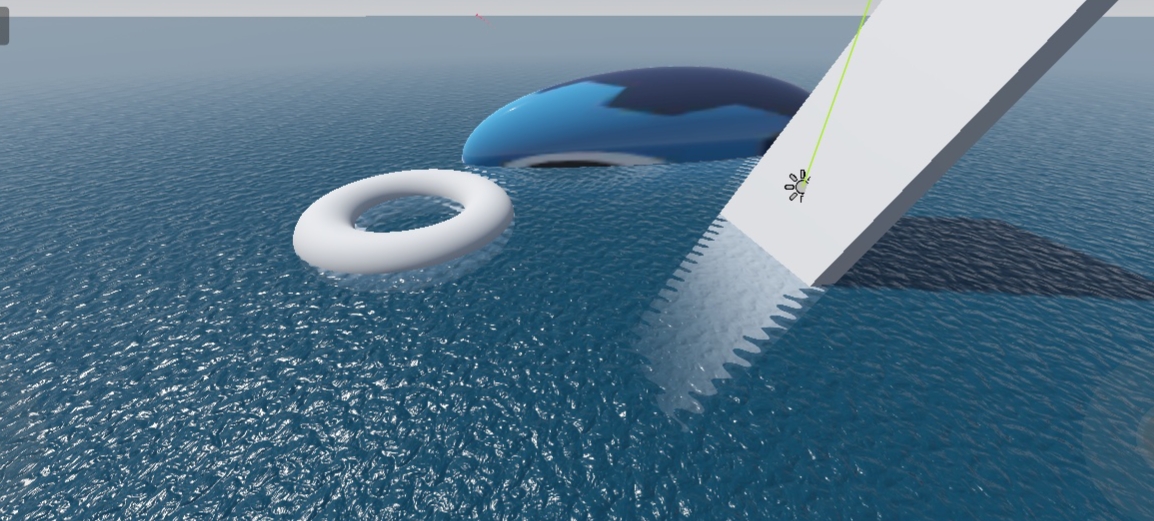
Water Shader

First, press the ➕ (Plus) icon in the Scene panel and search for MeshInstance3D.
Add it to your scene.
Next, go to the Inspector, open the Mesh option, and select PlaneMesh.
Now, scroll down to Material Override.
Select New ShaderMaterial, then click on it and create a new Shader file.
Open the shader file and paste the shader code I provided.
🎛️ Shader Setup
After pasting the shader, go back to the Inspector and open Shader Parameters.
Add two NoiseTexture2D textures.
For both noise textures, use the same settings:
Noise Type: FastNoiseLite
Fractal Type: Ridged
Enable Seamless
Enable Triplanar (if available)
Use as Normal Map ( Important)
and adjust water colour,etc
👉 Important:
Make sure both noise textures look the same.
They must have identical settings for smooth water movement.
Renderer Tip:
For the best and most realistic water results, use the Mobile
Shader code
Shader : shader_type spatial;

uniform vec3 water_color : source_color;
uniform sampler2D water_noise_1;
uniform sampler2D water_noise_2;

uniform sampler2D depth_texture : hint_depth_texture;
// 1. Define the screen texture uniform with repeat_disable
uniform sampler2D screen_texture : hint_screen_texture, filter_linear_mipmap, repeat_disable;

uniform float depth_distance : hint_range(0.0, 10.0, 0.1) = 0.5;
uniform float water_color_ratio : hint_range(0.0, 1.0, 0.1) = 0.5;
uniform float beers_law : hint_range(0.0, 20.0, 0.1) = 3.0;

uniform float normal_scale : hint_range(0.0, 1.0, 0.1) = 0.5;
uniform float roughness_scale : hint_range(0.0, 1.0, 0.1) = 0.2;
uniform float time_scale : hint_range(0.0, 10.0, 0.1) = 5.0;
uniform float uv_scale : hint_range(0.0, 10.0, 0.1) = 1.0;

varying vec4 world_uv;

void vertex() {
	world_uv = MODEL_MATRIX * vec4(VERTEX, 1.0);
}

void fragment() {
	vec2 _uv = world_uv.xz * uv_scale;

	// 2. Setup screen UVs for refraction
	vec2 _suv = SCREEN_UV;

	// 3. Apply distortion to BOTH wave UVs and screen UVs
	float distortion_x = sin(TIME * time_scale + (_uv.x + _uv.y) * 25.0) * 0.01;
	float distortion_y = cos(TIME * time_scale + (_uv.x - _uv.y) * 25.0) * 0.01;

	_uv.x += distortion_x;
	_uv.y += distortion_y;

	_suv.x += distortion_x;
	_suv.y += distortion_y;

	// Depth sampling
	float depth_r = textureLod(depth_texture, SCREEN_UV, 0.0).r;
	vec4 world = INV_PROJECTION_MATRIX * vec4(SCREEN_UV * 2.0 - 1.0, depth_r, 1.0);
	world.xyz /= world.w;

	float depth_blend = 1.0 - smoothstep(world.z + depth_distance, world.z, VERTEX.z);
	depth_blend = exp(depth_blend * -beers_law);
	depth_blend = clamp(pow(depth_blend, 3.0), 0.0, 1.0);

	// 4. Sample the background using distorted coordinates (Refraction)
	vec3 refraction = textureLod(screen_texture, _suv, 0.0).rgb;

	// 5. Final ALBEDO mix (Refraction + Beer's Law + Water Color)
	ALBEDO = mix(refraction * depth_blend, water_color, water_color_ratio);

	// Surface Detail
	NORMAL_MAP = mix(texture(water_noise_1, _uv).rgb, texture(water_noise_2, _uv).rgb, (sin(TIME * time_scale) + 1.0) / 2.0);
	NORMAL *= normal_scale;
	ROUGHNESS = roughness_scale;
}

Great work! Really love this one.