
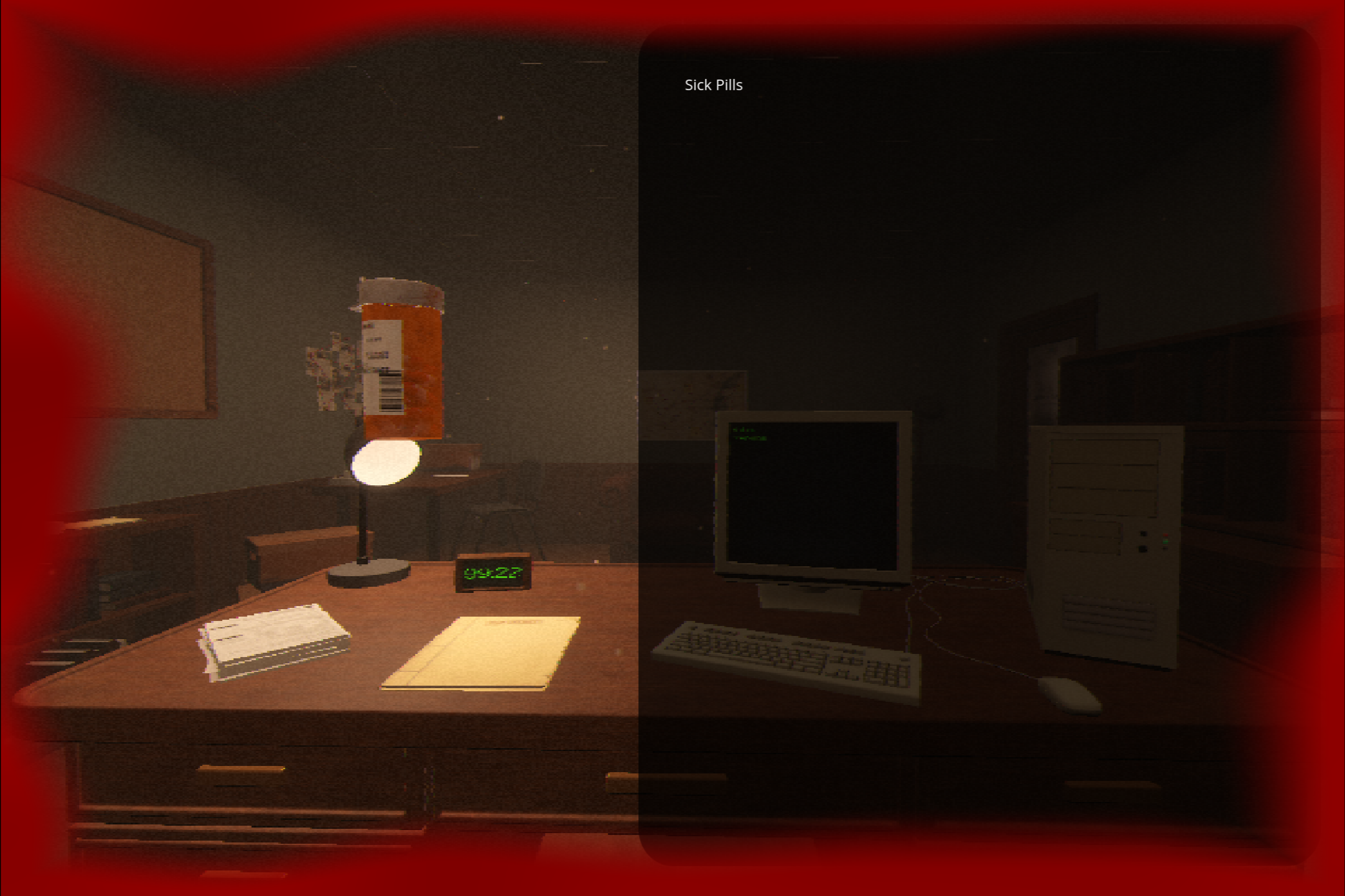
Damage Hurt — Pulsing Blood-Red Screen Edge

A full-screen canvas_item shader that overlays a pulsing, blood-red vignette around the edges of the screen — the classic “you just got hurt” effect. The inner boundary uses value noise instead of a smooth curve, so it reads as organic/vein-like rather than a flat UI gradient.
What it does
- Draws a colored vignette that fades in from all four screen edges toward the center.
- The inner edge of that vignette is perturbed with smooth noise, so the boundary looks ragged and organic instead of a perfect rounded rectangle.
- The whole effect pulses in intensity on a sine wave, and the color is subtly mottled using the same noise field so it doesn’t read as a flat color fill.
- Every visual property — color, size, softness, raggedness, pulse speed, pulse strength, and overall intensity — is exposed as a shader parameter, so it can be tuned live in the Inspector or driven from script (e.g. scaling intensity with the player’s current health).
Setup
- Add a ColorRect to your HUD/UI layer, sized to cover the full screen (Anchor Preset → Full Rect).
- Set its Mouse Filter to Ignore so it doesn’t block input to anything underneath.
- Give it a new ShaderMaterial, and assign the shader code below to a new Shader resource on that material.
- Tune the parameters in the Inspector, or drive them from script (see Triggering it from code, below).
Triggering it from code
The shader is fully functional on its own as a looping ambient pulse, but it’s also designed to be driven from gameplay — the cleanest hook is max_alpha, since animating it alone takes the effect from invisible to full intensity and back.
gdscript
@export var hurt_material: ShaderMaterial

## Call this when the player takes damage. strength ~0.6–1.0 for a sharp hit,
## lower for a graze. duration controls how long it takes to fade back out.
func flash_damage(strength: float, duration: float = 0.6) -> void:
    var tw := create_tween()
    tw.tween_method(
        func(v): hurt_material.set_shader_parameter("max_alpha", v),
        strength, 0.0, duration
    ).set_trans(Tween.TRANS_SINE).set_ease(Tween.EASE_OUT)
For a persistent “low health” state rather than a one-off flash, drive max_alpha and/or pulse_amount continuously from current health percentage instead of tweening a single flash.
Notes
- Works in both 2D and 3D projects — it’s a canvas_item shader on a UI ColorRect, independent of your scene’s render pipeline.
- size, roughness, and softness interact: larger roughness values relative to size can push the noisy edge outside the visible fade range and look clipped — if that happens, raise size or lower roughness.
- Performance is cheap — a handful of rand()/mix() calls per pixel, no loops, suitable for mobile.
- Made with AI
Shader code
shader_type canvas_item;

// Full-screen damage/hurt vignette — pulsing blood-red edges.
// Put this on a ColorRect sized to cover the whole screen (Full Rect anchor,
// Mouse Filter = Ignore so it doesn't block clicks on anything underneath).

uniform vec4 blood_color : source_color = vec4(0.55, 0.0, 0.0, 1.0);
uniform float size : hint_range(0.0, 0.5) = 0.22;        // how far inward from the edges the effect reaches
uniform float softness : hint_range(0.0, 1.0) = 0.6;      // 0 = hard edge, 1 = very gradual fade
uniform float roughness : hint_range(0.0, 1.0) = 0.35;    // how ragged/vein-like the inner edge looks
uniform float pulse_speed : hint_range(0.0, 10.0) = 1.8;  // pulses per second-ish
uniform float pulse_amount : hint_range(0.0, 1.0) = 0.5;  // how strongly it pulses (0 = steady, 1 = full fade in/out)
uniform float max_alpha : hint_range(0.0, 1.0) = 0.85;    // overall intensity cap

float rand(vec2 co) {
	return fract(sin(dot(co, vec2(12.9898, 78.233))) * 43758.5453);
}

float value_noise(vec2 p) {
	vec2 i = floor(p);
	vec2 f = fract(p);
	float a = rand(i);
	float b = rand(i + vec2(1.0, 0.0));
	float c = rand(i + vec2(0.0, 1.0));
	float d = rand(i + vec2(1.0, 1.0));
	vec2 u = smoothstep(0.0, 1.0, f);
	return mix(mix(a, b, u.x), mix(c, d, u.x), u.y);
}

void fragment() {
	// Distance from this pixel to the nearest screen edge: 0 at the border,
	// up to 0.5 at dead center.
	vec2 edge_dist = min(UV, vec2(1.0) - UV);
	float edge = min(edge_dist.x, edge_dist.y);

	// Slowly shifting organic noise so the inner boundary looks ragged and
	// alive instead of a perfect rounded rectangle.
	float n = value_noise(UV * 6.0 + vec2(0.0, TIME * 0.05));
	edge += (n - 0.5) * roughness * size;

	float soft_start = size * (1.0 - softness);
	float vignette = clamp(1.0 - smoothstep(soft_start, size, edge), 0.0, 1.0);

	// Smooth pulse — strength controlled by pulse_amount, rate by pulse_speed.
	float pulse = 1.0 - pulse_amount + pulse_amount * (sin(TIME * pulse_speed * TAU) * 0.5 + 0.5);

	// Subtle mottling using the same noise field, so the red isn't perfectly flat.
	vec3 mottled_color = blood_color.rgb * (0.85 + 0.3 * n);

	float alpha = vignette * pulse * max_alpha * blood_color.a;
	COLOR = vec4(mottled_color, alpha);
}