
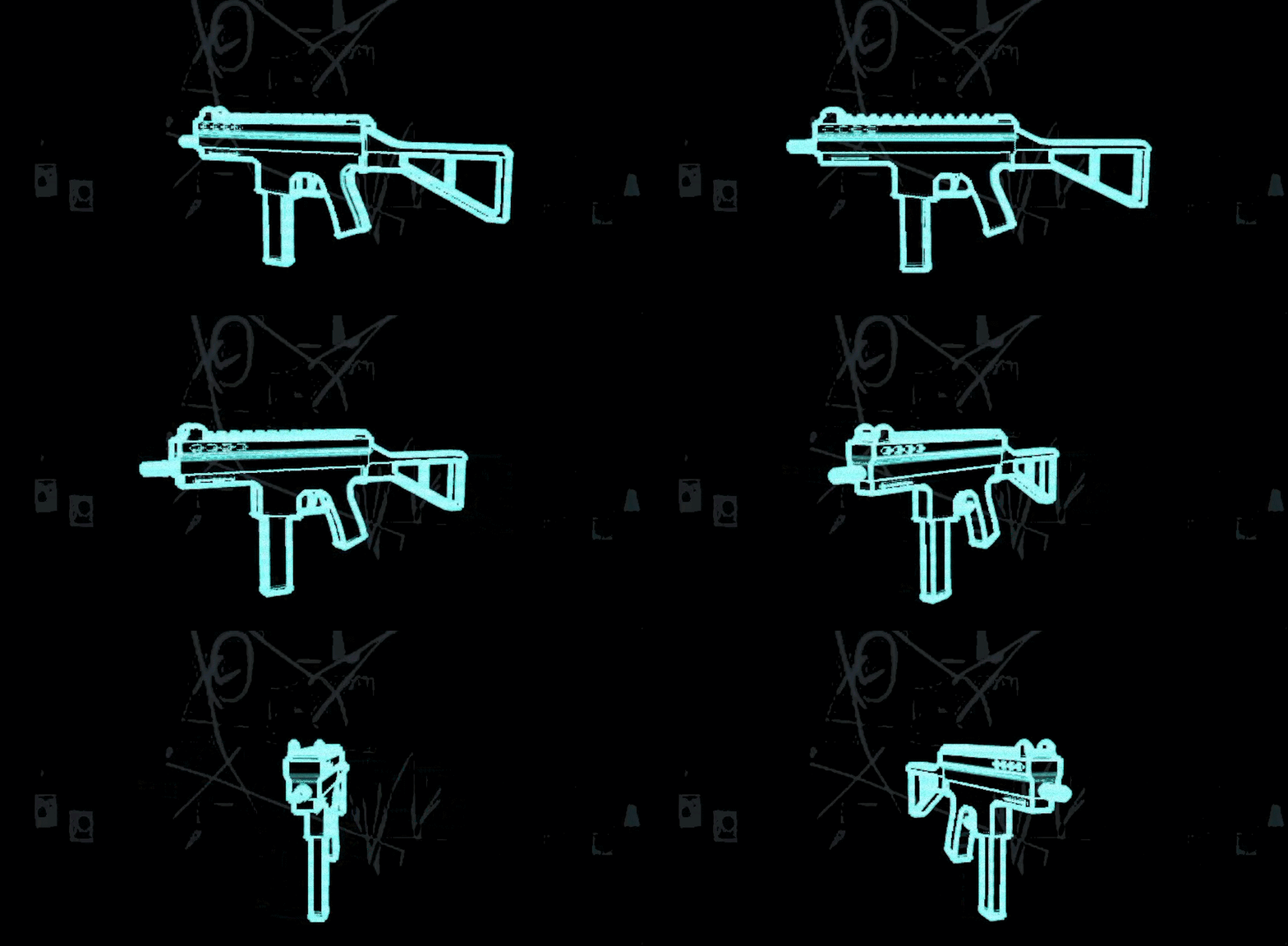
Holographic X-ray

A glowing, holographic, see-through outline of the model to give it an x-ray look.
Shader code
shader_type spatial;

// Holographic X-ray look.
//
// The see-through effect isn't a transparency trick, it's these three modes:
//   cull_disabled    - back faces are drawn too
//   depth_draw_never - nothing occludes anything, so interior geometry shows
//   blend_add        - overlapping surfaces accumulate, so the gun reads denser
//                      where there's more structure behind the silhouette
// Fresnel then brightens grazing angles, which is what turns a flat additive
// blob into something with readable edges.
render_mode unshaded, cull_disabled, depth_draw_never, blend_add, shadows_disabled;

uniform vec3 glow_color : source_color = vec3(0.35, 0.95, 0.92);
/// Higher = the glow hugs the silhouette more tightly, which also makes it
/// THINNER. Kept low: at high powers a flat face turned side-on has almost no
/// grazing area, so the gun thins to a hairline and reads as vanishing.
uniform float fresnel_power : hint_range(0.5, 6.0) = 1.2;
/// Floor brightness for faces pointing straight at the camera - this is what
/// keeps a slab visible when its normal points at you and fresnel gives nothing.
uniform float base_alpha : hint_range(0.0, 1.0) = 0.20;
uniform float rim_strength : hint_range(0.0, 4.0) = 2.0;
/// Extra bright band right at the silhouette, on top of the soft fresnel - this
/// is the part that reads as a drawn line rather than a glow.
uniform float edge_strength : hint_range(0.0, 4.0) = 1.4;
uniform float edge_start : hint_range(0.0, 1.0) = 0.55;

uniform float scanline_count : hint_range(0.0, 400.0) = 160.0;
uniform float scanline_strength : hint_range(0.0, 1.0) = 0.22;
uniform float scanline_speed : hint_range(-2.0, 2.0) = 0.25;
/// Subtle brightness instability - a hologram that's perfectly steady reads as plastic.
uniform float flicker_strength : hint_range(0.0, 0.5) = 0.05;

varying vec3 v_normal_view;
varying vec3 v_to_camera;

void vertex() {
    v_normal_view = NORMAL;
    // View-space position points from the vertex back to the camera at the origin.
    v_to_camera = -(MODELVIEW_MATRIX * vec4(VERTEX, 1.0)).xyz;
}

void fragment() {
    vec3 normal = normalize(v_normal_view);
    vec3 view_dir = normalize(v_to_camera);
    // cull_disabled means back faces arrive with flipped normals; abs() keeps
    // their rim just as bright instead of going black.
    float facing = abs(dot(normal, view_dir));
    float fresnel = pow(1.0 - clamp(facing, 0.0, 1.0), fresnel_power);

    float scan = sin((SCREEN_UV.y + TIME * scanline_speed) * scanline_count) * 0.5 + 0.5;
    float flicker = 1.0 - flicker_strength * fract(sin(TIME * 11.0) * 43758.5453);

    // smoothstep band nearest the silhouette: a crisper "line" riding on the
    // soft fresnel, so edges stay legible at any angle.
    float edge = smoothstep(edge_start, 1.0, fresnel) * edge_strength;

    float intensity = (base_alpha + fresnel * rim_strength + edge)
            * (1.0 - scanline_strength * scan) * flicker;
    intensity = max(intensity, 0.0);

    ALBEDO = glow_color * intensity;
    ALPHA = clamp(intensity, 0.0, 1.0);
}
